Field guide deck · last refresh 14 October 2026
Claude Certified Architect
— Foundations
The CCAR-F exam one idea per slide: five domains, the wrong answers it tempts you with, and the patterns it rewards.
Unofficial · not affiliated with Anthropicdnacenta.github.io/claude-certified-architect
The exam at a glance
Sixty questions, two hours, 720 to pass.
No penalty for guessing. Delivered by Pearson VUE, online through OnVUE or at a test center, and registered through the Anthropic Partner Academy.
Five domains
Agentic architecture carries the most weight.
Agentic Architecture & Orchestration
Agentic loops, stop_reason, multi-agent orchestration, hooks and session management.
Tool Design & MCP Integration
Tool design, structured error responses, tools per agent and MCP configuration.
Claude Code Configuration & Workflows
CLAUDE.md hierarchy, plan mode vs direct execution, and Claude Code in CI/CD.
Prompt Engineering & Structured Output
Explicit criteria, few-shot, structured output, validation-retry and batch.
Context Management & Reliability
Context management, escalation, error propagation and provenance.
How to use this deck
Every domain follows the same five steps.
Divider
The domain's weight and the task statements it covers.
Concepts
One idea per slide, with a diagram where the mechanism matters.
Traps
The wrong answers that look right, set against the pattern the exam rewards.
Practice
One question per slide. Commit to an answer first: the answer and the why are on the next slide.
Cheat sheet
The whole domain on one page, plus what it tests most.
Before the domains: the six scenarios, the ten anti-patterns, the decision frameworks and a four-week study plan.
The 6 exam scenarios
Each exam draws 4 of these 6 scenarios at random.
Customer Support Resolution Agent
Agent SDK, MCP tools and escalation logic.
Code Generation with Claude Code
CLAUDE.md, plan mode and slash commands.
Multi-Agent Research System
Coordinator-subagent patterns and error handling.
Developer Productivity with Claude
Built-in tools, MCP servers and codebase exploration.
Claude Code for CI/CD
Structured output, the batch API and multi-pass review.
Structured Data Extraction
JSON schemas, tool_use and validation-retry.
You can't know which four you'll get, so prepare all six.
The 10 critical anti-patterns · 1 of 2
These show up as wrong answers on the exam.
Parsing text to end the loop
Natural language is not a termination signal. Check stop_reason instead.
An iteration cap as the stop
An arbitrary cap is wrong as the primary stopping mechanism. stop_reason drives the loop.
Prompts for critical rules
Prompt-based enforcement is best-effort. Financial and safety rules belong in programmatic hooks.
Self-reported confidence
Don't escalate on the model's own confidence score. Escalate on an explicit customer request; otherwise resolve within capability.
Sentiment-based escalation
Sentiment ≠ complexity. An upset tone is not a reason to escalate an issue that is within capability.
The 10 critical anti-patterns · 2 of 2
Hidden errors, crowded agents and flattering metrics.
Generic error messages
They hide diagnostic context. Return structure: the error category, whether it's retryable, and partial results.
Silently suppressed errors
Returning empty results as success hides the failure. Error handling is never generic or silent.
Too many tools per agent
18 tools where 4–5 are recommended. Past ~10 tools, tool search with defer_loading changes the picture (Domain 2).
Same-session self-review
The session retains its own reasoning context, so its review inherits that bias. Review from a fresh session.
One aggregate accuracy number
A good overall metric can mask a document type that keeps failing. Measure per document type.
Key decision frameworks · 1 of 3
Match the mechanism to the stakes and the scope.
- Programmatic hooks — financial/safety
- Prompt-based — best-effort
- Immediate — explicit customer request
- Resolve first — within capability
- Structured context — category, retry, partial
- Never generic or silent
- Plan mode — multi-file, architectural
- Direct — single-file, obvious
- Multi-pass — large PRs
- Single-pass — small, focused
- Synchronous — blocking workflows
- Batch — latency-tolerant
Key decision frameworks · 2 of 3
Context never travels or survives on its own.
- Always explicit in subagent prompts
- Never rely on auto-inheritance
- Tool Runner / Agent SDK — you host
- Managed Agents — Anthropic hosts the loop; the sandbox is Anthropic's cloud or self-hosted
- Subagents / forks — a few delegated tasks per turn
- Dynamic workflows — a script the runtime executes for dozens to hundreds of agents
- Clear (context editing) — verbose tool results
- Compact — long conversations that need their narrative; prefer on-demand compaction
- Memory tool / files
- Never rely on the conversation surviving compaction
- Append-only — freeze
system/tools, changes viarole: "system"messages - Never edit or snip earlier turns — it invalidates thinking blocks
Key decision frameworks · 3 of 3
Defer big tool sets; sweep effort from the default.
- Load upfront — under ~10 tools
- Tool search +
defer_loading— 10+ tools or multi-server MCP
- "any" — guarantee tool call
- Forced — specific tool first
- On models where both return 400:
auto+ instruction +strict: true, oroutput_config.format
- Adaptive —
{"type": "adaptive"} budget_tokensis removed — it returns 400
- Start at the model's default and sweep;
xhighfor the hardest coding/agentic work low/medium— subagents, mechanical and routine tasks
4-week study plan
Build the core, apply it, harden it, then drill.
Assumes daily study, 1.5–2 hours per day.
Core Architecture
- Agentic loops,
stop_reason, multi-agent orchestration, hooks, session management, tool design, MCP config - Daily: 1 domain section + practice questions
Applied Skills
- CLAUDE.md hierarchy, plan mode, CI/CD, Batches API, explicit criteria, few-shot, validation-retry, structured output
- Daily: 1 domain section + build a small project using each concept
Reliability + Hands-On
- Context management, escalation, error propagation, provenance, hands-on exercises across all domains
- Daily: review weak areas + build an end-to-end scenario
Exam Prep
- Practice exams, anti-pattern drills, scenario walkthroughs, timed question sets
- Daily: 1 full practice exam + targeted review
The certification family
Four credentials, one program.
Associate — Foundations
Business / productivity users (non-developer)
$99
Architect — Foundations
Solution architects
$125
Architect — Professional
Senior architects owning the full solution lifecycle
$175
Developer — Foundations
Engineers shipping Claude apps, agents, and workflows
$125
Models in the code samples
The current lineup
Code samples use claude-opus-5-5 — Anthropic's current default for most workloads (Claude Opus 5.5 launched 2026-09-22). Samples that rely on forced tool_choice use claude-haiku-5-5, the only current model that still accepts it (Fable 5.1, Opus 5.5, and Sonnet 5.5 return 400).
| Model | ID | Context | Max output | Price (in / out per MTok) |
|---|---|---|---|---|
| Claude Fable 5.1 | claude-fable-5-1 | 1M | 128k | $10 / $50 (cache reads $0.25) |
| Claude Opus 5.5 | claude-opus-5-5 | 1M | 128k | $4 / $20 (cache reads $0.20) |
| Claude Sonnet 5.5 | claude-sonnet-5-5 | 1M | 128k | $2 / $10 (cache reads $0.10) |
| Claude Haiku 5.5 | claude-haiku-5-5 | 1M | 128k | $0.10 / $0.50 for prompts up to 100k tokens; $0.50 / $2.50 above |
Domain 1 of 5 · the heaviest
Agentic Architecture & Orchestration
How agentic systems are built, how loops run, how agents coordinate, and how enforcement works. Seven task statements:
1.1 · The agentic loop
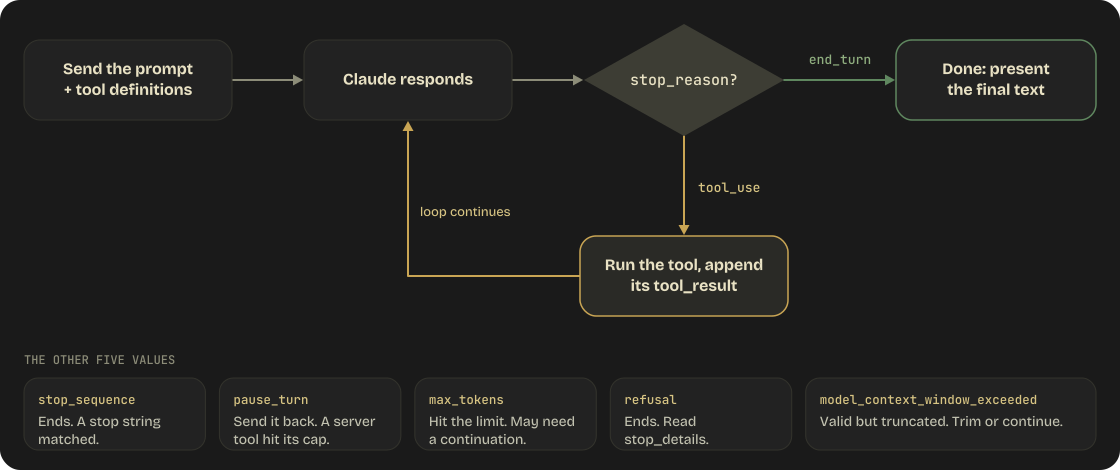
The loop ends on stop_reason, never on text.
1.1 · Exam traps
Three wrong answers that look right.
Branch on stop_reason every turn.
tool_use→ run the tool, return its tool_result, continue.end_turn→ present the final text.- A safety cap can exist, but
stop_reasondrives the loop.
Parsing natural language
“If Claude says I'm done, exit the loop.”
An iteration cap as the main stop
“Run max 5 loops, then stop.” Fine as a safety net, wrong as the mechanism.
Treating text as “done”
“If the response has text, it's finished.” Text and tool_use blocks can arrive together.
1.1 · The agentic loop
Claude decides the next step; stop_reason tells your code how to act.
| Value | Meaning | Action |
|---|---|---|
tool_use | Claude wants to call a tool | Execute it, return the result, continue the loop |
end_turn | Claude has finished reasoning | Present the final text response |
pause_turn | A server-side tool loop hit its internal limit | Send the response back to continue |
max_tokens | Response hit the max_tokens limit | May need to request continuation |
stop_sequence | Output matched a configured stop string | Loop ends; inspect which sequence hit |
refusal | Claude declined on safety grounds | Loop ends; inspect stop_details, rephrase or route |
A refusal arrives as HTTP 200, not an exception: branch on stop_reason before reading content.
1.1 · The agentic loop
A tool_result must echo the exact tool_use_id.
json// Claude's response, stop_reason "tool_use"
{ "type": "tool_use", "id": "toolu_01A", "name": "get_weather",
  "input": { "location": "San Francisco, CA" } }

// Your next request, role "user"
{ "type": "tool_result", "tool_use_id": "toolu_01A",
  "content": "15 degrees celsius, partly cloudy" }

// When the tool fails
{ "type": "tool_result", "tool_use_id": "toolu_01A",
"is_error": true, "content": "API timeout after 30 seconds" }- One response can hold text and several
tool_useblocks. - Several calls → several
tool_resultblocks in one message, each matching its id. is_error: truetells Claude the tool failed so it can reason about recovery.
1.2 · Multi-agent orchestration
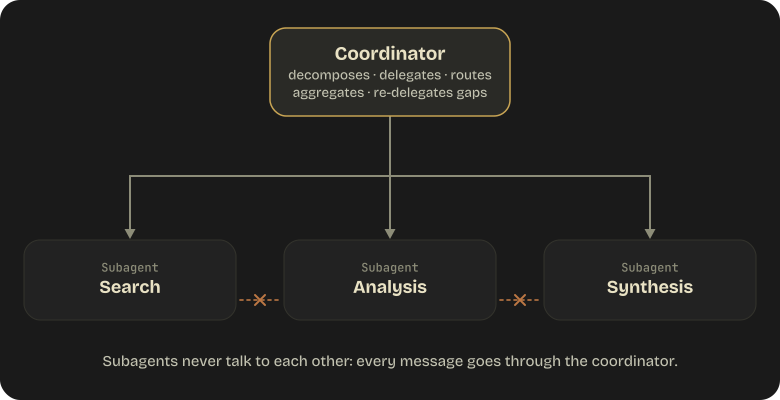
One coordinator routes everything; subagents never talk to each other.
- The coordinator decomposes the task and delegates subtasks to specialized subagents.
- It routes all inter-subagent communication. Subagents never talk directly.
- It aggregates results, handles subagent failures and re-delegates when gaps exist.
- Not every query needs every subagent. Invoke only the relevant ones.
1.2 · Exam traps
Decompose broadly; a narrow split misses whole subtopics.
Decompose broadly, then check coverage.
- Start with a broad initial decomposition of the whole topic.
- Add explicit coverage checks so no part of the topic is missed.
- Assess what each query actually requires and invoke only those subagents.
Overly narrow decomposition
“Creative industries” split into visual arts only, missing music, writing, film and design.
Every query through the full pipeline
Web search + document analysis + synthesis when a single focused search would suffice.
Subagents talking directly
Results passed from subagent to subagent. The coordinator routes all of it.
1.2 · Multi-agent orchestration
The coordinator evaluates the synthesis and re-delegates the gaps.

- Round 1: the coordinator delegates to subagents and collects their results.
- It evaluates the results and identifies gaps in coverage or quality.
- Round 2: targeted subtasks go out for the gaps only.
- Then the coordinator produces the final synthesis.
1.3 · Subagents & context passing
A subagent knows only what its prompt tells it.
“Analyze the customer's issue”
The subagent has no idea who the customer is or what the issue is. It inherits none of the coordinator's history.
Everything it needs, explicitly
“Customer #12345 reported that order #67890 ($149.99) arrived damaged and wants a full refund. Analyze the order history and return policy applicability.”
Pass findings as structured data (claim, evidence, source, date) so the receiver can judge source quality.
1.3 · Subagents & context passing
Parallel subagents means several Agent calls in one response.
json{ "content": [
  { "type": "tool_use", "name": "Agent",
    "input": { "prompt": "Search for recent papers on...",
               "subagent_type": "search" } },
  { "type": "tool_use", "name": "Agent",
    "input": { "prompt": "Analyze the document at...",
               "subagent_type": "analysis" } }
] }- Both calls in a single coordinator response run in parallel. Separate turns run sequentially.
- The coordinator needs
Agentin its allowed tools.Agent(worker, researcher)narrows the types. - Older material, including the exam guide, calls it the Task tool. Same mechanism.
1.3 · Subagents & context passing
A fork inherits everything; a fresh subagent inherits nothing.
Fresh subagent
- History not inherited: pass everything explicitly.
- Its own system prompt and tools.
- Cold prompt cache.
- Use for bounded, well-specified tasks and noisy exploration.
Fork
- Inherits the entire conversation, system prompt, tools and model.
- Shares the parent's prompt cache, so it's cheaper.
- Only its final result returns. Forks can't spawn sub-forks.
- Use for divergent branches off a shared baseline.
1.4 · Workflow enforcement & handoff
Money or safety at stake? Enforce it in code, not in the prompt.
Prompt-based
- Instructions like Always verify the customer's identity before any refund.
- Works most of the time, with a non-zero failure rate.
- Fine only where best-effort is acceptable.
Programmatic
- Hooks and prerequisites, enforced every time.
- Required when there are financial or safety consequences.
- A PreToolUse hook on
process_refundblocks with exit code 2 untilget_customerreturns a verified ID.
1.4 · Workflow enforcement & handoff
A human handoff needs a structured summary, not the transcript.
- The human agent typically has no access to the full conversation transcript.
- Lead with the facts: customer, issue, order details and root cause.
- List the actions already taken, such as verified order, confirmed damage via photos.
- Close with the recommended action and amount, such as full refund + replacement.
1.5 · Hooks
PreToolUse gates the call; PostToolUse cleans up the result.
PreToolUse
Can block the call with exit code 2 or a deny decision. Use it for prerequisites, like a verified identity before a refund.
PostToolUse
Intercepts results before Claude processes them: normalize timestamps, dates and status codes, scrub sensitive data, add metadata.
PostToolUseFailure
Fires instead of PostToolUse when the tool itself errored. Handle retries and diagnostics here.
Hooks live in user, project, local or managed settings, and can be scoped to a skill or a subagent.
1.5 · Hooks
A PreToolUse hook blocks the call with a deny decision.
json{
  "hookSpecificOutput": {
    "hookEventName": "PreToolUse",
    "permissionDecision": "deny",
    "permissionDecisionReason": "Customer identity not yet verified",
    "additionalContext": "Call get_customer first to verify identity"
  }
}- Decisions are
allow,deny,askanddefer. When hooks disagree,denywins. - A
commandhook passes with exit 0 and blocks with exit 2. - A hook's
allownever overrides a matching deny permission rule. - By default a hook that fails to start or times out lets the action go ahead. Make policy gates fail closed.
1.6 · Task decomposition
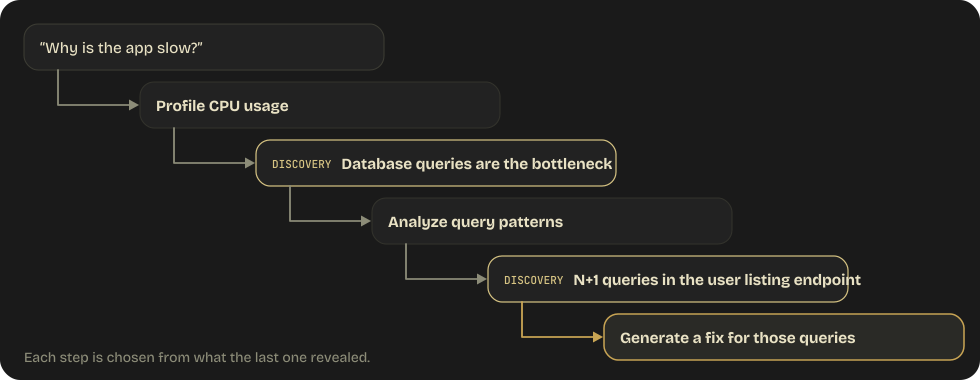
Known steps get a chain; open-ended work gets dynamic decomposition.
- Prompt chaining: steps fixed upfront, each step's output feeds the next.
- Fits predictable, multi-aspect tasks: per-file analysis, cross-file pass, final report.
- Dynamic decomposition: each step's discoveries generate the next subtask.
- Fits open-ended investigation, such as Why is the app slow?
1.6 · Exam traps
One pass over a large PR fails three ways. Split it in two.
A per-file pass, then a cross-file pass.
- Pass 1: review each file independently, at consistent depth, for bugs, style and types.
- Pass 2: a separate prompt for data flow, interface mismatches and cross-file consistency.
Attention dilution
A single pass focuses on early files and skimps on later ones.
Contradictory findings
Standards vary from file to file, so findings contradict each other.
Missed integration issues
Reviewing one file at a time can't see cross-file problems.
1.7 · Session management
Resume while tool results are valid; start fresh once they're stale.
--resumeResume
- Continues a named prior conversation with full context.
- Ongoing investigation or iterative work, tool results still valid.
--fork-sessionFork
- Resumes under a new session ID; the original stays untouched.
- Try two refactoring strategies from the same starting point.
Start fresh
- Tool results are stale: files changed, services restarted.
- Context has drifted too far from the current task.
- Pass a structured summary of prior findings instead.
Resuming after edits? Say what changed, such as I've updated auth.py to use JWT tokens. It won't notice on its own.
Practice · Domain 1 · question 1 of 3
An agentic loop is processing customer requests. After Claude responds, what should the system check to determine the next action?
Whether the response contains text content
The stop_reason field in the response
The length of the response
Whether Claude expressed confidence in its answer
Answer · Domain 1 · question 1
The stop_reason field in the response
AWhether the response contains text content
CThe length of the response
DWhether Claude expressed confidence in its answer
The stop_reason field determines whether to continue the loop (tool_use), end it (end_turn), or handle edge cases (pause_turn, max_tokens).
Practice · Domain 1 · question 2 of 3
A coordinator agent needs to pass customer information to a subagent. What is the correct approach?
The subagent will automatically inherit the coordinator's conversation context
Include all relevant customer information explicitly in the subagent's prompt
Store the information in a shared database that both agents access
Use environment variables to pass the context
Answer · Domain 1 · question 2
Include all relevant customer information explicitly in the subagent's prompt
AThe subagent will automatically inherit the coordinator's conversation context
CStore the information in a shared database that both agents access
DUse environment variables to pass the context
Subagents have isolated context and do not inherit the coordinator's conversation. Context must be explicitly passed in the prompt.
Practice · Domain 1 · question 3 of 3
A financial services application needs to ensure identity verification occurs before any refund processing. Which enforcement mechanism should be used?
Add instructions to the system prompt requiring verification first
Use a PreToolUse hook that blocks process_refund until verification is complete
Train the model on examples where verification comes first
Set a high temperature to encourage creative verification approaches
Answer · Domain 1 · question 3
Use a PreToolUse hook that blocks process_refund until verification is complete
AAdd instructions to the system prompt requiring verification first
CTrain the model on examples where verification comes first
DSet a high temperature to encourage creative verification approaches
Financial operations require deterministic, programmatic enforcement. Prompt-based instructions have a non-zero failure rate and are inappropriate for financial/safety-critical workflows.
Domain 1 · on one page
Agentic Architecture & Orchestration
1.1The loop
Branch on stop_reason. tool_use → run, return tool_result, continue. end_turn → done.
1.2Orchestration
Hub-and-spoke. The coordinator decomposes, delegates, routes every message and aggregates. Subagents never talk directly.
1.3Subagents
Isolated context: they inherit nothing. Put everything they need in the prompt.
1.4Enforcement
Money or safety → programmatic (hooks, prerequisites), deterministic. Prompts are probabilistic.
1.5Hooks
A PreToolUse hook can block a tool call (exit code 2) until a prerequisite is met.
1.6Decomposition
Known steps → prompt chaining. Open-ended → dynamic decomposition. Watch for splits that are too narrow.
1.7Sessions
--resume while tool results are valid. Stale? Start fresh with a summary. --fork-session to branch.
★Most tested
Programmatic vs prompt-based enforcement. If a prompt can fail and the cost is real, use a hook.
Domain 2 of 5 · tools & MCP
Tool Design & MCP Integration
How to design tool interfaces LLMs use reliably, handle tool errors, distribute tools across agents, and configure MCP servers. Six task statements:
2.1 · Tool interface design
Claude picks a tool by its description, so make it answer five questions.
The description is the selection criteria, not documentation. “Search for things” leads to unreliable selection.
Purpose
What the tool does and when to use it.
Input format
What the input should look like, with examples.
Output format
What the tool returns.
Edge cases
What happens with invalid inputs or no results.
Differentiation
When to use this tool instead of a similar one.
A good one, search_knowledge_base, says what it searches, when to use it, what to send, and what comes back.
2.1 · Tool interface design
Strict mode guarantees schema-valid inputs, once the schema is closed.
json{
  "name": "extract_invoice",
  "strict": true,
  "input_schema": {
    "type": "object",
    "properties": {
      "vendor_name": { "type": "string" },
      "total_amount": { "type": "number" }
    },
    "required": ["vendor_name", "total_amount"],
    "additionalProperties": false
  }
}
strict: trueguarantees Claude's tool inputs conform exactly to the schema.additionalProperties: falsemust be set.- Every property must be listed in
required. - Only a subset of JSON Schema is supported (Domain 4).
2.1 · Exam traps
Vague or overlapping tools get misrouted.
Make every tool distinct.
- A specific name, plus what it does, what it takes and what it returns.
- Say when to use this tool versus similar ones.
- Two tools overlap? Rename them to differentiate purpose, or merge them into one.
A one-line description
search: “Search for things.” Nothing to select on, so selection is unreliable.
Near-identical descriptions
analyze_content (“Analyze content for insights”) vs analyze_document (“Analyze a document for insights”). Claude can't reliably tell them apart.
2.2 · Structured error responses
The error category decides the move: retry, fix, explain, or escalate.
| Category | Retryable? | Examples | Agent action |
|---|---|---|---|
| Transient | Yes | Timeouts, service unavailability, rate limits | Retry with backoff |
| Validation | Not without input changes | Invalid email format, missing required field | Examine the error, fix the input, retry |
| Business | No | Refund exceeds policy limit, account frozen | Explain the policy to the user or escalate |
| Permission | No | Insufficient access, expired token | Escalate to a human |
Subagents recover from transient errors locally and propagate them only if recovery fails.
2.2 · Exam traps
Errors that hide, lie, or give up are the wrong answers.
Return a structured error.
- Set
isError, anerrorCategoryandisRetryable. - Describe the cause and the
attempted_action, so the agent can recover intelligently. - Use partial results or try alternatives instead of ending the workflow.
Generic messages
“Operation failed” or “search unavailable” hides the cause and what was attempted.
Silent suppression
Returning { "results": [] } when search is down. The agent confidently says “I found nothing.”
Terminating on a single failure
Killing a whole multi-step workflow because one step failed.
2.2 · Structured error responses
An empty result is information; a timeout is an error.
[] with status 200Valid query, no matches
- The search ran and found nothing.
- That is information, so report it.
- Say: “No results found for that query.”
The query didn't execute
- The search didn't work, so there is no result to report.
- That is an error, so handle it as one.
- Say: “I wasn't able to search right now, let me try again.”
Check the response status before answering. The two must be handled differently.
2.3 · Tool distribution & tool_choice
Give each agent four or five tools, and split the rest across subagents.
Eighteen tools on one agent degrades selection: wrong picks, unnecessary calls, trouble reasoning about which to use.
Agent, AskUser
search_web, search_docs, search_db
analyze_text, extract_entities, summarize
send_email, create_ticket, update_record
The principle behind the number is one agent, one focused job.
2.3 · Beyond the exam guide
Tool search keeps a few tools in view while the catalog behind them grows.
- Tools marked
defer_loading: trueare still sent every request but stay out of the context window. - Claude calls the search tool, and matches expand into full definitions inline, so prompt caching survives.
- Never defer everything: at least one tool, normally the search tool, must stay loaded, or it's a 400.
- Leave the 3–5 most-used tools non-deferred so Claude calls them without a search round-trip.
The exam's “4–5 tools” means tools in front of the model at decision time. Tool search keeps it there.
2.3 · Tool distribution & tool_choice
tool_choice decides whether Claude may, must, or can't call a tool.
| Value | Behavior | Use it for |
|---|---|---|
"auto" (default) | May call a tool or answer in text | General conversation with optional tool use |
"any" | Must call a tool, but chooses which | Guaranteed structured output, e.g. picking among invoice, receipt and contract schemas |
{"type": "tool", "name": …} | Must call that exact tool | Forcing a step first, e.g. extract_metadata before enrichment |
"none" | Text only; tool definitions stay in context | A prose turn, e.g. a final summarization pass |
Some current models reject forced any and tool with a 400. Use auto plus an instruction naming the tool and strict: true, or structured outputs.
2.4 · MCP server configuration
A host runs one MCP client per server, and servers supply the context.
- Host: the AI app, like Claude Code or an IDE, that coordinates MCP clients.
- Client: lives in the host, with a 1:1 connection to one server.
- Server: provides tools, resources and prompts.
- Resources are read-only catalogs Claude can browse instead of blindly searching.
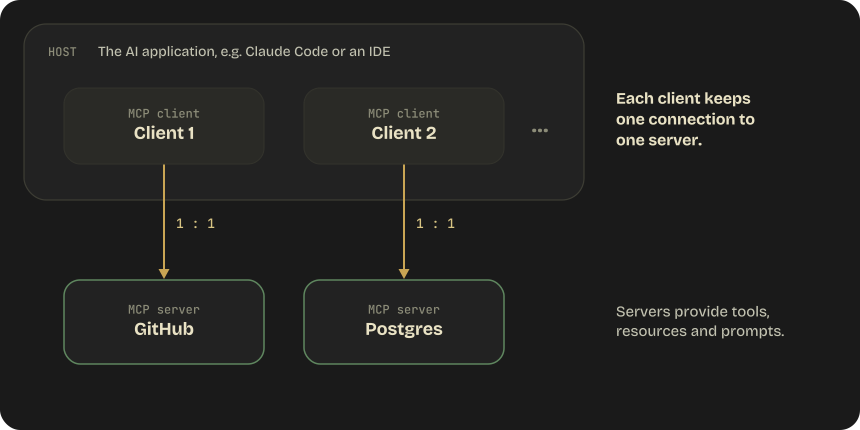
MCP is an open standard for connecting AI models to data and tools, over JSON-RPC 2.0.
2.4 · MCP server configuration
Use stdio for local servers and Streamable HTTP for remote ones.
| Transport | type in config | When to use |
|---|---|---|
| stdio | "stdio", implied by command | Local processes. No network overhead; most common for local tools |
| Streamable HTTP | "http" | Remote and cloud-hosted servers; supports OAuth |
| SSE (legacy) | "sse" | Services that still expose only an SSE endpoint |
| WebSocket | "ws" | Remote servers that push events unprompted; header-only auth, no OAuth |
Gotcha: an entry with a url but no type is read as stdio and skipped. Always set type on remote servers.
2.4 · MCP server configuration
The scope decides where a server is stored and who gets it.
| Scope | Loads in | Shared? | Stored in |
|---|---|---|---|
| Local (default) | Current project only | No | ~/.claude.json, keyed by project path |
| Project | Current project only | Yes, via version control | .mcp.json in the project root |
| User | All your projects | No | ~/.claude.json |
| Managed (admin) | Every session in the org | Yes, pushed by IT | managedMcpServers in managed settings |
Naming trap: MCP local scope lives in ~/.claude.json, not .claude/settings.local.json. The two are unrelated.
2.4 · MCP server configuration
.mcp.json is committed, so secrets come in through ${VAR} expansion.
json{
  "mcpServers": {
    "shared-api": {
      "type": "http",
      "url": "https://example.com/mcp",
      "headers": { "Authorization": "Bearer ${API_TOKEN}" }
    },
    "postgres": {
      "command": "npx",
      "args": ["@modelcontextprotocol/server-postgres"],
      "env": { "DATABASE_URL": "${DATABASE_URL}" }
    }
  }
}${VAR}expands from the environment, so the secret is never in the file.${VAR:-default}covers unset ones.command+argsstart a stdio server; remote entries settypeandurl.- Interactive sessions ask before using project servers;
claude -pand Agent SDK runs load them without asking. - Remote auth: OAuth via
/mcp, else a static token inheaders, orheadersHelperfor short-lived ones.
2.5 · Built-in tools
Grep searches inside files, Glob finds files, Edit changes them in place.
| Tool | Purpose | When to use |
|---|---|---|
| Grep | Search file contents for patterns | Function definitions, error messages, imports, string patterns |
| Glob | Find files by name or extension | **/*.test.ts, src/**/config.* |
| Read | Load full file contents | A specific file after Grep or Glob found it |
| Write | Create new files | Files that don't exist yet |
| Edit | Targeted changes by unique text matching | Specific sections of existing files |
| Bash | Run terminal commands | git, npm, scripts, system commands |
Also built in: Agent, Skill, WebSearch and WebFetch, AskUserQuestion, and ToolSearch for deferred tools.
2.5 · Built-in tools
Explore from entry points outward, and fall back to Read + Write when Edit fails.
Grep, read, follow, repeat
- Grep for entry points like main functions, routes and exports.
- Read those files, then Grep for the modules they import.
- Build understanding iteratively.
Reading every file upfront
Wastes context and doesn't build understanding.
Read it, then Write it whole
- Edit matches a unique text string. If the text isn't unique, the edit fails.
- Fallback: Read the full file, then Write the entire modified version.
2.6 · Anthropic-defined & server tools
Server-side tools run on Anthropic's side, and their errors arrive as HTTP 200.
- Anthropic-defined tools are schema-less: declare a
typeand aname, and Claude knows the interface. - Server-side tools such as web search and code execution return results as content blocks in the same response.
- A server-tool error returns 200 with an error object in the result block. Branch on its shape before indexing.
- Your own tool named
bashwith aninput_schemais a different tool from Anthropic's schema-less one.
Web fetch only fetches URLs already in the conversation. pause_turn means a server tool loop hit its cap: send it back.
2.6 · Parallel tool use
Parallel tool calls get all their results back in one message.
Run them together, answer them together.
- Execute every
tool_useblock in the message concurrently. - Return all
tool_resultblocks in a single user message. - A tool that failed still gets its
tool_result, withis_error: true.
Splitting results across messages
Silently teaches Claude to stop making parallel calls.
Dropping a failed result
Never drop it. Return the failure with is_error: true.
Practice · Domain 2 · question 1 of 5
An agent has 18 tools configured and is frequently selecting the wrong tool. What is the most effective solution?
Improve all 18 tool descriptions to be more detailed
Distribute the tools across specialized subagents with 4-5 tools each
Set tool_choice to "any" to force tool usage
Add examples to the system prompt showing correct tool selection
Answer · Domain 2 · question 1
Distribute the tools across specialized subagents with 4-5 tools each
AImprove all 18 tool descriptions to be more detailed
CSet tool_choice to "any" to force tool usage
DAdd examples to the system prompt showing correct tool selection
The 4-5 tool maximum per agent is the key architectural principle. Even with better descriptions, 18 tools degrades selection reliability.
Practice · Domain 2 · question 2 of 5
A search tool returns an empty array. What should the agent communicate to the user?
"The search service is currently unavailable"
"No results were found matching your query"
Check the response status to distinguish between "no results" and "search failed"
Retry the search with different parameters
Answer · Domain 2 · question 2
Check the response status to distinguish between "no results" and "search failed"
A"The search service is currently unavailable"
B"No results were found matching your query"
DRetry the search with different parameters
The agent must distinguish between a valid empty result (status 200, no matches) and a failed search (error/timeout). These require fundamentally different responses.
Practice · Domain 2 · question 3 of 5
Where should MCP server credentials be stored in a project using .mcp.json?
Directly in the .mcp.json file
In environment variables referenced via ${VAR_NAME} syntax
In a separate .mcp-secrets.json file
In the project's package.json
Answer · Domain 2 · question 3
In environment variables referenced via ${VAR_NAME} syntax
ADirectly in the .mcp.json file
CIn a separate .mcp-secrets.json file
DIn the project's package.json
.mcp.json supports environment variable expansion. Credentials should never be committed to version control.
.mcp.json lives in the project root and is version-controlled, so anything written in it gets committed.
Practice · Domain 2 · question 4 of 5
A platform team aggregates six MCP servers, exposing about 200 tools. Tool definitions consume ~55k tokens before any work starts, and tool selection has become unreliable. What is the current recommended fix?
Raise max_tokens so there is room for the definitions
Enable the tool search tool, keep it and the 3-5 most-used tools loaded, and mark the rest defer_loading: true
Set tool_choice: "any" so Claude is forced to commit to a tool
Set defer_loading: true on every tool including the search tool
Answer · Domain 2 · question 4
Enable the tool search tool, keep it and the 3-5 most-used tools loaded, and mark the rest defer_loading: true
ARaise max_tokens so there is room for the definitions
CSet tool_choice: "any" so Claude is forced to commit to a tool
DSet defer_loading: true on every tool including the search tool
Tool search keeps only a small hot set plus the search tool in context and loads the rest on demand via tool_reference blocks, cutting definition tokens by ~85% while preserving prompt caching. Deferring every tool, the search tool included, is a 400 error: at least one tool must stay non-deferred. Splitting across subagents (§2.3) is still valid, but tool search is what makes a 200-tool catalog workable inside one agent.
Practice · Domain 2 · question 5 of 5
An extraction service forces its schema with tool_choice: {"type": "tool", "name": "extract_invoice"} and is being moved from Claude Opus 5 to Claude Fable 5.1. What happens, and what is the right fix?
Nothing changes — forced tool use works on every current model
The request returns 400; switch to tool_choice: "any" instead
The request returns 400; use tool_choice: "auto" with an explicit instruction and strict: true, or structured outputs via output_config.format
The call silently falls back to text output
Answer · Domain 2 · question 5
The request returns 400; use tool_choice: "auto" with an explicit instruction and strict: true, or structured outputs via output_config.format
ANothing changes — forced tool use works on every current model
BThe request returns 400; switch to tool_choice: "any" instead
DThe call silently falls back to text output
Fable 5.1 and Mythos 5.1 reject both forced forms (any and tool) with a 400. auto plus an instruction keeps the tool call, strict: true keeps the arguments schema-valid, and structured outputs replace the pattern entirely when the tool only existed to return JSON. Opus 5.5 and Sonnet 5.5 reject it exactly as Fable 5.1 does, while Haiku 5.5 (and legacy Sonnet 5 / Opus 5) still accept it — so this is a per-model check, not a global rule, and three of the four current models fail it.
any is forced tool use too. The same models reject it with a 400, just like a named tool.
Domain 2 · on one page
Tool Design & MCP Integration
2.1Tool design
Descriptions are the selection criteria: purpose, input, output, edge cases, when to use vs similar. Overlap → rename or merge.
2.2Errors
Category + retryable. Transient → retry with backoff. Validation → fix input. Business → explain. Permission → escalate. Empty ≠ failed.
2.3Distribution
Four or five tools per agent; split the rest across subagents. auto may, any must, a named tool forces it, none is text only.
2.4MCP architecture
A host runs one client per server. stdio for local, Streamable HTTP for remote. A url always needs a type.
2.4MCP config
.mcp.json is project scope and committed, so secrets go in ${VAR}. Local and user scope live in ~/.claude.json.
2.5Built-in tools
Grep for contents, Glob for names. Explore from entry points, never read everything upfront. Edit fails on non-unique text → Read + Write.
2.6API-side tools
Schema-less: just type + name. Server-tool errors arrive inside a 200. Parallel results go back in one message.
Domain 3 of 5
Claude Code Configuration & Workflows
How Claude Code is configured and driven: instruction files, skills, rules, plan mode, refinement and CI/CD. Seven task statements:
3.0 · Surfaces & scheduling
Schedulers differ by where they run: the cloud, your machine, or this session.
Routines
- Keep running with your machine off.
- Can also trigger on API calls or GitHub events.
- Morning PR reviews, overnight CI failure analysis, weekly dependency audits.
Desktop scheduled tasks
- Run locally, with local file and tool access.
- For anything that needs the local filesystem or a private network.
/loop
- Runs inside the current CLI session.
- Quick polling within one sitting.
- Omit the interval and Claude self-paces between iterations.
Every surface (terminal, IDE, desktop, web, mobile) runs the same engine, so CLAUDE.md, settings, skills and MCP servers work identically everywhere.
3.1 · CLAUDE.md hierarchy
CLAUDE.md files stack up; none of them overrides another.
- Every file found is concatenated into context, broadest first.
- Files nearer the launch directory come last;
CLAUDE.local.mdfollowsCLAUDE.md. - Directory files load on demand, when Claude works on a file there.
- Contradictions leave Claude to pick one. Resolve them; don't rely on precedence.
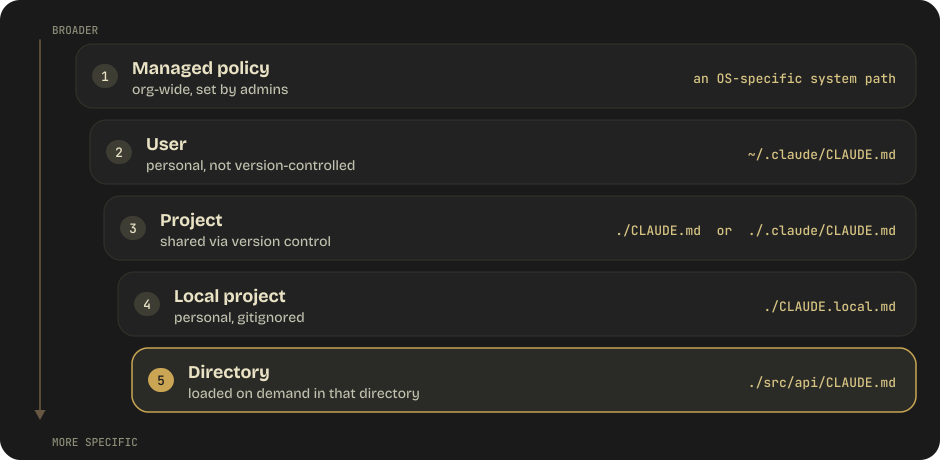
Monorepo with another team's nested CLAUDE.md? Skip it with claudeMdExcludes in settings.
3.1 · CLAUDE.md hierarchy
Only the project CLAUDE.md is shared; every other layer stays with you.
Project CLAUDE.md
./CLAUDE.mdor./.claude/CLAUDE.md, committed to version control.- The team's coding standards, conventions and workflow rules.
User & local files
~/.claude/CLAUDE.mdapplies to all your projects and is never version-controlled.CLAUDE.local.mdis personal per project: gitignore it.
Auto memory
- Notes Claude writes itself: project patterns, decisions, preferences.
- The start of
MEMORY.mdloads each session; topic files load on demand. - All worktrees of one repo share it.
3.1 · CLAUDE.md hierarchy
Imports keep CLAUDE.md modular, with one source of truth.
markdown# CLAUDE.md
@AGENTS.md
@docs/coding-standards.md
@~/.claude/my-personal-preferences.md

See @README.md for project overview.

## Claude-specific overrides
Use plan mode for changes under `src/billing/`.- Relative paths resolve from the file that holds the import;
@~/is your home directory. - Imported files can import too, up to a depth limit that stops circular imports.
- No CLAUDE.md in the project? Claude Code falls back to reading
AGENTS.md. - A personal
CLAUDE.local.mdcounts as having one and silently stopsAGENTS.mdloading. Import it with@AGENTS.md.
3.2 · Skills & commands
Custom commands are now skills: same /name, more power.
.claude/commands/deploy.mdand.claude/skills/deploy/SKILL.mdboth create/deployand behave the same.- On a name clash, Enterprise > Personal > Project > Plugin, and a skill beats a same-named command.
- Skills add a folder for supporting files, dynamic context injection, and subagent execution.
- The body enters the conversation once and is never re-read, so write standing instructions.
The old /project:name and /user:name namespacing is gone. Plugin skills are namespaced plugin-name:skill-name.
3.2 · Skills & commands
Frontmatter decides who can run a skill and where it runs.
yaml---
name: deploy
description: Deploy the application to a specified environment
context: fork
agent: Explore
allowed-tools: Bash(git *) Bash(npm run deploy *)
argument-hint: [environment]
disable-model-invocation: true
---

Deploy the application to $ARGUMENTS.descriptionis how Claude decides whether to auto-load the skill.disable-model-invocation: truemeans only the user can run it.user-invocable: falsehides it from the menu instead.context: forkruns it in an isolated subagent, chosen byagent. CLAUDE.md loads; chat history doesn't.allowed-toolspre-approves tools for the invoking turn only.$ARGUMENTSis what the user typed.
3.2 · Skills & commands
Pick the extension by what it has to change.
What Claude knows and does
A SKILL.md of instructions. Pick it when you keep pasting the same instructions.
Which tools Claude has
An external process that gives Claude tools. Pick it when Claude needs to reach an external system.
Whether an event goes ahead
A shell command, HTTP request or prompt run on a lifecycle event. Pick it to block, allow or log with a script.
Events and the interface
Plugin functions run inside Claude Code, unsandboxed. Pick it for a pane, a custom command, or rewriting an event.
A plugin bundles these and more, namespaced so they can't collide with yours. Plugins sit lowest in skill priority.
3.3 · Path-specific rules
Conventions that span many directories belong in one path-scoped rule.
A copy in every folder
- Testing rules repeated in
components/,api/,utils/… - Every copy has to be kept in sync by hand.
- A new test directory gets nothing until someone adds another copy.
One file in .claude/rules/
testing.mdwithpaths: ["**/*.test.*"]in its frontmatter.- A single source of truth for testing conventions.
- Applies wherever test files exist, even in new directories.
3.3 · Path-specific rules
A paths glob turns a rule from always-on into on-demand.
yaml---
paths:
  - "src/api/**/*.ts"
  - "src/api/**/*.test.ts"
---

# API Development Rules

All API endpoints must:
- Use Zod for request validation
- Return standardized error responses
- Include rate limiting middleware- Rules live in
.claude/rules/, one topic per file: testing, API design, security. - No frontmatter means the rule loads unconditionally at session start.
- With
paths, it loads when Claude reads, writes or edits a matching file. - Skills take the same
pathsfield to auto-load only for matching files.
3.4 · Plan mode vs direct execution
Plan when the scope or approach is open; execute directly when it's obvious.
Explore, design, then ask
- Multi-file changes, like refactoring auth across 15 files.
- Architectural decisions, or several valid approaches.
- Large scope, like a library migration touching 45+ files.
- Unclear requirements, like “make the app faster”.
Just make the change
- A single-file fix with a clear stack trace.
- Obvious scope, like adding a null check.
- Clear instructions: “Add a
createdAtfield to the User model”. - Small and contained, like a typo or a constant.
Combine them: plan mode explores and designs, you approve, then Claude exits plan mode and implements file by file.
3.4 · Plan mode vs direct execution
Plan mode is one permission mode among several.
| Mode | Behavior |
|---|---|
default | Shown as Manual. Reads run; edits, shell commands and network access prompt. |
acceptEdits | Auto-accepts file edits; other tools still prompt. |
plan | Exploration only: designs an approach and presents it before touching files. |
auto | A classifier decides per tool call whether to prompt. |
dontAsk | Only in-directory reads and pre-approved tools run; anything else is denied. |
bypassPermissions | Skips all prompts. Dangerous: short, contained tasks only. |
Set one with --permission-mode or permissions.defaultMode, or cycle with Shift+Tab. dontAsk suits locked-down CI.
3.4 · Plan mode vs direct execution
Hand noisy exploration to an Explore subagent and keep only its summary.
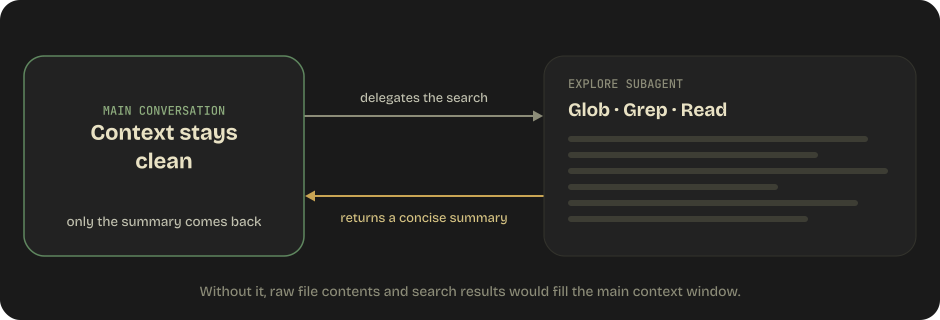
- Explore runs Glob, Grep and Read in its own context, then returns a concise summary.
- Without it, raw file contents and search results fill the main context window.
- Explore and Plan are read-only built-ins; general-purpose can explore and act.
- Every subagent starts without your conversation history; Explore and Plan even skip CLAUDE.md.
Define your own in .claude/agents/: markdown plus frontmatter such as tools, model and permissionMode.
3.5 · Iterative refinement
Refinement works on concrete evidence, not more prose.
Concrete examples
Prose like “format dates consistently” keeps drifting. Give 2–3 input/output examples instead.
TDD iteration
Write the test first, run it, share the failure. Claude fixes the code; rerun and repeat until green.
Interview pattern
Claude asks clarifying questions before implementing: JWT or sessions? Refresh tokens? Role-based access?
Interacting vs independent
Interacting issues go in one message, since fixes may conflict. Independent ones go one at a time, each reviewable.
3.6 · Exam traps
Three CI/CD answers that look right.
claude -p, parseable output, hard limits.
-p/--printruns non-interactively. Mandatory in CI.--output-format jsonmakes the output parseable.--json-schemaenforces its shape.--max-turnsand--max-budget-usdas guardrails.
--permission-prompts none when nobody can answer a prompt.
Running Claude Code without -p
The process hangs, waiting for input that never comes.
The Batch API for pre-merge checks
A blocking check needs an immediate response. Batches have no latency SLA.
Reviewing in the session that wrote the code
It keeps its reasoning context, so it is less likely to question its own decisions.
3.6 · CI/CD integration
The Batch API is for work nobody is waiting on.
Overnight, non-blocking jobs
- Overnight code analysis reports and weekly audit summaries.
- Nightly test generation and batch document processing.
- 50% cheaper than synchronous calls; results within 24 hours.
Anything that blocks
- Pre-merge checks that need an immediate response.
- Real-time user interactions.
- Tool-calling loops. Multi-turn isn't supported inside one request.
Results arrive in any order: match them by custom_id, never by position, and resubmit only the failures.
3.6 · CI/CD integration
Review code in a fresh session, not the one that wrote it.
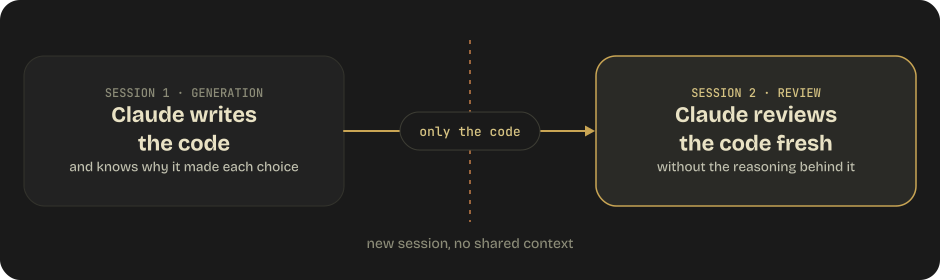
The writing session already “knows” why it made each choice, so it rarely questions them. A new session with no shared context reviews the code fresh.
Practice · Domain 3 · question 1 of 3
A team wants testing conventions to apply to all *.test.ts files throughout their codebase, which has tests scattered across many directories. What is the most maintainable approach?
Add a CLAUDE.md in every directory that contains test files
Create a single rule file in .claude/rules/ with paths: ["**/*.test.ts"] frontmatter
Add testing rules to the project-level CLAUDE.md
Create a tests/ directory and put all tests there with a CLAUDE.md
Answer · Domain 3 · question 1
Create a single rule file in .claude/rules/ with paths: ["**/*.test.ts"] frontmatter
AAdd a CLAUDE.md in every directory that contains test files
CAdd testing rules to the project-level CLAUDE.md
DCreate a tests/ directory and put all tests there with a CLAUDE.md
Path-specific rules in .claude/rules/ are superior to directory-level CLAUDE.md when conventions span multiple directories. A single rule file with glob patterns covers all matching files without duplication.
A CLAUDE.md in every test directory duplicates the rules, and a new test directory gets nothing until someone adds another copy.
Practice · Domain 3 · question 2 of 3
When should Claude Code use plan mode instead of direct execution?
When fixing a single bug with a clear stack trace
When migrating a library that affects 45+ files across the project
When adding a null check to a function
When updating a configuration constant
Answer · Domain 3 · question 2
When migrating a library that affects 45+ files across the project
AWhen fixing a single bug with a clear stack trace
CWhen adding a null check to a function
DWhen updating a configuration constant
Plan mode is for multi-file changes with architectural implications and multiple valid approaches. A library migration affecting 45+ files clearly fits. The other options are small, obvious-scope changes suited for direct execution.
A single bug with a clear stack trace is small, obvious scope, the textbook case for direct execution.
Practice · Domain 3 · question 3 of 3
A CI pipeline needs to run Claude Code for automated code review. Which flag is essential?
--verbose
-p / --print
--force
--no-cache
Answer · Domain 3 · question 3
-p / --print
A--verbose
C--force
D--no-cache
The -p/--print flag enables non-interactive mode, which is mandatory in CI. Without it, Claude Code hangs waiting for user input. Pair it with --output-format json (or stream-json), --max-turns / --max-budget-usd for production-grade guardrails, and --permission-prompts none when no host can answer a permission prompt.
Domain 3 · on one page
Claude Code Configuration & Workflows
3.0Surfaces
One engine everywhere, so config travels. Routines run in the cloud, desktop tasks locally, /loop in the session.
3.1CLAUDE.md
Managed → user → project → local → directory, all concatenated. Only project is shared. @import to split.
3.2Skills
Commands merged into skills. disable-model-invocation = user-only. context: fork = isolated subagent.
3.3Path rules
.claude/rules/ with a paths glob: one file for conventions spread across directories.
3.4Plan mode
Multi-file, architectural or unclear → plan. Small and obvious → direct. Explore keeps the main context clean.
3.5Refinement
Examples beat prose. Share test failures. Interview first. Fix interacting issues together.
3.6CI/CD
-p or it hangs. JSON output plus a schema. Batch only for non-blocking work. Review in a fresh session.
Domain 4 of 5
Prompt Engineering & Structured Output
How to write criteria the model can't misread, get structured output you can validate, and shape requests for current models. Eight task statements:
4.1 · Explicit criteria
Vague instructions get read differently every time.
Define each judgment explicitly.
- What qualifies: the specific conditions that trigger the judgment.
- What doesn't: the boundary cases that must not trigger it.
- Examples: concrete input/output pairs that show the boundary.
“Flag a comment as outdated ONLY when the claimed behavior directly contradicts the actual code behavior.”
Asking for caution
“Be conservative when flagging issues.”
Asking for confidence
“Only report high-confidence findings.”
Asking for judgment
“Use your best judgment on severity.”
4.1 · Explicit criteria
One noisy category erodes trust in every category.
- High false positive rates in one category undermine trust in all of them, even the accurate ones.
- Developers start ignoring every warning, not just the noisy kind.
- The fix: temporarily disable the noisy category, improve its criteria, then re-enable it.
- Tag each finding with a
detected_pattern(4.4) to see which constructs developers keep dismissing.
4.2 · Few-shot prompting
Few-shot examples show what prose can't pin down.
- Use them for ambiguous cases, formats or reasoning to demonstrate, edge cases, and extraction hallucination.
- 2–4 targeted examples is the sweet spot. Too few miss the pattern; too many waste context and overfit.
- Each example shows the input, the output, and the reasoning for why that output is correct.
- Good examples teach the pattern, so the model generalizes to situations it hasn't seen.
Include a boundary case too: a comment that is vague but not wrong, whose correct output is null.
4.3 · Structured output
Don't ask for JSON in text; give Claude a schema.
JSON requested in the prompt
- Malformed JSON
- Missing required fields
- Unexpected field names
- Wrong data types
A tool whose input_schema is the output
- Define a tool that represents the structure you want back.
strict: trueguarantees schema compliance.
output_config.format
- Request JSON against a
json_schema, no tool needed. - The SDK's
messages.parse()takes a Pydantic or Zod schema and returns the validated object. - The older top-level
output_formatis deprecated.
4.3 · Structured output
A strict tool schema is a contract for the output.
json{
  "name": "extract_invoice_data",
  "description": "Extract structured data from an invoice document",
  "strict": true,
  "input_schema": {
    "type": "object",
    "properties": {
      "vendor_name": { "type": "string" },
      "total_amount": { "type": "number" }
    },
    "required": ["vendor_name", "total_amount"],
    "additionalProperties": false
  }
}- The
input_schemais the structure you want back. strict: trueguarantees the output matches it.- Strict mode needs
additionalProperties: falseand every property listed inrequired. - Some current models reject forced
tool_choicewith a 400. There, useoutput_config.format, orautoplusstrict: true.
4.3 · Structured output
Structured output guarantees the shape, not the truth.
Schema compliance
- Correct types
- Required fields present
- Valid enum values
"total_amount": 150.00is a number in the right field.
Semantic correctness
"total_amount": 150.00while the line items sum to 175.00.- Valid against the schema, and still wrong.
- You still need validation logic to catch semantic errors.
4.3 · Structured output
Leave room for missing or unclear data, and check the rest in code.
Missing data becomes null
Use "type": ["string", "null"] when the source may not contain it. Making everything required can force Claude to fabricate data.
An escape hatch
Add "other" to the enum, paired with a nullable detail field that describes what the document actually is.
Permission not to guess
Add "unclear" so Claude doesn't guess when the information is ambiguous.
Some rules live in your code
No minimum/maximum, length limits, pattern, oneOf or recursive schemas. Validate ranges, lengths and regex yourself.
4.4 · Validation-retry loops
Feed the specific validation errors back into the retry.
pythonmax_retries = 3

for iteration in range(max_retries):
    response = extract_data(document, prompt)
    errors = validate(response)
    if not errors:
        return response  # success
    prompt += f"""
    Your previous extraction had these validation errors:
    {json.dumps(errors, indent=2)}
    Please correct these specific issues and try again.
    """

raise ExtractionError(f"Failed after {max_retries} attempts")- Validate every response and return the first clean one.
- Schema checks catch missing fields, wrong types and bad enums. Sums, dates and cross-field contradictions need custom logic.
- Extract a stated and a calculated total side by side to detect conflicts automatically.
- Cap the attempts and raise when they run out.
4.4 · Validation-retry loops
Retries can't recover data the document doesn't contain.
Accept null for missing data.
- Make fields nullable or optional when the source may not contain the information.
- No PO number on the invoice? Return
nullinstead of retrying.
Retrying until the field is filled
If the invoice doesn't have a PO number, retrying won't make one appear.
Making every field required
Requiring data the document may lack can force Claude to fabricate it.
4.5 · Batch processing
Batch what can wait; keep anything blocking synchronous.
Results needed now
- Pre-merge code review checks
- Real-time user interactions
- Blocking CI steps
- Interactive debugging
Results can wait
- 50% cheaper than synchronous calls.
- Up to 24 hours, with no SLA.
- Overnight code analysis, weekly audit reports, nightly test generation, bulk document processing.
Multi-turn conversations are not supported inside a single batch request.
4.5 · Batch processing
Key every batch result by custom_id, and resubmit only the failures.
Correlate by custom_id.
- Give every request a
custom_id. Results come back in any order. - Poll
processing_statusuntilended, then stream the results. - Resubmit only the requests that didn't succeed.
Result states: succeeded, errored, canceled, expired.
Resubmitting the whole batch
Wastes credits and reprocesses documents that already succeeded.
Matching results by position
Results arrive in any order. Key by custom_id, never by position.
Skipping the trial run
Refine prompts on a small sample before spending credits on thousands of documents.
4.6 · Multi-pass review
Review code in a fresh session, not the one that wrote it.
- In the same session, Claude keeps the reasoning context from generation.
- It “remembers” why it made each decision, so it is less likely to question them.
- This is reasoning context bias.
- The fix: a completely separate review session with no knowledge of why decisions were made.
4.6 · Multi-pass review
Review large PRs file by file first, then across files.
Breaks down on large PRs
- Attention dilution: early files get more focus than later ones.
- Inconsistent standards across files.
- Missed cross-file integration issues.
Per-file local analysis
- A separate prompt for each file, at consistent depth.
- Catches bugs, style issues, type errors and security vulnerabilities.
Cross-file integration
- A different prompt focused on how files interact, with Pass 1 results as context.
- Catches data flow issues, interface mismatches and missing error handling at boundaries.
4.7 · Thinking & effort
Older request shapes now return a 400 on current models.
Adaptive thinking, steered by effort.
thinking={"type": "adaptive"}replaces fixed thinking budgets.- Control depth with
effortinsideoutput_config, not at the top level. - Force a format with
output_config.formator system-prompt instructions.
budget_tokens
Fixed thinking budgets return a 400.
temperature, top_p, top_k
The sampling parameters return a 400 too.
Assistant prefill
Prefilling the last assistant turn to force a format returns a 400, though older material still recommends it.
4.7 · Thinking & effort
Four request-surface rules to carry through every migration.
Set it explicitly, re-tune on migration
Defaults differ by model, so an omitted effort can run shallower after a migration. Re-run your sweep; don't carry the old value across.
Hidden by default
Thinking still happens and is still billed, but display: "omitted" hides it. Streaming reasoning to users? Set "summarized".
A mid-conversation operator channel
Append a "role": "system" message to messages instead of editing system. It is prompt-injection-safe and leaves the cached prefix intact.
History is part of the contract
Thinking blocks are bound to the model, prefix and account that produced them. Editing earlier turns invalidates later blocks; append-only histories are safe.
4.8 · Prompt caching
The cache keys on an exact prefix, so put stable content first.
Stable first, volatile last.
- Render order is
tools→system→messages. Any byte change invalidates everything after it. - Frozen system prompt and deterministically ordered tools first.
- Timestamps, per-request IDs and the question go after the last
cache_controlbreakpoint. - Verify with
usage.cache_read_input_tokens. Zero across repeats means the prefix is breaking.
datetime.now() in the system prompt
The prefix changes on every request, invalidating everything behind it.
A tool list that varies or reorders
Tools render first, so it invalidates the system prompt and the whole conversation.
Changing effort or thinking between requests
Switching the top-level effort or thinking configuration invalidates the cache. Use a per-message effort change.
Practice · Domain 4 · question 1 of 4
A code review system flags "use your best judgment" as a criterion for reporting issues. What should be changed?
Add more examples of past reviews
Replace with explicit criteria defining exactly what qualifies as a reportable issue
Increase the model's temperature for more nuanced judgment
Add a confidence score threshold
Answer · Domain 4 · question 1
Replace with explicit criteria defining exactly what qualifies as a reportable issue
AAdd more examples of past reviews
CIncrease the model's temperature for more nuanced judgment
DAdd a confidence score threshold
Vague instructions like "use your best judgment" produce inconsistent results. Replace with explicit criteria that define exactly what qualifies and what doesn't.
Practice · Domain 4 · question 2 of 4
An invoice extraction system uses strict mode but sometimes returns a total that doesn't match the sum of line items. What's happening?
Strict mode is broken
The schema is misconfigured
Strict mode guarantees schema compliance, not semantic correctness
The model needs fine-tuning
Answer · Domain 4 · question 2
Strict mode guarantees schema compliance, not semantic correctness
AStrict mode is broken
BThe schema is misconfigured
DThe model needs fine-tuning
Strict mode ensures the output conforms to the JSON schema (correct types, required fields) but cannot validate semantic correctness (whether the math adds up). Custom validation logic is needed for that.
Practice · Domain 4 · question 3 of 4
A batch processing job has 1,000 documents. 50 fail. What's the correct approach?
Resubmit the entire batch of 1,000
Use custom_id to identify and resubmit only the 50 failed documents
Switch to synchronous processing
Increase the batch timeout
Answer · Domain 4 · question 3
Use custom_id to identify and resubmit only the 50 failed documents
AResubmit the entire batch of 1,000
CSwitch to synchronous processing
DIncrease the batch timeout
Use custom_id to correlate requests with responses and resubmit only the failures. Resubmitting the entire batch wastes credits and reprocesses already-successful documents.
Practice · Domain 4 · question 4 of 4
An extraction service written for an older model sets thinking={"type": "enabled", "budget_tokens": 8000} and temperature=0. It is being moved to Claude Opus 5. What happens?
It works unchanged; both parameters are still supported
Both parameters return a 400 — use thinking={"type": "adaptive"} and control depth with output_config.effort
budget_tokens is ignored silently and temperature still applies
It works, but thinking is disabled
Answer · Domain 4 · question 4
Both parameters return a 400 — use thinking={"type": "adaptive"} and control depth with output_config.effort
AIt works unchanged; both parameters are still supported
Cbudget_tokens is ignored silently and temperature still applies
DIt works, but thinking is disabled
budget_tokens and the sampling parameters (temperature / top_p / top_k) are removed on Fable 5 / 5.1, Opus 5.5, Opus 5, Sonnet 5.5 / 5, Haiku 5.5, and the 4.7/4.8 family, and return a 400 (Haiku 5.5 tolerates only the defaults, temperature: 1 and top_p: 0.99). Moving the same service to Haiku 5.5 — the natural successor for high-volume extraction — fails the same way. Adaptive thinking plus effort replaces the fixed-thinking-budget concept. Assistant prefills also 400 on these models.
Domain 4 · on one page
Prompt Engineering & Structured Output
4.1Explicit criteria
Define what qualifies, what doesn't, and examples. One noisy category? Disable it, fix its criteria, re-enable.
4.2Few-shot
2–4 targeted examples, each with input, output and reasoning. For ambiguity, formats and edge cases.
4.3Structured output
A tool's input_schema or output_config.format, plus strict: true. It guarantees the shape, not the truth: validate semantics in code.
4.4Validation-retry
Feed the specific errors back and retry. Data absent from the source won't appear: accept null.
4.5Batch
Cheaper, up to 24 hours, no SLA. Key by custom_id; resubmit only failures. Keep blocking work synchronous.
4.6Multi-pass review
Review in a fresh session to avoid reasoning context bias. Large PRs get a per-file pass, then a cross-file pass.
4.7Thinking & effort
Adaptive thinking plus output_config.effort. budget_tokens, sampling parameters and prefill return a 400.
4.8Prompt caching
Exact prefix match, in tools → system → messages order. Stable first, volatile after the last breakpoint.
Domain 5 of 5 · the last
Context Management & Reliability
How long conversations keep their facts, when an agent hands off to a human, how errors travel, and how outputs stay checkable. Eight task statements:
5.1 · Conversation context
Long context costs more and loses the middle, so keep it lean and ordered.
- Every token is billed on every turn. Filling a big window just because you can costs money and quality.
- Models read the beginning and end of long inputs best, and the middle gets worse with length.
- Put key-findings summaries first, add explicit section headers, and bookend the important parts.
- Trim tool results before returning them: an order lookup may send 40 fields when you need 5.
5.1 · Conversation context
Exact numbers survive summarization only in a case-facts block.
textCASE FACTS (do not summarize):
- Customer ID: #12345
- Order: #67890
- Order date: 2024-01-15
- Total: $149.99
- Issue: Damaged product on arrival
- Refund requested: Full refund ($149.99)- Summaries round things off:
$149.99becomes “approximately $150”,2024-01-15becomes “mid-January”. - Order numbers, customer IDs, reference codes and exact error messages get lost too.
- Extract them into a persistent structured block that survives summarization.
- No compaction mechanism protects exact numbers better than restating them.
5.1 · Conversation context
Nested CLAUDE.md files and path-scoped rules don't survive /compact.
Survives /compact | May be lost |
|---|---|
| Project-root CLAUDE.md and unscoped rules, re-injected from disk | Earlier conversation details |
| System prompts | Specific tool results |
| Recent messages | Nuanced reasoning from earlier turns |
| Auto-memory (MEMORY.md) | Exact quotes and numbers from early context |
| The plan-mode plan, recently edited files, invoked skill bodies (capped) | Nested CLAUDE.md files and paths:-scoped rules, until Claude next touches a matching file |
Put a rule that must survive compaction in the project-root CLAUDE.md, or drop its paths: frontmatter.
5.2 · Escalation patterns
Escalate on issue complexity, never on emotional tone.
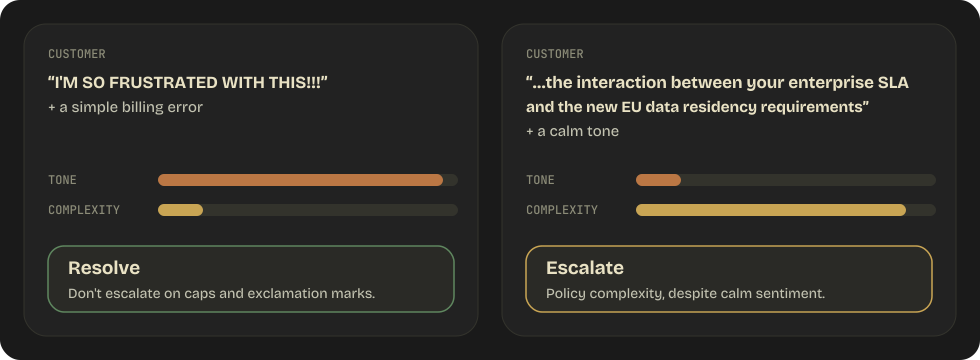
Caps and exclamation marks over a simple billing error: resolve it. A calm question about how policies interact: it may need a human.
5.2 · Exam traps
Mood, confidence and length are not reasons to escalate.
Escalate on these three triggers.
- The customer explicitly asks for a human: escalate immediately, no further investigation.
- A policy gap or exception: the agent can't make policy decisions.
- No progress after reasonable attempts: hand off a summary of what was tried.
High sentiment
An angry customer may have a simple issue. Sentiment ≠ complexity.
Self-reported low confidence
Claude's confidence scores are poorly calibrated: a “low confidence” answer may be right, a “high confidence” one wrong.
A long conversation
Length doesn't signal a need to escalate. Some issues legitimately take multiple turns.
5.2 · Escalation patterns
Ask instead of guessing, and hand off a summary that stands on its own.
Ask, don't pick by heuristics
“I found multiple accounts matching that name. Could you provide your email address or the last four digits of your phone number?”
Send a structured summary
- Customer, contact details, issue type and order.
- Every action the agent already took.
- Recommended action and urgency.
The human agent typically can't see the conversation transcript.
5.3 · Exam traps
An error Claude can't read is an error Claude can't recover from.
Propagate structured context, then keep going.
- Say what failed, the service, the attempted query, partial results, alternatives, and whether it's retryable.
- Service down (503 or timeout) → “I wasn't able to search right now.”
- Valid search, no matches (200 + empty array) → “I didn't find any matching articles.”
- One step times out → continue with partial results, note the gap, offer alternatives.
Generic error messages
{ "error": "Operation failed" } hides what failed and why, so Claude can't recover intelligently.
Silent suppression
Returning { "results": [] } while search is down makes Claude say “nothing found” when the truth is “I couldn't search.”
Aborting the whole workflow
One timeout in step 2 throws away a run whose step 1 already succeeded.
5.3 · Error propagation
Subagents recover locally from transient failures and propagate only what they can't fix.
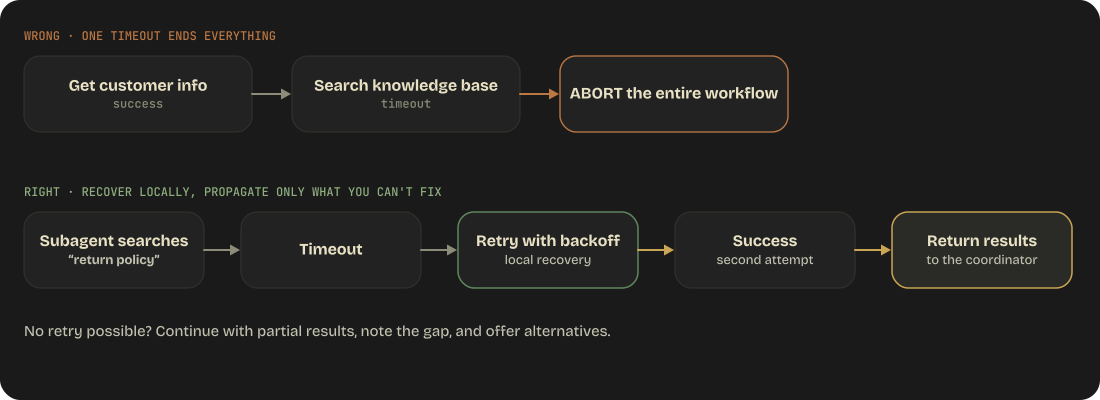
A propagated error says what was attempted, what partial results exist, what failed, and whether it's retryable.
5.4 · Large codebase context
Long sessions drift, so persist what you learn before compression takes it.
Signs of drift: Claude cites “typical patterns” instead of code it found, gives inconsistent answers, forgets discoveries, and assumes instead of checking.
Write findings down
Persist findings such as entry points, key facts and known issues to a file. After compression, Claude re-reads it to recover them.
Compact on your terms
Compact with a structured summary before context degrades, rather than letting automatic compression lose information unpredictably.
Resume from a manifest
In long multi-agent runs, each agent exports its state to a known location. The coordinator keeps a manifest and picks up where it left off.
5.4 · Large codebase context
An Explore subagent reads widely so the main context gets only the summary.
A mitigation for drift in long sessions. Verbose exploration stays in the subagent, and the main context stays focused on the task.
5.5 · Human review workflows
A strong overall accuracy can hide the document types that fail.
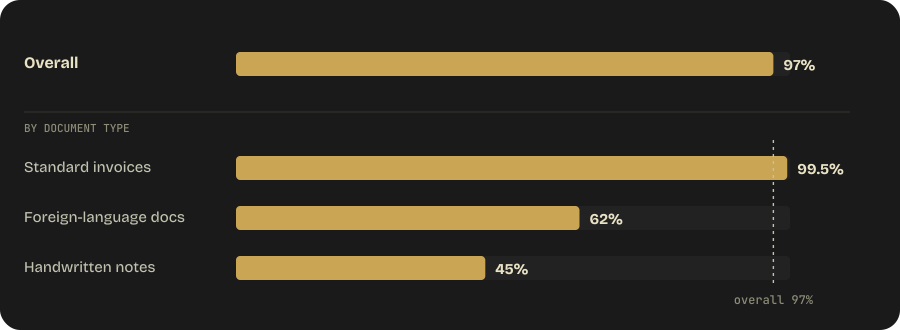
Report accuracy for each document type and each field within it before calling a system production-ready.
5.5 · Human review workflows
Aim human review by risk, and trust only calibrated per-field confidence.
Stratify by risk or category
- Don't just sample randomly from all outputs.
- For example: 20% of high-risk, 10% of medium-risk and 5% of low-risk outputs.
- Review effort lands where errors are most likely.
Score each field, then calibrate
- One confidence score per field, not one for the whole extraction.
- Calibrate against labeled validation sets: 0.9 should mean correct about 90% of the time.
- Without calibration, confidence scores are meaningless.
5.6 · Information provenance
When sources disagree, show the disagreement instead of resolving it silently.
Keep provenance and annotate conflicts.
- Every claim carries its evidence, source, document name, publication date and source type.
- Conflicting values stay side by side, each with its source and a note.
- State the resolution and why: an audited filing outranks preliminary figures.
- Label claims as well-established, contested or single-source.
Silently picking one value
Hides potential data quality issues. Nobody downstream can evaluate the discrepancy.
Leaving out dates
Two figures from different months look like a contradiction when both are correct for their period.
Merging or reinterpreting sources
Quote or closely paraphrase the original claim, and keep the source's own caveats.
5.7 · Server-side context
Context editing clears, compaction summarizes, the memory tool persists.
| Mechanism | What happens to old context | Reach for it when |
|---|---|---|
| Context editing | Cleared: old tool results or thinking blocks are deleted | Dozens of verbose tool results, or thinking that must keep cache hits high |
| Compaction | Summarized into a signed block that replaces it | A long conversation must keep its narrative |
| Memory tool | Written to files outside the conversation | Findings must survive across sessions, not just turns |
| Case-facts block | Restated word for word | Facts must never be paraphrased |
Complementary, not alternatives. Paired with context editing, the memory tool is what makes clearing safe.
5.7 · Exam traps
Compaction and trimming fail silently when the client mangles history.
Send compaction state back intact, and trim on the server.
- Threshold compaction: append the whole
response.contentevery turn, not the extracted text. - On demand: the block goes first, in place of the messages it summarized, on every later request.
- Keep history append-only. Server-side editing and compaction don't count as edits.
Appending only the text
Destroys the compaction state without an error, so you notice only deep into a long run.
Leaving summarized messages after the block
Claude gets them twice, and every request still returns 200.
Deleting old tool results client-side
On models with preserved thinking, it invalidates every later thinking block (a 400 by default).
5.8 · Bounding long runs
max_tokens truncates blindly; a task budget lets the model pace itself.
max_tokensA ceiling the model can't see
- Enforced, but the model is unaware of it.
- Hitting it truncates output mid-thought.
A ceiling the model can see
- The model paces itself and lands the work.
- Counts what Claude generates plus tool results it reads this turn, not resent history.
- Too small, and Claude declines, scopes down or stops early: raise it first.
A hard cap on one session
- A Managed Agents feature.
- Dollar-denominated and platform-enforced, where a task budget is advisory and counts tokens.
5.8 · Bounding long runs
A refusal arrives as HTTP 200, so check stop_reason before reading content.
- It carries
stop_reason: "refusal"and astop_details.category. - Reading
contentblindly turns a refusal into a successful empty answer, like a failed search read as zero results. - In production, enable server-side fallback so the request is re-routed by category, not dropped.
- Refusals are a first-class path, not just a flagship issue, and they count against rate limits.
Practice · Domain 5 · question 1 of 8
An agent is processing a customer support request. After context compression, the customer's order number ($149.99 order #67890) was summarized as "a recent order." What should have been done to prevent this?
Increase the context window size
Extract critical transactional data into a persistent case facts block
Disable context compression
Repeat the order details in every message
Answer · Domain 5 · question 1
Extract critical transactional data into a persistent case facts block
AIncrease the context window size
CDisable context compression
DRepeat the order details in every message
Extracting transactional facts (amounts, order numbers, dates) into a structured block that persists through compression prevents loss of critical details.
Practice · Domain 5 · question 2 of 8
A customer says "I AM SO ANGRY RIGHT NOW!!!" about a simple billing charge of $5. Should the agent escalate to a human?
Yes, high sentiment indicates a complex issue
Yes, capital letters indicate urgency
No, sentiment intensity does not indicate issue complexity — the billing issue is simple and resolvable
No, but reduce the agent's confidence score
Answer · Domain 5 · question 2
No, sentiment intensity does not indicate issue complexity — the billing issue is simple and resolvable
AYes, high sentiment indicates a complex issue
BYes, capital letters indicate urgency
DNo, but reduce the agent's confidence score
Sentiment ≠ complexity. An angry customer with a simple $5 billing issue doesn't need human escalation. The agent should resolve the simple issue while acknowledging the customer's frustration.
Practice · Domain 5 · question 3 of 8
An extraction system reports 97% overall accuracy. A stakeholder asks if it's ready for production. What additional information is needed?
The system is ready at 97%
Check if accuracy is consistent across all document types and fields
Run more documents through to increase the sample size
Compare against competitor systems
Answer · Domain 5 · question 3
Check if accuracy is consistent across all document types and fields
AThe system is ready at 97%
CRun more documents through to increase the sample size
DCompare against competitor systems
Aggregate accuracy can mask poor performance on specific document types. 97% overall might hide 45% accuracy on handwritten documents. Break down by type and field before declaring production readiness.
Practice · Domain 5 · question 4 of 8
Two research subagents return different values for the same metric. What should the coordinator do?
Average the two values
Use the most recent value
Annotate the conflict with source attribution and let the user decide
Discard both and search again
Answer · Domain 5 · question 4
Annotate the conflict with source attribution and let the user decide
AAverage the two values
BUse the most recent value
DDiscard both and search again
Conflicting data should be annotated with source attribution rather than silently resolved. This preserves transparency and lets downstream consumers evaluate the discrepancy.
Practice · Domain 5 · question 5 of 8
A long-running agent enables server-side compaction. The integration appends only response.content[0].text to its message history each turn. What goes wrong?
Nothing — text is all the API needs
Compaction state is lost silently, because the compaction blocks in response.content are what the API uses to replace compacted history
The request fails with a 400 on the first compaction
Compaction triggers too early
Answer · Domain 5 · question 5
Compaction state is lost silently, because the compaction blocks in response.content are what the API uses to replace compacted history
ANothing — text is all the API needs
CThe request fails with a 400 on the first compaction
DCompaction triggers too early
Append the whole response.content, not the extracted text. Dropping the non-text blocks destroys the compaction state without raising an error, so the failure only surfaces deep into a long conversation.
Practice · Domain 5 · question 6 of 8
An agentic workflow keeps getting truncated mid-task when it hits max_tokens. Which mechanism lets the model pace itself instead?
Raise max_tokens and hope for the best
A task budget (output_config.task_budget), which the model can see and plan around
A lower effort setting
An iteration cap in the client loop
Answer · Domain 5 · question 6
A task budget (output_config.task_budget), which the model can see and plan around
ARaise max_tokens and hope for the best
CA lower effort setting
DAn iteration cap in the client loop
max_tokens is an enforced ceiling the model is unaware of; a task budget injects a countdown the model sees during generation, so it finishes gracefully. Lower effort reduces spend but does not communicate a ceiling, and a client-side iteration cap is the anti-pattern from Domain 1 §1.1.
Practice · Domain 5 · question 7 of 8
A custom harness keeps context small by deleting old tool results from the middle of the messages array before each request. It worked on Claude Opus 5. After moving to Claude Fable 5.1, requests start failing with a 400 that mentions thinking blocks. What is the correct fix?
Strip all thinking blocks from every request
Keep the history append-only and move the trimming to server-side context editing (clear_tool_uses_20250919) or compaction, which don't count as edits
Switch thinking to {"type": "disabled"}
Delete the tool results and the thinking block right after each one
Answer · Domain 5 · question 7
Keep the history append-only and move the trimming to server-side context editing (clear_tool_uses_20250919) or compaction, which don't count as edits
AStrip all thinking blocks from every request
CSwitch thinking to {"type": "disabled"}
DDelete the tool results and the thinking block right after each one
Fable 5.1's thinking blocks are valid only against the exact prefix that preceded them, so any client-side edit to earlier turns invalidates every later block. Server-side context editing and compaction are exempt because the check compares the conversation as you sent it. Stripping every thinking block always works but throws away the reasoning and restarts the prompt cache on every request; disabling thinking is a 400 on Fable 5.1 and Opus 5.5 (thinking is always on); deleting the tool results with only the thinking block right after each one still leaves the later thinking blocks behind an edited prefix, so the 400 stays.
Practice · Domain 5 · question 8 of 8
An application uses on-demand compaction. It puts the returned compaction block first in messages, but leaves the messages the block summarized in place after it. Requests keep returning 200. What is happening?
The request should have returned compaction_block_misplaced; the API is being lenient
Nothing was saved — the API sends the summarized messages to Claude again after the summary, and no error is raised
The API deduplicates the summarized messages against the block automatically
The block is dropped because its signature no longer matches the messages
Answer · Domain 5 · question 8
Nothing was saved — the API sends the summarized messages to Claude again after the summary, and no error is raised
AThe request should have returned compaction_block_misplaced; the API is being lenient
CThe API deduplicates the summarized messages against the block automatically
DThe block is dropped because its signature no longer matches the messages
After the swap, the block stands in for the messages it summarized, and the API passes every message after it to Claude unchanged, so leaving them in place re-sends them with no error. compaction_block_misplaced fires only when summarized messages remain in front of the block. Leaving the block out of a later request is the other silent mistake: Claude simply gets no summary. Signatures are checked, but only against edits to the block itself.
Domain 5 · on one page
Context Management & Reliability
5.1Context
Exact numbers go in a case-facts block. Key facts at the edges, not the middle.
5.2Escalation
Escalate on a human request, a policy gap or a stall. Hand off a structured summary.
5.3Errors
Say what failed and if it's retryable. “Couldn't search” ≠ “found nothing.”
5.4Codebases
Scratchpad files survive compression. Subagents return summaries.
5.5Human review
Stratify by risk. Calibrate per-field confidence. Break accuracy down by type.
5.6Provenance
Every claim keeps its source and date. Annotate conflicts; never pick silently.
5.7Server-side
Editing clears, compaction summarizes. Append the whole response.content.
5.8Long runs
A task budget is visible, max_tokens isn't. A refusal is a 200: check stop_reason.
★Most tested
Sentiment ≠ complexity. Escalate on policy complexity, not an angry tone.
Before exam day
Every domain rewards the same instincts.
Decide on signals, not prose
Loops end on stop_reason. Critical rules live in hooks. Escalation follows an explicit request, not sentiment or self-reported confidence.
Errors carry structure
Return the category, whether it's retryable, and partial results. Never generic, never silent, never empty results passed off as success.
Nothing is inherited
Subagent prompts carry everything explicitly. State that must persist goes in the memory tool or files, not the conversation.
Review outside the session
Same-session self-review keeps its reasoning bias. Use multi-pass review for large PRs and break accuracy down per document type.
Scale to the job
Plan mode for multi-file or architectural work, batch for latency-tolerant jobs, tool search once an agent passes about ten tools.
Prepare all six scenarios
Each exam draws 4 of 6 at random, and there is no penalty for guessing, so answer every question.
Last refresh 14 October 2026
Good luck on exam day.
Read online · dnacenta.github.io/claude-certified-architectFull text · guide_en.pdfSource · github.com/dnacenta/claude-certified-architect
Unofficial community study guide. Claude Certified Architect is a certification program by Anthropic.