Domain 2 · 18% of the exam
Tool Design & MCP Integration
Covers how to design tool interfaces that LLMs can reliably use, how to handle errors from tools, how to distribute tools across agents, and how MCP servers are configured and operate.
2.1 Tool Interface Design
Tool Descriptions Are Everything
Tool descriptions are the primary mechanism Claude uses to decide which tool to call. The description is not just documentation — it's the selection criteria.
Bad description (leads to unreliable selection):
{
"name": "search",
"description": "Search for things"
}
Good description:
{
"name": "search_knowledge_base",
"description": "Search the internal knowledge base for support articles, FAQs, and troubleshooting guides. Use this when the customer asks a question that may have an existing documented answer. Input should be a natural language query describing the customer's issue. Returns matching articles ranked by relevance with titles, snippets, and article IDs."
}
What to Include in Tool Descriptions
- Purpose — What the tool does and when to use it
- Input format — What the input should look like, with examples
- Output format — What the tool returns
- Edge cases — What happens with invalid inputs or no results
- Differentiation — When to use THIS tool vs similar tools
The Full Tool Definition Schema
{
"name": "get_weather",
"description": "Get the current weather in a given location. Returns temperature, conditions, humidity, and wind speed. Use this when the user asks about current weather conditions. For forecasts, use get_forecast instead.",
"input_schema": {
"type": "object",
"properties": {
"location": {
"type": "string",
"description": "The city and state/country, e.g. 'San Francisco, CA' or 'London, UK'"
},
"unit": {
"type": "string",
"enum": ["celsius", "fahrenheit"],
"description": "Temperature unit. Defaults to celsius if not specified."
}
},
"required": ["location"]
}
}
Strict Mode
Strict mode guarantees Claude's tool inputs conform exactly to the schema:
{
"name": "extract_invoice",
"strict": true,
"input_schema": {
"type": "object",
"properties": {
"vendor_name": { "type": "string" },
"invoice_number": { "type": "string" },
"total_amount": { "type": "number" },
"currency": { "type": "string", "enum": ["USD", "EUR", "GBP"] }
},
"required": ["vendor_name", "invoice_number", "total_amount", "currency"],
"additionalProperties": false
}
}
Requirements for strict mode:
additionalProperties: falsemust be set- All properties must be in
required - Only a subset of JSON Schema is supported (see Domain 4)
Anti-Pattern: Ambiguous Tool Overlap
Having two tools with near-identical descriptions causes misrouting:
Tool 1: "analyze_content" — "Analyze content for insights"
Tool 2: "analyze_document" — "Analyze a document for insights"
Claude can't reliably distinguish between these. Fix: rename to clearly differentiate purpose, or merge into one tool.
2.2 Structured Error Responses
MCP Error Structure
When tools fail, the error response should be structured, not a generic string:
{
"isError": true,
"errorCategory": "transient",
"isRetryable": true,
"description": "Database connection timed out after 30 seconds. The query was for customer #12345's order history.",
"partial_results": null,
"attempted_action": "SELECT * FROM orders WHERE customer_id = 12345"
}
Error Categories
| Category | Retryable? | Examples | Agent Action |
|---|---|---|---|
| Transient | Yes | Timeouts, service unavailability, rate limits | Retry with backoff |
| Validation | No (without input changes) | Invalid email format, missing required field | Fix input, retry |
| Business | No | Refund exceeds policy limit, account frozen | Escalate or inform user |
| Permission | No | Insufficient access, expired token | Escalate |
What the Agent Should Do with Errors
- Transient errors: Subagents should implement local recovery (retry with backoff). Only propagate if recovery fails.
- Validation errors: Claude should examine the error, fix the input, and retry.
- Business errors: Claude should explain the policy to the user or escalate.
- Permission errors: Claude should escalate to a human.
Anti-Patterns (Wrong Answers)
- Generic error messages:
"Operation failed"— hides the cause and prevents intelligent recovery - Silent suppression: Returning
{ "results": [] }when the search engine is down. This makes it look like there are no results when actually the search didn't work. The agent will confidently tell the user "I found nothing" when the truth is "I couldn't search." - Generic status messages:
"search unavailable"without context about what was attempted - Terminating on single failure: Killing an entire multi-step workflow because one step failed, instead of using partial results or trying alternatives
Distinguishing Empty from Failed
This is a specific exam concept:
| Situation | What Happened | Correct Response |
|---|---|---|
Search returns [] with status 200 |
Valid query, no matches | "No results found for that query" |
| Search returns timeout error | Query didn't execute | "I wasn't able to search right now, let me try again" |
These must be handled differently. The first is information. The second is an error.
2.3 Tool Distribution and tool_choice
The 4-5 Tool Maximum
Each agent should have 4-5 tools maximum. Giving an agent 18 tools degrades selection reliability — Claude may pick the wrong tool, call unnecessary tools, or struggle to reason about which to use.
Solution for complex systems: Distribute tools across specialized subagents.
Instead of:
  One agent with 18 tools

Do:
  Coordinator with: Agent, AskUser
  Search subagent with: search_web, search_docs, search_db
  Analysis subagent with: analyze_text, extract_entities, summarize
  Action subagent with: send_email, create_ticket, update_record
This is the exam's answer, and the underlying principle (one agent, one focused job) is still correct. The current numbers from Anthropic's docs are worth knowing alongside it.
Beyond the Exam Guide: Tool Search
Anthropic's current published guidance is that tool-selection accuracy degrades once an agent exceeds roughly 30–50 available tools, and that a typical multi-server MCP setup (GitHub, Slack, Sentry, Grafana, Splunk) burns ~55k tokens of context in tool definitions before any work happens. The fix is no longer "split into subagents" alone — it's the tool search tool, which is GA on the Claude API.
"tools": [
{ "type": "tool_search_tool_regex_20251119", "name": "tool_search_tool_regex" },
{ "name": "get_weather", "description": "...", "input_schema": { ... },
"defer_loading": true }
]
How it works:
- You still send every tool definition on every request.
defer_loadingcontrols what enters the context window, not what you transmit. - Non-deferred tools load into context immediately; deferred ones don't.
- When Claude needs something else, it calls the search tool. The API returns
tool_referenceblocks and expands them into full definitions inline — the system-prompt prefix is untouched, so prompt caching survives. - Two variants:
tool_search_tool_regex_20251119(Claude writes Pythonre.search()patterns, max 200 chars) andtool_search_tool_bm25_20251119(natural-language queries, max 500 chars). Both search names, descriptions, argument names, and argument descriptions.
| Rule | Detail |
|---|---|
| Never defer everything | At least one tool must have defer_loading: false, normally the search tool itself. Otherwise: 400, "All tools cannot be deferred" |
| Keep a hot set | Leave your 3–5 most-used tools non-deferred so Claude can call them without a search round-trip |
| Limits | Up to 10,000 deferred tools per request; searches return 5 matches by default (Claude may set limit, 1–10,000) |
| Cache | A tool with defer_loading: true can't also carry cache_control — 400. Put the breakpoint on a non-deferred tool |
| Composability | Works with strict: true; the grammar builds from the full toolset |
| MCP | Don't set defer_loading per tool — set it on the mcp_toolset entry's default_config |
| Models | Both variants on every current model (Fable 5.1, Opus 5.5, Sonnet 5.5, Haiku 5.5) and back to Opus 4.5 / Sonnet 4.5 / Haiku 4.5; not on Opus 4.1 or earlier |
When to use it: 10+ tools, tool definitions over 10k tokens, accuracy dropping as the toolset grows, or aggregating multiple MCP servers. When not to: fewer than 10 tools, every tool used every request, or definitions totalling under ~100 tokens.
Reconciling the two: the exam's "4-5 tools" is about how many tools are in front of the model at decision time. Tool search doesn't raise that number — it keeps it at 3–5 while letting the catalog behind it grow to thousands.
tool_choice Parameter
Controls how Claude interacts with tools:
| Value | Behavior | Use Case |
|---|---|---|
"auto" (default) |
Claude may call a tool OR respond with text | General conversation with optional tool use |
"any" |
Claude MUST call a tool, but can choose which | Guarantee structured output |
{"type": "tool", "name": "specific_tool"} |
Claude MUST call this exact tool | Force a specific operation first |
"none" |
Claude cannot call any tool; text only | Force a text answer while keeping tool definitions in context |
Any tool_choice value can also carry "disable_parallel_tool_use": true to cap Claude at a single tool call per response (by default it may emit several tool_use blocks at once).
Fable 5.1 / Mythos 5.1 (since 2026-09-01), Opus 5.5 (since 2026-09-22), and Sonnet 5.5 (since 2026-09-28): forced tool use is gone.
{"type": "any"}and{"type": "tool", "name": ...}return400 invalid_request_error(tool_choice: type "tool" and "any" are not supported for this model) — oncount_tokensand in the Batches API too.autoandnonestill work, anddisable_parallel_tool_usestill works withauto. The replacements, in order of preference:
tool_choice: {"type": "auto"}plus an explicit instruction naming the tool (in theuserturn, or in a mid-conversationrole: "system"message when the app requires the call), withstrict: trueon the tool so the arguments still match your schema.- Structured outputs (
output_config.format, Domain 4 §4.3) when the forced call only existed to get JSON back.Haiku 5.5 is now the only current model that accepts forced
tool_choice— but a forced call skips thinking: the response starts with the tool call and carries nothinkingblock, so useautoplus an instruction when you want it to reason before calling. Sonnet 5, Opus 5 (both legacy), and the 4.x family also keep all four values, so the exam's "anyguarantees a tool call" answer is still correct as a concept — but it now holds on only one of the four current models. Checkclient.models.retrieve(id).capabilitiesbefore assuming.
When to Use Each
"auto" — Most conversations. Claude decides whether a tool is needed.
"any" — When you need guaranteed structured output. Example: You have multiple extraction schemas (invoice, receipt, contract) and you want Claude to pick the right one and always return structured data.
Forced specification — When a specific tool must run first. Example: Always call extract_metadata before any enrichment step.
"none" — When a turn must produce prose (e.g., a final summarization pass) without stripping the tool definitions from the request.
# Force Claude to call a specific tool (Haiku 5.5, and legacy Sonnet 5 / Opus 5 / 4.x —
# 400 on Fable 5.1, Opus 5.5, and Sonnet 5.5)
response = client.messages.create(
model="claude-haiku-5-5",
messages=[...],
tools=[...],
tool_choice={"type": "tool", "name": "extract_metadata"}
)
2.4 MCP Server Configuration
What is MCP?
The Model Context Protocol is an open standard for connecting AI models to external data sources and tools. It provides a standardized way for Claude to interact with databases, APIs, file systems, and other services.
Architecture
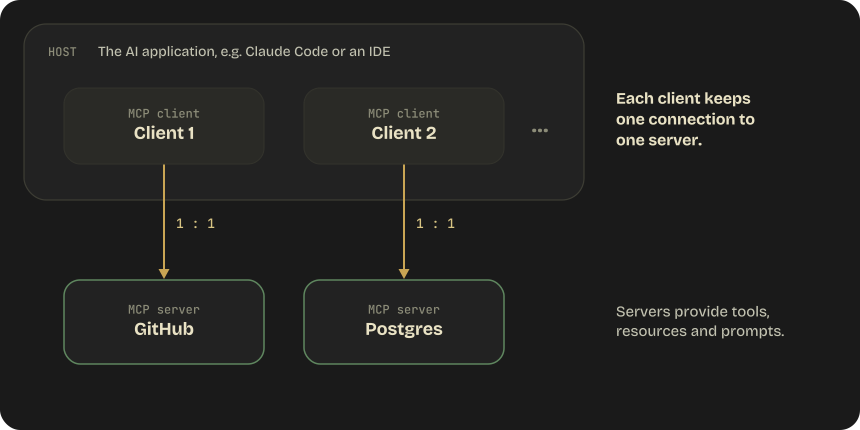
- Host: The AI application (Claude Code, an IDE) that coordinates MCP clients
- Client: A component within the host that maintains a 1:1 connection to an MCP server
- Server: A program that provides context (tools, resources, prompts) to the client
Transport Types
| Transport | type in config |
How It Works | When to Use |
|---|---|---|---|
| stdio | "stdio" (implied when the entry has command) |
Standard input/output | Local process communication. No network overhead. Most common for local tools. |
| Streamable HTTP | "http" (alias: "streamable-http") |
HTTP POST for client→server, optional SSE for streaming | Remote servers, cloud-hosted tools. The only remote transport that supports OAuth |
| SSE (legacy) | "sse" |
Server-Sent Events endpoint | Services that still expose only an SSE endpoint |
| WebSocket | "ws" |
Persistent bidirectional connection | Remote servers that push events unprompted. Header-only auth, no OAuth |
Config gotcha: an entry with a
urlbut notypeis a configuration error — Claude Code reads a typeless entry as a stdio server, skips it, and reportshas a "url" but no "type". Always settypeon remote servers.
MCP Protocol Details
- Uses JSON-RPC 2.0 message format
- Classic lifecycle (protocol revisions up to 2025-11-25):
initialize— Capability negotiation (what the server supports)notifications/initialized— Client confirms it is readytools/list— Client discovers available toolstools/call— Client invokes a tool
The 2026-07-28 revision makes MCP stateless, and the handshake above is gone:
| 2025-11-25 and earlier | 2026-07-28 |
|---|---|
initialize / notifications/initialized handshake per connection |
No handshake — every request carries its protocol version and client capabilities in _meta (io.modelcontextprotocol/protocolVersion, .../clientCapabilities) |
| Version and capabilities agreed once at connect time | Servers must implement server/discover (supported versions, capabilities, identity); clients may call it first, or use it as a backward-compatibility probe |
Protocol-level sessions (Mcp-Session-Id header on Streamable HTTP) |
Sessions and Mcp-Session-Id removed; servers that need cross-call state mint explicit handles |
Server-initiated requests (roots/list, sampling/createMessage, elicitation/create) |
Multi Round-Trip Requests: the server returns an interim result with resultType: "input_required", the client gathers the input and retries; every result carries resultType ("complete" for ordinary ones) |
The same revision deprecates Roots, Sampling, and Logging (they keep working through a deprecation window of at least twelve months, but new implementations shouldn't adopt them: pass directories via tool parameters, resource URIs, or server configuration instead of Roots; call an LLM provider's API directly instead of Sampling; log to stderr or OpenTelemetry instead of Logging), reclassifies the legacy HTTP+SSE transport as Deprecated, and deprecates OAuth Dynamic Client Registration in favor of Client ID Metadata Documents. URL-mode elicitation — a server asking the client to open a browser-based flow instead of a form — dates from 2025-11-25; 2026-07-28 only removed its notifications/elicitation/complete / elicitationId plumbing, since elicitation now rides on Multi Round-Trip Requests.
Claude Code asks HTTP, stdio (every install since v2.1.292), claude.ai connector (v2.1.295), and cloud / Remote Control connector (v2.1.299) servers whether they speak 2026-07-28, uses it with those that do, and connects to the rest on the classic handshake; MCP_PROTOCOL_NEGOTIATION=legacy keeps every server on the handshake. It supports URL-mode elicitation on 2026-07-28 connections (v2.1.281) and on 2025-11-25 servers (v2.1.287 — a server that stops connecting after that can set "bareElicitationCapability": true in its entry).
Server Primitives
| Primitive | What It Is | Example |
|---|---|---|
| Tools | Executable functions | search_database, create_issue |
| Resources | Data sources (read-only content catalogs) | File listings, database schemas |
| Prompts | Interaction templates | Pre-built prompt workflows |
Client Primitives
| Primitive | What It Is |
|---|---|
| Sampling | Server requests an LLM completion from the client — Deprecated since 2026-07-28 |
| Elicitation | Server requests user input from the client — form mode, or URL mode (open a browser flow, since 2025-11-25); on 2026-07-28 it arrives as a Multi Round-Trip input_required result |
| Roots | Server asks the client which URIs or filesystem boundaries it may operate within — Deprecated since 2026-07-28 |
Installation Scopes
Three scopes, and the file a server lands in depends on the scope — not on which file you happened to edit.
| Scope | Loads in | Shared with the team? | Stored in |
|---|---|---|---|
| Local (default) | Current project only | No | ~/.claude.json, keyed by project path |
| Project | Current project only | Yes, via version control | .mcp.json in the project root |
| User | All your projects | No | ~/.claude.json |
| Managed (admin) | Every session in the org | Yes, pushed by IT | managedMcpServers in managed settings (v2.1.259+) — org-provided servers users can't remove |
Note the naming trap: MCP local scope lives in ~/.claude.json (home directory), while general local settings live in .claude/settings.local.json (project directory). They are unrelated files.
Adding servers from the CLI:
# Remote HTTP server, shared with the team
claude mcp add --transport http --scope project shared-api https://example.com/mcp
# Remote server with a static auth header
claude mcp add --transport http secure-api https://api.example.com/mcp \
--header "Authorization: Bearer $TOKEN"
# Local stdio server — everything after -- is passed to the server untouched
claude mcp add airtable --env AIRTABLE_API_KEY=YOUR_KEY -- npx -y @example/mcp-server
# Paste a config block written for another MCP client
claude mcp add-json example '{"type":"http","url":"https://mcp.example.com/mcp"}'
Project-Level Configuration (.mcp.json)
This file lives in the project root and is version-controlled:
{
"mcpServers": {
"shared-api": {
"type": "http",
"url": "https://example.com/mcp",
"headers": { "Authorization": "Bearer ${API_TOKEN}" },
"timeout": 600000
},
"postgres": {
"command": "npx",
"args": ["@modelcontextprotocol/server-postgres"],
"env": {
"DATABASE_URL": "${DATABASE_URL}"
}
}
}
}
Key details:
${DATABASE_URL}— Environment variable expansion. The actual secret is NOT in the config file. Use${VAR:-default}when the variable may be unset.command+args— How to start the MCP server process (stdio transport)timeout— per-server tool execution timeout in milliseconds; overridesMCP_TOOL_TIMEOUTfor that server- Claude Code prompts for approval before using project-scoped servers from
.mcp.jsonin interactive sessions.claude -p, Agent SDK sessions, and cloud sessions can't show that prompt and load them without asking — usedisabledMcpjsonServersor--setting-sourcesto keep a server out of headless runs;CLAUDE_CODE_MCP_STARTUP_WAIT_MSbounds how long the first non-interactive turn waits for servers to connect (0= don't wait — except that servers named in--allowedToolsor by anmcp_toolhook still get up to 2 seconds, v2.1.284+) - Some server names are reserved (
workspace,claude-in-chrome,computer-use,Claude Preview,Claude Browser, and — in cloud sessions and on self-hosted runners only —widgets, v2.1.285+) and will be skipped with a warning;claude mcp addrejects them outright /mcp reconnect allretries every server that failed or needs authentication (v2.1.284+)- Permission rules name servers exactly: since v2.1.299,
mcp__aallows only the servera, nota__bora_— writemcp__<server>__*with the server's full normalized name
Authentication for Remote Servers
HTTP and SSE servers support OAuth — run /mcp in-session (or claude mcp add then authenticate) and Claude Code handles the browser flow and token refresh. For services without OAuth, pass a static token via headers, or generate one at connect time with headersHelper (a command whose stdout becomes the header value) when the credential is short-lived. WebSocket servers are header-only.
Tool Search Is On by Default in Claude Code
MCP tool definitions are deferred by default: only tool names and server instructions load at session start, and Claude searches for the rest on demand. That is why Claude Code imposes no per-server tool cap — the practical limit is your context budget.
ENABLE_TOOL_SEARCH |
Behavior |
|---|---|
| (unset) | All MCP tools deferred, loaded on demand |
true |
Force deferral (sends the beta header even through proxies) |
auto / auto:N |
Load upfront while deferred definitions total under 10% (or N%) of the context window; defer once past it |
false |
Load every MCP tool upfront |
Set "alwaysLoad": true on a server entry to exempt it from deferral when Claude needs its tools on every turn, or "alwaysLoad": false to keep all its tools behind tool search — even ones the server's author marked to load upfront with "anthropic/alwaysLoad" in a tool's _meta (v2.1.287+; leave the key out and those marked tools load upfront). Server authors should write good server instructions — with tool search on, those instructions are how Claude decides whether to search your server at all.
Claude Code cuts long text, and Claude sees only what comes before the cut:
| Text | Default limit |
|---|---|
| Server instructions, and the description of a tool that loads upfront | 4,096 characters (2,048 before v2.1.296) |
| The description of a tool loaded through tool search | 16,384 characters (v2.1.295+) |
Descriptions and instructions from Anthropic's first-party servers at api.anthropic.com |
Not cut (v2.1.299+) |
Tool search matches only against the part within the shorter limit, so put the words Claude would search for — and anything critical — near the start. CLAUDE_CODE_MAX_MCP_DESCRIPTION_LENGTH (v2.1.280+) replaces both limits with one number — 8192, for example, raises the upfront limit but lowers the tool-search one.
Output Limits
Claude Code warns when MCP tool output exceeds 10,000 tokens and truncates at 25,000 tokens by default. Raise the ceiling with MAX_MCP_OUTPUT_TOKENS; the warning threshold is fixed. This is the mechanical reason tool-output trimming (Domain 5) matters — a chatty server can silently lose the tail of its own response.
MCP Resources
Resources expose content catalogs to reduce exploratory tool calls. Instead of Claude blindly searching, it can browse available resources:
{
"resources": [
{
"uri": "file:///project/docs/api-reference.md",
"name": "API Reference",
"mimeType": "text/markdown"
}
]
}
2.5 Built-in Tools
Claude Code's built-in tools and when to use each:
| Tool | Purpose | When to Use |
|---|---|---|
| Grep | Search file contents for patterns | Finding function definitions, error messages, imports, string patterns |
| Glob | Find files by name/extension | Locating files: **/*.test.ts, src/**/config.* |
| Read | Load full file contents | Reading a specific file after finding it with Grep/Glob |
| Write | Create new files | Creating new files that don't exist |
| Edit | Targeted modifications | Changing specific sections of existing files (uses unique text matching) |
| Bash | Run terminal commands | git, npm, running scripts, system commands |
| WebSearch / WebFetch | Search the web; fetch and read a URL | Looking up current docs, checking an API's behavior |
| Agent | Spawn a subagent | Delegating bounded or noisy work (see Domain 1 §1.3) |
| Skill | Invoke a skill by name | Running a packaged workflow |
| NotebookEdit | Edit Jupyter notebook cells | .ipynb files |
| AskUserQuestion | Ask the user a blocking question | Decisions only the user can make |
| ToolSearch | Load a deferred tool's schema on demand | The client-side counterpart of the API's tool search — MCP and rarely used built-in tools ship as names only until Claude searches for them |
| SendMessage / ListAgents | Message a running or completed subagent, teammate, or another session | Resuming a subagent with its context intact (Domain 3 §3.4); cross-session messaging |
| Workflow | Run a dynamic-workflow script that orchestrates many subagents | Only when the user opts in ("use a workflow", ultracode) — see Domain 1 §1.3 |
Codebase Exploration Pattern
The correct pattern for exploring an unfamiliar codebase:
1. Grep for entry points (main functions, route definitions, exports)
2. Read the entry point files
3. Follow imports — Grep for referenced modules
4. Read those files
5. Build understanding iteratively
Anti-pattern: Reading all files upfront. This wastes context and doesn't build understanding.
When Edit Fails
The Edit tool works by matching unique text strings. If the text isn't unique in the file, the edit fails.
Fallback: Use Read to get the full file, then Write to replace the entire file with the modified version.
2.6 Anthropic-Defined and Server-Side Tools
Not every tool is one you write. Some are Anthropic-defined (schema-less: you declare a type and a name, and Claude knows the interface), and some are server-side (they execute on Anthropic's infrastructure — results come back as content blocks in the same response, with no client-side execution loop).
| Tool | type |
Client- or server-side | Result block |
|---|---|---|---|
| Web search | web_search_20260209 |
Server | web_search_tool_result |
| Web fetch | web_fetch_20260209 |
Server | web_fetch_tool_result |
| Code execution | code_execution_20260521 |
Server | bash_code_execution_tool_result (.content.stdout) |
| Tool search (regex / BM25) | tool_search_tool_regex_20251119 / ..._bm25_20251119 |
Server | tool_search_tool_result |
| Memory | memory_20250818 |
Client (you implement the file ops) | standard tool_result |
| Bash | bash_20250124 |
Client | standard tool_result |
| Text editor | text_editor_20250728 |
Client | standard tool_result |
Details worth carrying into an exam or a design review:
- Version the type string.
web_search_20260209/web_fetch_20260209add dynamic filtering and need Opus 4.6+ / Sonnet 4.6+; older models use the basicweb_search_20250305/web_fetch_20250910. Don't also declarecode_executionalongside the_20260209variants — they run code under the hood, and a second execution environment confuses the model. - Web fetch only fetches URLs already present in the conversation. It is not a crawler.
- Server-tool errors do not raise. They return HTTP 200 with an error object inside the result block (e.g.
{"error_code": "max_uses_exceeded"}). For web search, a successcontentis a list and an errorcontentis an object — branch on that before indexing. This is the same "empty vs failed" distinction from §2.2, at the API layer. pause_turnis how a server-side tool loop tells you it hit its internal cap. Send the response back to continue (Domain 1 §1.1).- Bash and text editor are schema-less. Declaring a custom tool of your own named
"bash"with aninput_schemacreates a different tool. - Advisor tool: its
modelmust be Sonnet 4.6 or better and at least as capable as the request's top-level (executor)model(e.g. executorclaude-sonnet-5-5→ advisorclaude-opus-5-5). An invalid pair returns 400 — and the matrix is per model, not a simple ranking: a Sonnet 5.5 executor rejects Opus 4.8, Opus 4.7, Sonnet 5, and Haiku 5.5 advisors that a Sonnet 5 executor accepts. Fable / Mythos 5 and 5.1, Opus 5 / 5.5, Sonnet 5.5, and Haiku 5.5 advisors return their advice encrypted, as anadvisor_redacted_resultblock your client can't read; round-trip it verbatim and the server decrypts it into the executor's prompt next turn. Only older advisors (Opus 4.8, for example, where the executor accepts it) return the plaintextadvisor_resultyou could log. - Computer use moved to a toolset. On the Claude API and Google Cloud, Claude 5.5-and-later models accept only
computer_toolset_20260801— the earliercomputer_20251124/computer_20250124tools return 400 — while on Bedrock Opus 5.5, Sonnet 5.5, and Haiku 5.5 still acceptcomputer_20251124. Since 2026-10-07 the Python and TypeScript SDKs have beta browser and computer toolset classes: you subclass one and write the methods against your own browser or desktop automation (or use a provider's driver); the SDK runs the tool loop, the URL and file policies you set, and your approval callback.
Parallel Tool Use
By default Claude may emit several tool_use blocks in one assistant message. Execute them concurrently and return all tool_result blocks in a single user message. Splitting them across multiple messages silently teaches Claude to stop making parallel calls. For a tool that failed, return its tool_result with is_error: true — never drop it.
Programmatic Tool Calling
Claude can call your custom tool from inside the code execution sandbox instead of round-tripping through the conversation — useful when a tool returns large results that would otherwise flood the context. Declare {"type": "code_execution_20260120", "name": "code_execution"} and set "allowed_callers": ["code_execution_20260120"] on the custom tool. When responding to a pending programmatic call, the user message must contain only tool_result blocks — no text. Not compatible with strict: true, disable_parallel_tool_use, forced tool_choice, or MCP tools.
MCP from the API Side: the MCP Connector
Domain 2's MCP material is written from Claude Code's perspective (a host that manages its own clients). The Messages API can also connect to remote MCP servers directly. It needs both halves — passing mcp_servers alone is a validation error:
client.beta.messages.create(
model="claude-opus-5-5",
betas=["mcp-client-2025-11-20"],
mcp_servers=[{"type": "url", "url": "https://mcp.example.com/mcp", "name": "example"}],
tools=[{"type": "mcp_toolset", "mcp_server_name": "example"}],
messages=[...],
)
Set defer_loading once on the mcp_toolset entry's default_config (or per tool in configs) rather than on individual tool definitions.
Changing Tools Mid-Conversation Without Breaking the Cache
The tools array sits earlier in the cached prefix than system, so editing it between turns invalidates the cache for the whole conversation (Domain 4 §4.8). On the models that support mid-conversation system messages (Fable 5 / 5.1, Mythos 5 / 5.1, Opus 5.5, Opus 5, Opus 4.8, Sonnet 5.5, Haiku 5.5 — not Sonnet 5), declare the full tool set up front and then offer or withdraw tools with tool_addition / tool_removal blocks inside a role: "system" message (beta; each block's tool is a tool_reference by name, or mcp_tool_reference / mcp_toolset_reference for connector tools — naming a tool that isn't in tools is a 400, tool_reference_unresolved). The reference-only header mid-conversation-tool-changes-2026-07-01 works on the Claude API, Bedrock, and Google Cloud; on the Claude API, inline-tools-2026-09-15 covers both references and inline definitions (below). A tool declared with defer_loading: true stays withheld until a tool_addition surfaces it. On Fable 5.1, Opus 5.5, Sonnet 5.5, and Haiku 5.5 this is also the only history-safe way to change tools, because rebuilding tools counts as editing earlier turns and invalidates later thinking blocks.
Placement caveat on Sonnet 5.5 / Haiku 5.5: both are trained to resist prompt injection through tool results, so they can treat a system message placed right after a
tool_resultas untrusted text and ignore it. Relay a user's mid-turn words as atextblock after the lasttool_resultin the sameusermessage, and keep harness notices in a separate system message after that. Never put tool output or retrieved documents in a system message on any model — that hands third-party text operator authority.
Defining Tools in a Message (beta inline-tools-2026-09-15, since 2026-09-22)
The reference form assumes you knew every tool at the first request. The inline form lets a tool_addition block carry the full definition instead:
{
"role": "system",
"content": [{
"type": "tool_addition",
"tool": {
"type": "tool_definition",
"definition": {
"name": "db_query",
"description": "Run a read-only SQL query against the analytics database.",
"input_schema": {"type": "object", "properties": {"sql": {"type": "string"}}, "required": ["sql"]}
}
}
}]
}
Send a different definition under the same name and it replaces the earlier one from that point on — that is how you change a schema, or move a server tool to a newer version, without touching tools or the prompt cache (reusing the name of a different type of tool is a 400, tool_name_conflict). With the mcp-client-2026-09-15 header as well, the definition can be an mcp_toolset; the response then opens with one mcp_tool_listing block per server it fetched — send it back to pin that tool list, and don't read content[0] blindly. It works on every model that supports mid-conversation tool changes, Opus 5.5, Sonnet 5.5, and Haiku 5.5 included — on the Claude API, where the docs offer the inline-tools-2026-09-15 and mcp-client-2026-09-15 headers (on Bedrock and Google Cloud, stick to reference-only changes).
Rules of thumb: declare what you know up front (in tools, deferred if the model shouldn't see it yet) and define inline only what is unknown at the first request or changes later; keep at least one non-deferred tool in tools, or the first inline definition changes the start of the rendered prompt and costs a full cache miss; cache_control goes on the block or in the definition, not both, and a deferred definition can't carry one. Limits: 10,000 deferred or message-defined tools, and 4 MB of definitions sent after the first user message (available_tools_limit_exceeded). After an on-demand compaction, tool changes inside the summarized range carry over only when the compaction request also sent this header — the block then records their net effect in a tool_changes field (Domain 5 §5.7).
Domain 2 Practice Questions
Q1: An agent has 18 tools configured and is frequently selecting the wrong tool. What is the most effective solution?
- A) Improve all 18 tool descriptions to be more detailed
- B) Distribute the tools across specialized subagents with 4-5 tools each
- C) Set tool_choice to "any" to force tool usage
- D) Add examples to the system prompt showing correct tool selection
Show answer
Answer: B — The 4-5 tool maximum per agent is the key architectural principle. Even with better descriptions, 18 tools degrades selection reliability.
Q2: A search tool returns an empty array. What should the agent communicate to the user?
- A) "The search service is currently unavailable"
- B) "No results were found matching your query"
- C) Check the response status to distinguish between "no results" and "search failed"
- D) Retry the search with different parameters
Show answer
Answer: C — The agent must distinguish between a valid empty result (status 200, no matches) and a failed search (error/timeout). These require fundamentally different responses.
Q3: Where should MCP server credentials be stored in a project using .mcp.json?
- A) Directly in the
.mcp.jsonfile - B) In environment variables referenced via
${VAR_NAME}syntax - C) In a separate
.mcp-secrets.jsonfile - D) In the project's
package.json
Show answer
Answer: B — .mcp.json supports environment variable expansion. Credentials should never be committed to version control.
Q4: A platform team aggregates six MCP servers, exposing about 200 tools. Tool definitions consume ~55k tokens before any work starts, and tool selection has become unreliable. What is the current recommended fix?
- A) Raise
max_tokensso there is room for the definitions - B) Enable the tool search tool, keep it and the 3-5 most-used tools loaded, and mark the rest
defer_loading: true - C) Set
tool_choice: "any"so Claude is forced to commit to a tool - D) Set
defer_loading: trueon every tool including the search tool
Show answer
Answer: B — Tool search keeps only a small hot set plus the search tool in context and loads the rest on demand via tool_reference blocks, cutting definition tokens by ~85% while preserving prompt caching. Deferring every tool, the search tool included, is a 400 error: at least one tool must stay non-deferred. Splitting across subagents (§2.3) is still valid, but tool search is what makes a 200-tool catalog workable inside one agent.
Q5: An extraction service forces its schema with tool_choice: {"type": "tool", "name": "extract_invoice"} and is being moved from Claude Opus 5 to Claude Fable 5.1. What happens, and what is the right fix?
- A) Nothing changes — forced tool use works on every current model
- B) The request returns 400; switch to
tool_choice: "any"instead - C) The request returns 400; use
tool_choice: "auto"with an explicit instruction andstrict: true, or structured outputs viaoutput_config.format - D) The call silently falls back to text output
Show answer
Answer: C — Fable 5.1 and Mythos 5.1 reject both forced forms (any and tool) with a 400. auto plus an instruction keeps the tool call, strict: true keeps the arguments schema-valid, and structured outputs replace the pattern entirely when the tool only existed to return JSON. Opus 5.5 and Sonnet 5.5 reject it exactly as Fable 5.1 does, while Haiku 5.5 (and legacy Sonnet 5 / Opus 5) still accept it — so this is a per-model check, not a global rule, and three of the four current models fail it.