Domain 4 · 20% of the exam
Prompt Engineering & Structured Output
Covers writing explicit criteria, few-shot prompting, getting guaranteed structured output via tool_use and JSON schemas, validation-retry loops, batch processing, and multi-pass review architecture.
4.1 Explicit Criteria
The Problem with Vague Instructions
Vague instructions produce inconsistent results because the model interprets them differently each time.
Bad (vague):
"Be conservative when flagging issues."
"Only report high-confidence findings."
"Use your best judgment on severity."
Good (explicit):
"Flag a comment as outdated ONLY when the claimed behavior directly
contradicts the actual code behavior. Do NOT flag comments that are
merely incomplete or could be more detailed."
Explicit Criteria Structure
For each type of judgment the model must make, define:
- What qualifies — Specific conditions that trigger the judgment
- What doesn't qualify — Boundary cases that should NOT trigger it
- Examples — Concrete input/output pairs showing the boundary
Flag as SECURITY ISSUE when:
  - User input is passed to SQL queries without parameterization
  - User input is rendered in HTML without escaping
  - Credentials are hardcoded in source files

Do NOT flag:
  - ORM queries (already parameterized)
  - Rendering user input in server-side templates with auto-escaping
  - Credentials loaded from environment variables
False Positive Impact
High false positive rates in one category undermine trust in ALL categories, even accurate ones. Developers start ignoring all warnings.
Solution: When a category has high false positives, temporarily disable it and improve the criteria prompts before re-enabling. Don't let one noisy category degrade the value of accurate ones.
4.2 Few-Shot Prompting
When to Use Few-Shot
- Ambiguous scenarios where prose instructions aren't precise enough
- Tasks where the format or reasoning pattern needs demonstration
- Reducing hallucination in extraction tasks
- Showing how to handle edge cases
How Many Examples
2-4 targeted examples is the sweet spot. Too few may not cover the pattern. Too many wastes context and may overfit to the examples.
What Good Examples Include
Each example should demonstrate:
- Input — What the model receives
- Output — What it should produce
- Reasoning — WHY this output is correct (not just what to do, but why)
Example 1:
Input: "// Returns the user's full name"
Code: function getName(user) { return user.firstName; }
Output: {
  "issue": "Comment claims full name but function only returns firstName",
  "severity": "medium",
  "location": "line 1",
  "reasoning": "The comment says 'full name' but the code returns only
    firstName, not firstName + lastName. This is a factual contradiction."
}

Example 2:
Input: "// Validates the input"
Code: function validate(input) { return input.length > 0 && input.length < 100; }
Output: null
Reasoning: "The comment says 'validates input' and the function does validate
  input. The comment is vague but not wrong — it doesn't claim specific
  validation rules that contradict the implementation."
Few-Shot Enables Generalization
Good examples teach the pattern, not just the specific cases. The model should generalize to novel situations by understanding the reasoning behind each example.
4.3 Structured Output via tool_use
The Problem
When you need Claude to return structured data (JSON), free-form text generation can produce:
- Malformed JSON
- Missing required fields
- Unexpected field names
- Wrong data types
Solution 1: tool_use with Schema
Define a tool that represents your desired output structure:
{
"name": "extract_invoice_data",
"description": "Extract structured data from an invoice document",
"input_schema": {
"type": "object",
"properties": {
"vendor_name": {
"type": "string",
"description": "The company or person who issued the invoice"
},
"invoice_number": {
"type": "string",
"description": "The unique invoice identifier"
},
"line_items": {
"type": "array",
"items": {
"type": "object",
"properties": {
"description": { "type": "string" },
"quantity": { "type": "number" },
"unit_price": { "type": "number" },
"total": { "type": "number" }
},
"required": ["description", "quantity", "unit_price", "total"]
}
},
"total_amount": { "type": "number" },
"currency": {
"type": "string",
"enum": ["USD", "EUR", "GBP", "other"]
}
},
"required": ["vendor_name", "invoice_number", "line_items", "total_amount", "currency"]
}
}
Use tool_choice: {"type": "tool", "name": "extract_invoice_data"} to force Claude to call this tool, guaranteeing structured output — on Haiku 5.5 (the only current model that still accepts it; the response then starts with the tool call and has no thinking block), and on legacy Sonnet 5, Opus 5, and the 4.x family. Fable 5.1 / Mythos 5.1, Opus 5.5, and Sonnet 5.5 reject forced tool use with a 400 (Domain 2 §2.3); there, prefer Solution 3 below, or auto plus an instruction naming the tool with strict: true.
Solution 2: Strict Mode
Add "strict": true to the tool definition for guaranteed schema compliance:
{
"name": "extract_invoice_data",
"strict": true,
"input_schema": {
"type": "object",
"properties": { ... },
"required": ["vendor_name", "invoice_number", "line_items", "total_amount", "currency"],
"additionalProperties": false
}
}
Strict mode requirements:
additionalProperties: falsemust be set- ALL properties must be listed in
required
Solution 3: output_config (Direct JSON Output)
Instead of tool_use, you can request JSON output directly. The parameter is output_config.format. The older top-level output_format is deprecated — don't use it in new code — and the previous structured-outputs-2025-11-13 beta header is no longer required:
response = client.messages.create(
model="claude-opus-5-5",
messages=[{"role": "user", "content": "Extract data from this invoice: ..."}],
output_config={
"format": {
"type": "json_schema",
"schema": {
"type": "object",
"properties": {
"vendor_name": { "type": "string" },
"total_amount": { "type": "number" }
},
"required": ["vendor_name", "total_amount"],
"additionalProperties": false
}
}
}
)
SDK helper:
client.messages.parse()(Python/TypeScript) wraps this pattern — pass a Pydantic model or Zod schema and it sendsoutput_config.format, validates the response against your schema, and returns the parsed object viaresponse.parsed_output. Prefer it over hand-parsing JSON when using structured outputs.
Schema Compliance vs Semantic Correctness
Important exam concept: Structured output guarantees schema compliance (correct types, required fields present, valid enums) but does NOT guarantee semantic correctness.
Schema compliance: ✅ "total_amount": 150.00 (correct type, field exists)
Semantic error: ❌ "total_amount": 150.00 when line items sum to 175.00
You still need validation logic to catch semantic errors.
Schema Design Patterns
Required vs Optional Fields:
{
"purchase_order_number": {
"type": ["string", "null"],
"description": "PO number if present on the invoice, null if not found"
}
}
Use nullable fields when source documents may not contain the information. Making everything required can force Claude to fabricate data.
Enum with "other":
{
"document_type": {
"type": "string",
"enum": ["invoice", "receipt", "contract", "purchase_order", "other"]
},
"document_type_detail": {
"type": ["string", "null"],
"description": "If document_type is 'other', describe the document type"
}
}
Enum with "unclear":
{
"payment_status": {
"type": "string",
"enum": ["paid", "unpaid", "partial", "unclear"]
}
}
Adding "unclear" as an option prevents Claude from guessing when the information is ambiguous.
JSON Schema Limitations in Strict Mode
Strict mode supports a subset of JSON Schema:
| Supported | NOT Supported |
|---|---|
type (object, array, string, integer, number, boolean, null) |
minimum, maximum, multipleOf |
properties, required |
minLength, maxLength |
enum, const |
pattern (regex), patternProperties |
items (for arrays) |
oneOf, if/then/else |
anyOf, allOf, $ref/$defs |
Recursive schemas |
additionalProperties: false (required on every object) |
additionalProperties set to anything other than false |
format (date-time, time, date, duration, email, hostname, uri, ipv4, ipv6, uuid) |
Complex array constraints |
Earlier versions of structured outputs did not support
anyOf/allOf— they do now. The Python and TypeScript SDKs strip unsupported constraints from the schema they send and validate them client-side instead.
Implication: Numeric range validation, string length validation, regex patterns, and complex conditional schemas must be handled in your validation code, not in the schema.
4.4 Validation-Retry Loops
The Pattern
max_retries = 3
for iteration in range(max_retries):
response = extract_data(document, prompt)
errors = validate(response)
if not errors:
return response # Success
# Append specific errors to prompt for next attempt
prompt += f"""
Your previous extraction had these validation errors:
{json.dumps(errors, indent=2)}
Please correct these specific issues and try again.
"""
raise ExtractionError(f"Failed after {max_retries} attempts: {errors}")
What Validation Catches
Schema validation (can catch reliably):
- Missing required fields
- Wrong data types
- Invalid enum values
- Malformed dates or emails
Semantic validation (needs custom logic):
- Line items don't sum to total
- Dates are in the future when they shouldn't be
- Referenced entities don't exist
- Cross-field contradictions
Self-Correction Patterns
Calculated vs Stated:
{
"stated_total": 150.00,
"calculated_total": 175.00,
"conflict_detected": true,
"conflict_note": "Stated total ($150) doesn't match sum of line items ($175)"
}
By extracting both the stated value and a calculated value, you can detect discrepancies automatically.
When Retries Don't Work
Retries are ineffective when the information is absent from the source document. If the invoice doesn't have a PO number, retrying won't make one appear.
Solution: Use nullable/optional fields and accept null for missing data rather than retrying.
Tracking False Positives
Add a detected_pattern field to track which code constructs trigger findings:
{
"issue": "Potential SQL injection",
"detected_pattern": "string concatenation in query",
"file": "users.py",
"line": 42
}
This allows analysis of dismissal patterns — if developers consistently dismiss "string concatenation in query" findings, the prompt criteria for that pattern may need refinement.
4.5 Batch Processing
Message Batches API
| Feature | Detail |
|---|---|
| Cost | 50% savings vs synchronous |
| Latency | Up to 24 hours, no SLA |
| Correlation | custom_id per request — results come back in any order, so key by custom_id, never by position |
| Multi-turn | NOT supported in a single batch request |
| Max output | 128k normally; up to 300k with beta header output-300k-2026-03-24 on Opus 5.5 / 5 / 4.8 / 4.7 / 4.6, Sonnet 5.5 / 5 / 4.6, and Haiku 5.5 (not Fable 5.1) |
| Result states | succeeded, errored, canceled, expired — poll batches.retrieve(id).processing_status until "ended", then stream batches.results(id) |
Creating a Batch
batch = client.messages.batches.create(
requests=[
{
"custom_id": "invoice-001",
"params": {
"model": "claude-haiku-5-5",
"max_tokens": 4096,
"messages": [
{"role": "user", "content": f"Extract data from: {invoice_001_text}"}
],
"tools": [extract_tool],
"tool_choice": {"type": "tool", "name": "extract_invoice_data"} # forced: Haiku 5.5 (and legacy Sonnet 5 / Opus 5 / 4.x) — 400 on Opus 5.5 / Sonnet 5.5 / Fable 5.1
}
},
{
"custom_id": "invoice-002",
"params": { ... }
}
]
)
When to Use Batch vs Synchronous
| Synchronous | Batch |
|---|---|
| Pre-merge code review checks | Overnight code analysis |
| Real-time user interactions | Weekly audit reports |
| Blocking CI steps | Nightly test generation |
| Interactive debugging | Bulk document processing |
Failure Handling
Don't resubmit the entire batch when some requests fail. Use custom_id to identify and resubmit only failures:
failed = [r for r in results if r.status == "failed"]
resubmit = [orig for orig in original if orig.custom_id in [f.custom_id for f in failed]]
Pre-Batch Refinement
Always refine your prompts on a small sample before batch-processing large volumes. This catches prompt issues before you waste credits on 10,000 documents.
4.6 Multi-Pass Review
The Self-Review Problem
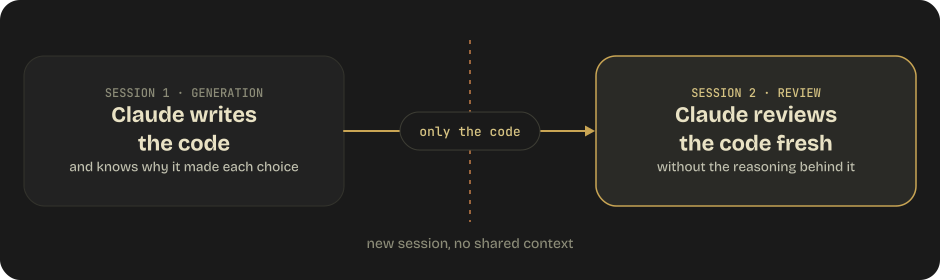
When Claude generates code and then reviews it in the same session, it retains the reasoning context from generation. It "remembers" why it made each decision, making it less likely to question those decisions.
This is called reasoning context bias.
The Solution: Independent Review Instances
Multi-Pass Architecture for Large PRs
Pass 1 — Per-file local analysis:
- Review each file independently
- Consistent depth across all files
- Catches: bugs, style issues, type errors, security vulnerabilities
- Separate prompt for each file
Pass 2 — Cross-file integration:
- Review how files interact with each other
- Different prompt focused on integration concerns
- Catches: data flow issues, interface mismatches, missing error handling at boundaries
- Receives results from Pass 1 for context
Why Not Single-Pass?
For large PRs (10+ files), single-pass review suffers from:
- Attention dilution — Model focuses on early files, gives less attention to later ones
- Inconsistent standards — Different quality of review across files
- Missing integration issues — Can't see cross-file problems when reviewing one file at a time in a single pass
4.7 Thinking, Effort, and the Current Request Surface
The request shape for prompting Claude changed substantially across the 4.6 → 5 generations. Several parameters that older material treats as standard now return 400 on current models.
Adaptive Thinking Replaced Thinking Budgets
response = client.messages.create(
model="claude-opus-5-5",
max_tokens=16000,
thinking={"type": "adaptive", "display": "summarized"},
output_config={"effort": "high"},
messages=[...],
)
| Model | Thinking config | Omitting thinking |
budget_tokens |
temperature / top_p / top_k |
|---|---|---|---|---|
| Claude Fable 5.1 / Mythos 5.1 | {"type": "adaptive"} or omit; disabled → 400 |
Runs adaptive (always on) | 400 | 400 |
| Claude Fable 5 | {"type": "adaptive"} or omit |
Runs adaptive (always on) | 400 | 400 |
| Claude Opus 5.5 | {"type": "adaptive"} or omit; disabled → 400 at every effort |
Runs adaptive (always on); default effort medium |
400 | 400 |
| Claude Opus 5 | {"type": "adaptive"} or omit; disabled accepted only at effort high or below |
Runs adaptive by default | 400 | 400 |
| Claude Opus 4.8 / 4.7 | {"type": "adaptive"} |
Runs without thinking | 400 | 400 |
| Claude Sonnet 5.5 | {"type": "adaptive"} or omit; disabled → 400 — send {"type": "between_tools"} instead (low / medium / high effort only) |
Runs adaptive | 400 | 400 |
| Claude Haiku 5.5 | {"type": "adaptive"} or omit; disabled accepted at effort high or below; between_tools → 400 |
Runs adaptive; default effort medium |
400 | 400 (temperature only as 1, top_p only as 0.99) |
| Claude Sonnet 5 (legacy) | {"type": "adaptive"} |
Runs adaptive | 400 | 400 |
| Claude Haiku 4.5 (legacy) | {"type": "enabled", "budget_tokens": N} |
No thinking | Required for thinking | Allowed |
The subtlety worth flagging: on Opus 4.8/4.7 you must set adaptive explicitly or you get no thinking at all, on Opus 5 thinking is on by default, and on Opus 5.5 it can't be turned off at all — a disabled setting carried forward from 4.8 or Opus 5 is a 400; lower effort instead. Sonnet 5.5 also rejects disabled, but offers between_tools: no up-front thinking, while the short progress updates between tool calls still come back (with their summary text). It takes no other field (display, budget_tokens, or block_binding alongside it is a 400), works only at low / medium / high, and pins effort for the conversation — a per-message effort change is a 400 while it is on. Haiku 5.5 is the only current model that still accepts disabled (at high or below); its migration from Haiku 4.5 replaces budget_tokens with adaptive thinking and drops the sampling parameters. Prefer that anyway: with thinking off, Opus 5 sometimes writes a tool call into its visible text instead of a tool_use block, so the call never runs and no error is raised.
Effort
effort is GA (no beta header) and lives inside output_config, not at the top level:
output_config={"effort": "xhigh"} # low | medium | high | xhigh | max
The API default is high on every model that supports effort except Opus 5.5 and Haiku 5.5, which default to medium — on Opus 5.5 one level below Opus 5, so a request that omits effort runs cheaper and shallower after a migration; set it explicitly and re-run your sweep (Opus 5.5 also thinks more per turn than Opus 5 at the same level, most of all at xhigh / max, so leave room in max_tokens). Setting effort to the model's default is identical to omitting it. Haiku 4.5 rejects effort, and xhigh is not available on Opus 4.6 / Sonnet 4.6. Claude Code sets effort per model (/effort), so a level saved for one model doesn't carry to a newly released one, and maxEffortLevel caps it org-wide. Anthropic's per-model guidance: on Fable 5.1, Opus 5, and Sonnet 5 start at high and sweep — step up to xhigh/max only where evals show headroom, and use low/medium liberally for routine or latency-sensitive routes (lower effort on these models often beats xhigh on the previous generation); on Opus 5.5 start at medium and sweep in both directions; on Sonnet 5.5 the levels are recalibrated (the same level doesn't buy the same thinking as on Sonnet 5), so start at high for general work but at medium for agentic coding and multistep tool use, and at medium or low for chat; on Haiku 5.5 start at medium, including agentic coding, and use low for chat and simple high-volume calls; on Opus 4.8 / 4.7 start at xhigh for coding and agentic work. Lower effort means fewer, more-consolidated tool calls and terser output. Effort matters more on these models than on any prior generation, so re-tune it when you migrate, don't carry the old value across. Changing the top-level effort mid-conversation invalidates the message cache; on Fable 5.1, Mythos 5.1, Opus 5.5, Opus 5, Sonnet 5.5, and Haiku 5.5, a per-message effort change — a role: "system" message with empty content carrying output_config.effort (beta mid-conversation-output-config-2026-07-01, Claude API and Google Cloud) — keeps the prefix intact and, having no text, can sit anywhere in messages.
Thinking Display
display: "omitted" is now the default on Fable 5 / 5.1, Opus 5.5, Opus 5, Opus 4.8/4.7, Sonnet 5.5 / 5, and Haiku 5.5 — a silent change from Opus 4.6 and Sonnet 4.6, where it was "summarized". Thinking still happens and is still billed identically; only visibility changes. If you stream reasoning to users, the default looks like a long pause before any output, so set display: "summarized" explicitly. The raw chain of thought is never exposed on any model. On Fable 5.x, Opus 5.5, and Sonnet 5.5 the text Claude writes between tool calls comes back as progress-update thinking blocks rather than text blocks (Sonnet 5.5 keeps one-line remarks as text), so under the default it is empty — a UI that streamed those notes on Opus 5 or Sonnet 5 goes quiet between tool calls, with no error. On Haiku 5.5 a response can simply begin with thinking blocks, so code that reads content[0] as the answer must select blocks by type. display: "updates" (beta thinking-display-updates-2026-08-18) returns those progress notes as readable text while the reasoning itself stays hidden; "summarized" returns both.
Assistant Prefill Is Gone
Prefilling the last assistant turn to force a response format returns 400 on Fable 5 / 5.1, Opus 5.5, Opus 5, Sonnet 5.5 / 5, Haiku 5.5, and the whole 4.6/4.7/4.8 family — Haiku 4.5 was the last model that allowed it. Use structured outputs (output_config.format) or system-prompt instructions instead. This retires a prompt-engineering technique that a lot of older material still recommends.
Mid-Conversation System Messages
On Claude Opus 5.5, Opus 5, Opus 4.8, Fable 5 / 5.1, Mythos 5 / 5.1, Sonnet 5.5, and Haiku 5.5 (not Sonnet 5, no beta header) you can append {"role": "system", "content": "..."} to the messages array rather than editing the top-level system field. This is the prompt-injection-safe operator channel, and — because it doesn't touch the cached prefix — the cheap one. Constraints: it must follow a user message (or an assistant message ending in server-tool use), can't be messages[0], and must either be last or be followed by an assistant turn.
Placement caveat on Sonnet 5.5 and Haiku 5.5: both are trained to resist prompt injection through tool results, so a system message placed right after a tool_result can be read as untrusted text and ignored. To relay something the user typed while the agent was working, append it as a text block after the last tool_result in the same user message; keep harness notices (reminders, budget warnings) in a separate system message after that, and never mix a notice and the user's words in one block.
Two extensions arrived with Fable 5.1 (both beta): turn-scoped messages with clear_at: "next_user_message" (header mid-conversation-system-clear-at-2026-08-21) render for one turn, then stay in the transcript cleared — the right shape for a per-turn reminder such as "batch independent tool calls", which Fable 5.1 needs more often than Fable 5 in long loops; and tool changes via tool_addition / tool_removal blocks (header mid-conversation-tool-changes-2026-07-01) — since 2026-09-22 a tool_addition can also carry a full definition (inline-tools-2026-09-15), so a schema change or a server-tool version bump no longer touches tools — both covered in Domain 2 §2.6. Opus 5.5, Sonnet 5.5, and Haiku 5.5 support all of these. Never delete earlier copies of these messages: on Fable 5.1, Opus 5.5, Sonnet 5.5, and Haiku 5.5 that counts as editing history.
Preserved Thinking: The History Is Now Part of the Contract
Every thinking block Fable 5.1, Opus 5.5, Sonnet 5.5, or Haiku 5.5 emits records the model that produced it and is valid only against the exact system, tools, and message prefix that preceded it. Three rules follow:
- Model binding. Fable 5.1 and Mythos 5.1 read each other's blocks and every earlier model's, and — on the Claude API — Opus 5.5's. Opus 5.5 reads Opus 5 and earlier Opus / Sonnet / Haiku blocks and, on the Claude API and Google Cloud, Sonnet 5.5's and Haiku 5.5's, but not Fable or Mythos ones. Sonnet 5.5 reads Sonnet 5, Opus 4.8, Haiku 4.5, and earlier blocks plus Haiku 5.5's (Claude API and Google Cloud), but not Opus 5 / 5.5, Fable, or Mythos ones. Haiku 5.5 reads the same older set but none of its 5.5 siblings. So escalating Haiku 5.5 → Sonnet 5.5 → Opus 5.5 keeps every block (Claude API and Google Cloud); a further hop to Fable 5.1 keeps Opus 5.5's blocks (Claude API only) but drops the Sonnet 5.5 and Haiku 5.5 ones. Any other switch (a fallback from Opus 5.5 to Opus 5, a router from Fable 5.1 to Opus 5.5, an escalation that later drops back to Haiku) silently drops the unreadable blocks (unbilled) and the target model re-plans.
- Prefix binding. Editing, reordering, or removing earlier turns invalidates every later thinking block. The API enforces the check on Fable 5.1, Opus 5.5, Sonnet 5.5, and Haiku 5.5 by default for accounts created on or after 2026-08-31 (a replayed block after such an edit is a 400); older accounts are checked only when they set
thinking.block_binding.prefix_mismatch_behavior("error"or"drop_block"). Append-only histories, server-side context editing, and API-written compaction are all safe, because the check compares the conversation as you sent it — a keep-tail summary you wrote yourself is not (Domain 5 §5.7). On Sonnet 5.5 and Haiku 5.5,block_bindingworks only with{"type": "adaptive"}— withbetween_toolsordisabledyou must keep the history append-only or strip the thinking blocks from the edited turn on. - Account binding. Sonnet 5.5 and Haiku 5.5 blocks work only in the account that produced them (or a linked one). Replaying a stored conversation through another account succeeds, but the API drops those blocks first (
organization_binding_mismatchininput_transformations) and the model answers without that reasoning — replay each conversation through the account that produced it.
If Claude Code, claude.ai, Managed Agents, or the Agent SDK own your history, they already comply. If your code builds messages itself, run the three-step check from the migration guide: capture consecutive request bodies, diff system / tools / shared messages prefix, and fix every non-append change. Under the thinking-binding-controls-2026-08-01 header every response carries input_transformations: thinking_dropped entries name blocks the API removed (prefix_binding_mismatch or model_binding_mismatch), and — on requests where the check isn't enforced, i.e. older accounts — thinking_mismatch_allowed entries (since 2026-09-14) name blocks that would have failed but still reached the model. Log the second kind now to find history edits in production before you opt into enforcement; /claude-api preserved-thinking-migration in Claude Code automates the capture-diff-replay loop. Claude Code's own September releases fixed several cases where --continue / --resume re-sent earlier messages in a changed form — the same check biting Anthropic's harness.
4.8 Prompt Caching
Caching is a prompt-structure problem, which is why it belongs here rather than in an ops runbook.
Prefix match: the cache keys on an exact prefix. Any byte change anywhere in the prefix invalidates everything after it. Render order is tools → system → messages, so a tool list that reorders between requests invalidates the system prompt and the whole conversation behind it.
Design rule: stable content first (frozen system prompt, deterministically ordered tool list), volatile content (timestamps, per-request IDs, the actual question) after the last cache_control breakpoint.
| Mechanic | Detail |
|---|---|
| Breakpoints | Max 4 per request (cache_control: {"type": "ephemeral"}) |
| Minimum prefix | Model-dependent — 512 tokens on Fable 5.x / Mythos 5.x / Opus 5.5 / Opus 5 / Sonnet 5.5 / Haiku 5.5; 1,024 on Opus 4.8, Sonnet 5, Sonnet 4.6/4.5; 2,048 on Opus 4.7; 4,096 on Opus 4.6/4.5 and Haiku 4.5. Shorter prefixes silently don't cache |
| Pricing | Cache reads cost 10% of the input price (2.5% on Fable 5.1 / Mythos 5.1 — $0.25/MTok; 5% on Opus 5.5 and Sonnet 5.5 — $0.20 and $0.10/MTok); 5-minute writes 1.25×, 1-hour writes 2×. On Opus 5.5 and Sonnet 5.5 a cached turn costs a twentieth of an uncached one — the strongest cost argument yet for a stable prefix. Haiku 5.5 reads cost $0.01/MTok on prompts up to 100k tokens and $0.05 above; its whole price list steps up past that threshold, and the threshold counts cache reads and writes too |
| Verification | usage.cache_read_input_tokens. Zero across repeated requests means something is invalidating the prefix. Cache diagnostics is GA on the Claude API since 2026-09-23 (no beta header): send diagnostics: {"previous_message_id": null} on the first turn and the previous response id after that, and response.diagnostics reports exactly where consecutive requests diverged. The field is now always present (null when you didn't opt in), and a fingerprint is stored only for requests that include the diagnostics object — include it on every turn or a later one reports previous_message_not_found |
| Pre-warming | max_tokens: 0 warms a cache entry without generating — with the same thinking and effort configuration your real traffic uses, or the entry is never hit |
Silent invalidators to audit for: datetime.now() in the system prompt, JSON serialized with non-deterministic key order, a tool set that varies per request, a session ID or user name interpolated into the prefix, switching speed (fast mode) mid-conversation, changing the top-level effort or thinking configuration between requests (use per-message effort on Fable 5.1 / Opus 5.5 / Opus 5 / Sonnet 5.5 / Haiku 5.5), and changing a task-budget value (it is rendered into the prompt).
Interaction with tool search: deferred tools are excluded from the system-prompt prefix and discovered tools are appended inline, so defer_loading preserves the cache. A tool with defer_loading: true cannot also carry cache_control — put the breakpoint on a non-deferred tool.
Domain 4 Practice Questions
Q1: A code review system flags "use your best judgment" as a criterion for reporting issues. What should be changed?
- A) Add more examples of past reviews
- B) Replace with explicit criteria defining exactly what qualifies as a reportable issue
- C) Increase the model's temperature for more nuanced judgment
- D) Add a confidence score threshold
Show answer
Answer: B — Vague instructions like "use your best judgment" produce inconsistent results. Replace with explicit criteria that define exactly what qualifies and what doesn't.
Q2: An invoice extraction system uses strict mode but sometimes returns a total that doesn't match the sum of line items. What's happening?
- A) Strict mode is broken
- B) The schema is misconfigured
- C) Strict mode guarantees schema compliance, not semantic correctness
- D) The model needs fine-tuning
Show answer
Answer: C — Strict mode ensures the output conforms to the JSON schema (correct types, required fields) but cannot validate semantic correctness (whether the math adds up). Custom validation logic is needed for that.
Q3: A batch processing job has 1,000 documents. 50 fail. What's the correct approach?
- A) Resubmit the entire batch of 1,000
- B) Use
custom_idto identify and resubmit only the 50 failed documents - C) Switch to synchronous processing
- D) Increase the batch timeout
Show answer
Answer: B — Use custom_id to correlate requests with responses and resubmit only the failures. Resubmitting the entire batch wastes credits and reprocesses already-successful documents.
Q4: An extraction service written for an older model sets thinking={"type": "enabled", "budget_tokens": 8000} and temperature=0. It is being moved to Claude Opus 5. What happens?
- A) It works unchanged; both parameters are still supported
- B) Both parameters return a 400 — use
thinking={"type": "adaptive"}and control depth withoutput_config.effort - C)
budget_tokensis ignored silently andtemperaturestill applies - D) It works, but thinking is disabled
Show answer
Answer: B — budget_tokens and the sampling parameters (temperature / top_p / top_k) are removed on Fable 5 / 5.1, Opus 5.5, Opus 5, Sonnet 5.5 / 5, Haiku 5.5, and the 4.7/4.8 family, and return a 400 (Haiku 5.5 tolerates only the defaults, temperature: 1 and top_p: 0.99). Moving the same service to Haiku 5.5 — the natural successor for high-volume extraction — fails the same way. Adaptive thinking plus effort replaces the fixed-thinking-budget concept. Assistant prefills also 400 on these models.