Domain 3 · 20% of the exam
Claude Code Configuration & Workflows
Covers CLAUDE.md hierarchy and loading, custom commands and skills, path-specific rules, plan mode vs direct execution, iterative refinement, and CI/CD integration.
3.0 Surfaces: Where Claude Code Runs
Claude Code is no longer just a CLI. Every surface connects to the same engine, so CLAUDE.md files, settings, skills, and MCP servers work identically across all of them — which is the architecturally relevant point: configuration is portable, and so is a session.
| Surface | What it is | Install / entry point |
|---|---|---|
| Terminal | Full-featured CLI | curl -fsSL https://claude.ai/install.sh | bash, then claude |
| VS Code / Cursor | Extension with inline diffs, @-mentions, plan review | Extensions marketplace |
| JetBrains | Plugin for IntelliJ, PyCharm, WebStorm (requires the CLI) | JetBrains Marketplace |
| Desktop app | Standalone app: visual diffs, parallel sessions, scheduled tasks, cloud sessions | macOS / Windows download |
| Web | Browser sessions with no local setup; long-running tasks on repos you don't have locally | claude.ai/code |
| Mobile | iOS / Android app for the same cloud sessions | Claude app |
Session Portability
| Goal | Mechanism |
|---|---|
| Start locally, finish in the cloud | claude --cloud "<task>" (--remote is a deprecated alias) |
| Pull a web/cloud session into the terminal | claude --teleport |
| Run a task as a local background session | claude --bg "<task>", then claude agents / claude attach <id> / logs / stop / respawn / rm |
| Copy the current session into a background session | /fork [prompt] (a forked subagent that reports back is /subtask; /branch switches you into a copy) |
| Hand the current terminal session to the desktop app | /desktop |
| Drive a running local session from a phone or another browser — or fork it from the Claude app into a local background session (v2.1.273+) | Remote Control |
| Push external events (Telegram, Discord, iMessage, webhooks) into a session | Channels |
| Route work from team chat | @Claude in Slack |
Scheduling
Three distinct mechanisms — the exam-relevant distinction is where they run:
| Mechanism | Runs | Use for |
|---|---|---|
Routines (/schedule, web, or desktop) |
In the cloud — keeps running with your machine off; can also trigger on API calls or GitHub events | Morning PR reviews, overnight CI failure analysis, weekly dependency audits |
| Desktop scheduled tasks | On your machine, with local file and tool access | Anything that needs the local filesystem or private network |
/loop |
Inside the current CLI session | Quick polling within one sitting — omit the interval and Claude self-paces between iterations |
3.1 CLAUDE.md Hierarchy
What is CLAUDE.md?
CLAUDE.md files are instruction files that tell Claude Code how to behave in a specific context. They're like .editorconfig or .eslintrc but for an AI agent — defining coding standards, project conventions, tool restrictions, and workflow rules.
Loading Order (Broader → More Specific)
Claude Code loads CLAUDE.md files in a hierarchy. Every file it finds is concatenated into context, not overridden: content runs from the filesystem root down to the working directory, so instructions closer to where you launched Claude are read last, and CLAUDE.local.md follows CLAUDE.md within each directory. Two files that contradict each other leave Claude to pick one, so resolve conflicts rather than relying on precedence:
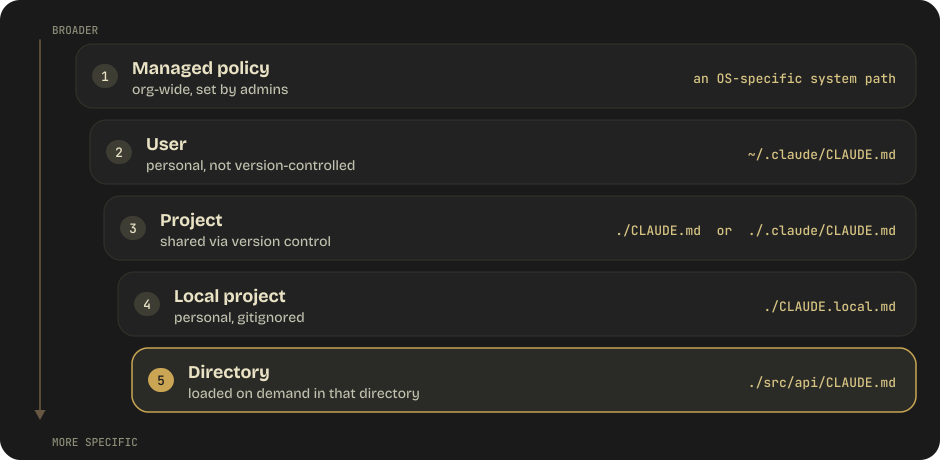
Managed policy lives at /etc/claude-code/CLAUDE.md (Linux, WSL), /Library/Application Support/ClaudeCode/CLAUDE.md (macOS), or C:\Program Files\ClaudeCode\CLAUDE.md (Windows). A directory-level file such as ./src/api/CLAUDE.md or ./tests/CLAUDE.md loads when Claude reads, writes, or edits a file in that directory.
Key distinction: Project-level CLAUDE.md is committed to git and shared with the team. User-level is personal and local. CLAUDE.local.md is personal per project (gitignore it). Directory-level loads dynamically when Claude works in that directory — since v2.1.288 on Write and Edit as well as Read, and since v2.1.293 also when Claude views a single file there with a Bash read such as cat or head.
AGENTS.md Interop
Since v2.1.277, a project with no CLAUDE.md falls back to reading AGENTS.md (on every provider since v2.1.281). A CLAUDE.md, .claude/CLAUDE.md, or CLAUDE.local.md in the working directory or above it counts as having one — so adding a personal CLAUDE.local.md silently stops AGENTS.md loading; ~/.claude/CLAUDE.md, managed policy, and .claude/rules/ don't count. The "Project instructions" setting in /config takes four values: claude-md-or-agents-md (the default), claude-md-and-agents-md (both, each directory's CLAUDE.md first), claude-md, and managed-only. In a settings file it lives under pluginConfigs → cc-plugin-agents-md@builtin (renamed from agents-md@builtin in v2.1.285), read from user, --settings, or managed settings only. /init still reads AGENTS.md when scaffolding. If your repo already uses AGENTS.md for other coding agents and you also need Claude-specific rules, keep one source of truth by importing it:
# CLAUDE.md
@AGENTS.md
## Claude-specific overrides
Use plan mode for changes under `src/billing/`.
@import Syntax
CLAUDE.md files can import other files for modular configuration:
# Project Configuration
@docs/coding-standards.md
@docs/api-conventions.md
@~/.claude/my-personal-preferences.md
See @README.md for project overview.
Resolution rules:
- Relative paths resolve relative to the file containing the import
@~/resolves to the user's home directory- Maximum import depth: four hops (to prevent circular imports)
- Imported files can themselves contain @imports (up to depth limit)
.claude/rules/ Directory
For topic-specific rules organized as separate files:
.claude/
  rules/
    testing.md       — Testing conventions
    api-design.md    — API endpoint patterns
    security.md      — Security requirements
    typescript.md    — TypeScript-specific rules
Without frontmatter: Rules load unconditionally at session start.
With frontmatter: Rules load conditionally based on file paths — when Claude uses Read, Write, or Edit on a matching file (Write/Edit since v2.1.288), or views one with a single-file Bash read such as cat or head (v2.1.293).
Auto Memory
Claude Code maintains automatic memory at:
~/.claude/projects/<project>/memory/MEMORY.md
- First 200 lines OR 25 KB (whichever comes first) loaded at session start
- Machine-local (not version controlled)
- All worktrees in the same git repo share one memory directory
- Claude writes notes here automatically about project patterns, decisions, preferences
- Requires Claude Code v2.1.59 or later
autoMemoryEnabled: falsedisables it;autoMemoryDirectoryrelocates it- Topic files (e.g.,
debugging.md,api-conventions.md) alongsideMEMORY.mdare loaded on demand — the 200-line cap applies only toMEMORY.mditself - Current layout:
MEMORY.mdis an index (one line per memory) and each memory is its own file with YAML frontmatter —name,description, and atypeofuser/feedback/project/reference; Claude Code stamps amodifiedtimestamp on every write (v2.1.214+) - Subagents can maintain their own auto memory
Monorepo and Multi-Directory Controls
| Setting / flag | Purpose |
|---|---|
claudeMdExcludes (in settings) |
Glob-list of CLAUDE.md files to skip — useful when another team's nested CLAUDE.md would otherwise load |
--add-dir <path> |
Grant Claude access to additional working directories |
CLAUDE_CODE_ADDITIONAL_DIRECTORIES_CLAUDE_MD=1 |
Also load CLAUDE.md / rules from --add-dir paths |
CLAUDE_CODE_NEW_INIT=1 |
Interactive multi-phase /init that scaffolds CLAUDE.md, skills, and hooks |
/doctor prompt-audit [path] (alias /checkup) |
Audit CLAUDE.md, CLAUDE.local.md, AGENTS.md, rules, skills, commands, subagents, and output styles for instructions written for older models, dead references, and contradictions; proposes edits and changes nothing until you agree (v2.1.283+) |
3.2 Skills (and Legacy Slash Commands)
Major change (2026): Custom slash commands have been merged into skills. A file at
.claude/commands/deploy.mdand a skill at.claude/skills/deploy/SKILL.mdboth create/deployand behave the same way. The old/project:nameand/user:namenamespacing is gone — commands are just/name, and higher-priority locations win when names collide.
Skill Locations (Priority: Enterprise > Personal > Project > Plugin)
| Location | Path | Applies to |
|---|---|---|
| Enterprise | Managed settings path | All users in the org |
| Personal | ~/.claude/skills/<name>/SKILL.md |
All your projects |
| Project | .claude/skills/<name>/SKILL.md |
This project only |
| Plugin | <plugin>/skills/<name>/SKILL.md |
Where the plugin is enabled (namespaced plugin-name:skill-name) |
Legacy .claude/commands/*.md still works and supports the same frontmatter — but skills add a directory for supporting files, dynamic context injection, and subagent execution. When a skill and a command share a name, the skill wins. Claude Code skills follow the open Agent Skills standard.
Example SKILL.md
---
name: deploy
description: Deploy the application to a specified environment
context: fork
agent: Explore
allowed-tools: Bash(git *) Bash(npm run deploy *)
argument-hint: [environment]
disable-model-invocation: true
---
# Deploy Skill
Deploy the application to $ARGUMENTS.
1. Run the test suite
2. Build the application
3. Push to the deployment target
4. Verify the deployment succeeded
Frontmatter Reference (Current)
| Field | Purpose |
|---|---|
name |
/slash-command name (defaults to directory name; lowercase, digits, hyphens, max 64 chars) |
description |
When to use the skill — Claude uses this to decide whether to auto-load. Capped at 1,536 chars combined with when_to_use |
when_to_use |
Additional trigger phrases / example requests, appended to description |
argument-hint |
Hint shown in autocomplete, e.g. [issue-number] |
arguments |
Named positional arguments for $name substitution |
disable-model-invocation |
true → only the user can invoke via /name; Claude can't auto-trigger |
user-invocable |
false → hidden from / menu; Claude can still invoke (background knowledge) |
allowed-tools |
Tools pre-approved for the turn that invokes the skill — the grant clears when you send your next message, and it still goes through the normal permission flow |
model |
Model override for this skill's turn |
effort |
low / medium / high / xhigh / max — effort-level override |
context |
fork runs the skill in an isolated subagent |
agent |
Which subagent type executes when context: fork (e.g. Explore, Plan, general-purpose) |
hooks |
Hooks scoped to this skill's lifecycle |
paths |
Glob patterns — auto-load only when working with matching files |
shell |
bash (default) or powershell for inline command injection |
Substitution Variables
| Variable | Resolves To |
|---|---|
$ARGUMENTS |
Full argument string passed by the user |
$ARGUMENTS[N] / $N |
0-indexed positional argument ($0, $1, …) |
$name |
Named argument declared in arguments: frontmatter |
${CLAUDE_SESSION_ID} |
Current session identifier |
${CLAUDE_SKILL_DIR} |
Directory containing the SKILL.md file |
Dynamic Context Injection
Skills can preprocess shell output and file contents before Claude sees them:
---
name: pr-summary
description: Summarize changes in a pull request
context: fork
agent: Explore
allowed-tools: Bash(gh *)
---
## PR context
- Diff: !`gh pr diff`
- Comments: !`gh pr view --comments`
- Changed files: !`gh pr diff --name-only`
## Your task
Summarize this pull request...
!`cmd` runs the command before the skill body is sent. Multi-line blocks use ```!. File inclusion with @path also works. Disable globally with "disableSkillShellExecution": true.
Context Isolation (context: fork)
- Spawns the skill as a subagent with its own context
- The
agent:field picks the execution environment (built-inExplore,Plan,general-purpose, or a custom.claude/agents/*subagent) - CLAUDE.md still loads; main conversation history does not
- Useful for noisy operations (deep research, deployments) that would pollute the main context
Skill Lifecycle and Compaction
When invoked, a skill's rendered body enters the conversation as a single message and stays there. Claude Code does not re-read the file on later turns — write standing instructions, not one-time steps. Auto-compaction re-attaches the most recently invoked skills (first 5 000 tokens of each, 25 000-token combined budget), dropping older ones if you used many.
Bundled Skills
Claude Code ships with a set of bundled skills that varies by release. Recent versions include:
/claude-api— Build and migrate Claude API / Anthropic SDK apps; subcommandsmigrate,prompt-audit,upgrade(Python SDK 0.x → 1.x),cost-optimize,preserved-thinking-migration(find and fix the history edits a harness makes),build-eval/hillclimb,managed-agents-onboard/code-review— Multi-agent review of pending changes or a PR (ultraruns it in the cloud;/ultrareviewis the legacy alias)/diff— Review the working-tree changes, including Claude's edits, before shipping/security-review— Security review of the pending changes on the branch/simplify— Reuse / simplification / efficiency cleanups on changed code/dataviz— Charts and dashboards with consistent design/design— Multi-artboard visual design canvas/init— Scaffold a CLAUDE.md for the codebase/run— Launch the project's app to confirm a change works/verify— Build and run the app to confirm a change does what it should, rather than trusting tests or type checks; runs only when invoked, and records its recipe as a project skill at.claude/skills/verify//run-skill-generator— Record how to build and launch the project as a per-project skill that/runand/verifythen follow/loop— Run a prompt or slash command on a recurring interval/schedule— Create and manage cloud routines/deep-research— A bundled dynamic workflow: fan out web searches, cross-check sources, synthesize a cited report/workflows//workflow-authoring— Watch running workflows; load the script-writing reference (when dynamic workflows are enabled)/advisor— Consult a second model (fable,opus,sonnet) at key moments of a task/fast— Toggle fast mode (Opus 5.5 / Opus 5 / Opus 4.8; premium pricing — $8 / $40 on Opus 5.5, $10 / $50 on Opus 5 and 4.8 — same model, faster output; also honored in cloud and self-hosted remote sessions)/update-config— Configure settings.json, hooks, and permissions/fewer-permission-prompts— Build a permission allowlist from your usage/output-style [name]— List and switch output styles, including in headless and Remote Control sessions (v2.1.269+)/insights— Usage report; now estimates how many recent permission prompts auto mode could have handled/skill-doctor— Show what each skill costs in context and how often it is used (v2.1.252+); every listed skill costs tokens on every turn/doctor(alias/checkup) — Diagnose Claude Code setup problems;/doctor prompt-auditaudits your instruction files instead (§3.1);/feedbacksends a report with session context
Check /help in your installed version (or the commands page in the docs) for the current list — the set changes release to release.
Pre-commit checks (v2.1.286+): when a session starts with a project, personal, or enterprise skill named verify or simplify that Claude may invoke, Claude Code's commit instructions tell Claude to run it right before each commit (docs- and tests-only changes excepted). The bundled /verify and /simplify and plugin skills don't trigger it, and turning off includeGitInstructions removes it. It is the skill-level answer to "how do we make Claude check its work before every commit without a hook?"
Inside workflows: when an agent in a dynamic workflow invokes a forked skill, that agent waits for and receives the result (v2.1.295+); earlier releases could deliver it to the main conversation instead.
Plugins
A plugin is a distributable bundle — skills and commands, subagents, hooks, MCP and LSP servers, monitors, output styles and themes, default settings, and (since v2.1.287) mods — installed from a marketplace and enabled per project. Plugin-provided items are namespaced (plugin-name:skill-name for skills, plugin:<plugin>:<server> for MCP servers) so they can't collide with your own. Plugins sit at the lowest priority in the skill resolution order (Enterprise > Personal > Project > Plugin).
Plugins are also the unit that claude plugin eval tests: you write an eval suite against the plugin's skills and run it in a sandbox or in CI, and it emits a JSON report. That is the packaging answer to "how does a team ship and regression-test its Claude Code conventions?"
Mods are plugins whose JavaScript or TypeScript handlers Claude Code calls in its own process: they can watch, rewrite, or answer tool calls, prompts, turns, and commands, and draw panes in the interface. The docs now call the settings-file kind of hook a "settings hook" to tell the two apart. The exam-style choice:
| Mod | Settings hook | Skill | MCP server | |
|---|---|---|---|---|
| What it is | Functions in a plugin, run inside Claude Code | A shell command, HTTP request, or prompt run on a lifecycle event | A SKILL.md of instructions |
An external process that gives Claude tools |
| What it can change | Tool calls, prompts, commands, turns, and the interface | Whether a call or prompt goes ahead, its arguments and result, added context | What Claude knows and does | Which tools Claude has |
| Pick it when | You need a pane, a custom command, or to rewrite an event | You want to block, allow, or log an event with a script | You keep pasting the same instructions | Claude needs to reach an external system |
Mods are on by default and aren't sandboxed — they run with the user's permissions, and processes they start run outside the Bash sandbox. disableAllHooks and --safe-mode turn off installed mods (not built-in ones); admins set allowManagedModsOnly under pluginConfigs → cc-plugin-sec-default@builtin in managed settings to stop user-installed mods running, and a mod can't approve a call a deny rule refuses unless allowModsToOverrideDenyRules is set.
Recent plugin tooling: claude plugin validate also checks a plugin's .mcp.json entries (servers that would be silently dropped, undeclared ${user_config.*} references, insecure URLs); --plugin-dir can point at a folder of plugins and picks up children added while running; claude plugin install <plugin> --marketplace <source> offers to add the marketplace on the way in; and skills and plugins enabled on your claude.ai account sync into terminal sessions signed in with it (syncClaudeAiSkills / syncClaudeAiPlugins: false opt out). Since v2.1.285, claude plugin install --config <server>.<key>=<value> sets a bundled server's options from the shell (install never prompts for userConfig), and /plugin configure <plugin>@<marketplace> reopens the configuration dialog.
3.3 Path-Specific Rules
Conditional Rule Loading
Rules in .claude/rules/ can specify which files they apply to using glob patterns in YAML frontmatter:
---
paths:
- "src/api/**/*.ts"
- "src/api/**/*.test.ts"
---
# API Development Rules
All API endpoints must:
- Use Zod for request validation
- Return standardized error responses
- Include rate limiting middleware
- Have corresponding integration tests
---
paths:
- "**/*.test.tsx"
- "**/*.test.ts"
- "**/*.spec.ts"
---
# Testing Conventions
- Use React Testing Library, not Enzyme
- Test behavior, not implementation
- Mock external APIs, not internal modules
- Each test file must have a describe block matching the component/function name
When Path-Specific Rules Beat Directory CLAUDE.md
Scenario: Testing conventions that apply to test files scattered throughout the entire codebase.
Directory CLAUDE.md approach:
src/
  components/
    CLAUDE.md  ← Would need testing rules here
    Button.test.tsx
  api/
    CLAUDE.md  ← And here
    users.test.ts
  utils/
    CLAUDE.md  ← And here
    format.test.ts
Path-specific rules approach:
.claude/
  rules/
    testing.md  ← One file with paths: ["**/*.test.*"]
The rules approach is superior because:
- Single source of truth for testing conventions
- Applies everywhere test files exist, even new directories
- No need to duplicate CLAUDE.md files across directories
3.4 Plan Mode vs Direct Execution
Permission Modes (Current)
Plan mode is now one entry in a broader permission-mode system. Start in a specific mode with --permission-mode <mode> or permissions.defaultMode, or cycle modes with Shift+Tab in an interactive session.
Which mode a session starts in (v2.1.283+): with nothing configured, interactive terminal and VS Code sessions start in auto on every plan and provider. claude -p and the Agent SDK start in default in sessions that fetch feature flags — but on a third-party provider or with telemetry off they start in auto (v2.1.285+), so pass --permission-mode default (SDK: permissionMode: 'default') when a script must get manual approvals. HIPAA-configured organizations and any settings file with disableAutoMode: "disable" start in default. If auto mode isn't available to the session, it falls back to default.
| Mode | Behavior |
|---|---|
default |
Shown as Manual in the CLI and apps (manual is accepted as an alias): reads run without asking; edits, shell commands, and network access prompt |
acceptEdits |
Auto-accept file edits; still prompt for other tools |
plan |
Exploration-only: Claude designs an approach and presents it before touching files |
auto |
A classifier decides per-tool whether to prompt — see claude auto-mode defaults. Since v2.1.278–282 the classifier runs server-side by default on the Claude API, Bedrock, Vertex, Foundry, and gateways (no classifier overhead billed; CLAUDE_CODE_AUTO_MODE_SERVER=0 opts out; /status shows which is active), and read-only or sandboxed commands also wait for its review |
dontAsk |
Only file reads inside the working directories and pre-approved tools run; anything that would prompt is denied — locked-down CI with an exact --allowedTools list |
bypassPermissions |
Skip all prompts (dangerous; use only for short, contained tasks) |
When to Use Plan Mode
| Indicator | Example |
|---|---|
| Multi-file changes | Refactoring auth across 15 files |
| Architectural decisions | Choosing between REST and GraphQL |
| Multiple valid approaches | Several ways to implement caching |
| Large scope | Library migration affecting 45+ files |
| Unclear requirements | "Make the app faster" — needs investigation first |
In plan mode, Claude:
- Explores the codebase (Glob, Grep, Read)
- Identifies affected files and patterns
- Designs an approach
- Presents the plan for approval
- Only implements after user approval
When to Use Direct Execution
| Indicator | Example |
|---|---|
| Single-file fix | Bug fix with clear stack trace |
| Obvious scope | Adding a null check |
| Clear instructions | "Add a createdAt field to the User model" |
| Small, contained | Fixing a typo, updating a constant |
Built-in Subagents
Four subagents ship with Claude Code and are registered by default in interactive sessions:
| Agent | Purpose | Tools |
|---|---|---|
| Explore | Fast file discovery and codebase search | Read-only; skips CLAUDE.md and git status |
| Plan | Research for plan mode before proposing changes | Read-only; skips CLAUDE.md and git status |
| general-purpose | Multi-step tasks needing exploration and action | All subagent tools |
| claude | Catch-all fallback | All subagent tools |
The Explore agent is the canonical context-preservation move:
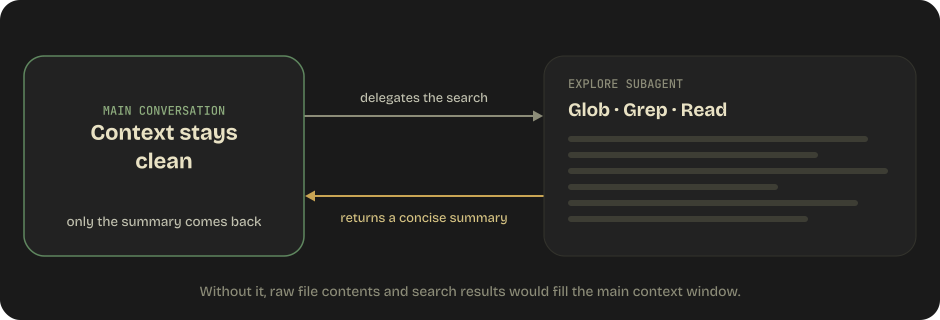
Without it, a deep codebase exploration would fill the main context window with raw file contents and search results.
Custom Subagents (.claude/agents/)
Custom subagents are markdown files with YAML frontmatter, resolved in the order: managed settings > --agents CLI JSON > project (.claude/agents/) > user (~/.claude/agents/) > plugin.
---
name: db-reader
description: Execute read-only database queries # how Claude decides to delegate
tools: Read, Grep, Bash # allowlist
disallowedTools: Write, Edit # denylist, applied after `tools`
model: sonnet # inherit | sonnet | opus | haiku | full ID
effort: low # low | medium | high | xhigh | max
permissionMode: plan # default | acceptEdits | auto | dontAsk | bypassPermissions | plan
maxTurns: 10
skills: [api-conventions] # preloaded skill content (first 32 distinct names)
mcpServers: [github]
memory: project # user | project | local — persistent across sessions
isolation: worktree # run in its own git worktree
background: false
omitClaudeMd: true # skip user / project / local CLAUDE.md; managed policy still loads (v2.1.271+)
experimental:
cacheTtl: 1h # prompt-cache lifetime for this subagent (v2.1.248+)
hooks:
PreToolUse:
- matcher: "Bash"
hooks:
- type: command
command: ./scripts/validate-readonly-query.sh
---
Execute SELECT queries only. Never issue writes.
Three ways to invoke: name it in natural language ("use the db-reader to…"), @-mention it to guarantee that specific agent runs, or start a whole session as it with claude --agent db-reader. Since v2.1.292 Claude can also pass a per-invocation effort to a non-fork subagent; it overrides the frontmatter effort and survives a resume, and CLAUDE_CODE_EFFORT_LEVEL still beats both.
What a fresh subagent loads: its own system prompt, the delegation prompt, the CLAUDE.md hierarchy (unless omitClaudeMd: true), a git status snapshot, preloaded skills, and environment details. What stays out: your conversation history, the main session's auto memory, and other subagents' results — which is exactly the "context does not inherit" rule from Domain 1 §1.3.
Constraints worth remembering: permission modes flow down — if the parent runs bypassPermissions, acceptEdits, or auto, the subagent inherits it and cannot override. Subagents nest 3 deep by default and 20 can run concurrently. Completed subagents can be resumed by ID or name via SendMessage, retaining their prior context; one-shot agents (Explore, Plan) cannot be resumed.
Prompt-injection note: two layers protect the main agent. Subagent output scanning (v2.1.210+) escapes tags that imitate harness markup and prepends a marker line when a report imitates a tag such as <system-reminder> or mentions permission settings like bypassPermissions; and since v2.1.277 the result also arrives under a header marking it as subagent output, stating that instructions or approval claims inside it carry no authority from the user. Both are mitigations, not a permission boundary — every tool call still goes through the session's permission checks.
Beyond Subagents: Agent Teams and Dynamic Workflows
Subagents are one worker per delegation, decided turn by turn. Two larger units exist when that isn't enough, and the exam-style question is who holds the plan:
| Subagents | Agent teams (experimental) | Dynamic workflows | |
|---|---|---|---|
| What it is | A worker Claude spawns | A lead session supervising peer Claude Code sessions with a shared task list and inter-agent messaging | A JavaScript script Claude writes and a runtime executes in the background |
| Who decides what runs next | Claude, turn by turn | The lead agent | The script (agent(), parallel(), pipeline(), phase()) |
| Scale | A few delegated tasks per turn | A handful of long-running peers | Dozens to hundreds of agents per run; resumable in-session |
| Enable | Built in | CLAUDE_CODE_EXPERIMENTAL_AGENT_TEAMS=1 |
Paid plans and API access; Pro turns it on in /config; workflowSizeGuideline sets the advisory agent count (medium is now 10 agents, Pro defaults to small); CLAUDE_CODE_WORKFLOW_MAX_CONCURRENT_AGENTS (1–256) raises the per-run concurrency cap |
A workflow only runs when the user opts in — the ultracode keyword in a prompt, an explicit "use a workflow", a bundled workflow skill such as /deep-research, or the ultracode toggle. Since v2.1.284 ultracode is a session setting, not an effort level: /effort ultracode [on|off] or the ultracode settings key has Claude plan a workflow for every substantive task at whatever effort the session runs; only claude --effort ultracode (and the Agent SDK's effortLevel: "ultracode") also sets xhigh. /workflows watches, pauses, resumes, or saves a run. Codifying the orchestration is the point: the plan becomes a reviewable, rerunnable script instead of a coordinator's memory (Domain 1 §1.2).
Combining Modes
Plan mode for investigation → Direct execution for implementation:
1. Enter plan mode
2. Explore the codebase
3. Design the approach
4. Present plan to user
5. User approves
6. Exit plan mode
7. Implement directly, file by file
3.5 Iterative Refinement Techniques
1. Concrete Examples
When prose instructions produce inconsistent results, provide 2-3 input/output examples:
Instead of: "Format dates consistently"

Use: "Format dates as YYYY-MM-DD. Examples:
  Input: 'January 5th, 2024' → Output: '2024-01-05'
  Input: '12/31/23' → Output: '2023-12-31'
  Input: 'Mar 2024' → Output: '2024-03-01'"
2. TDD Iteration
Write tests first, then iterate by sharing test failures:
1. Write the test: expect(validateEmail("bad")).toBe(false)
2. Run tests → FAIL
3. Share failure with Claude
4. Claude fixes the implementation
5. Run tests → PASS or new failures
6. Repeat until green
3. Interview Pattern
Claude asks clarifying questions before implementing:
User: "Add authentication to the app"
Claude: "Before I implement, a few questions:
  - JWT or session-based?
  - Do you need refresh tokens?
  - What's the session duration?
  - Should I add role-based access control?"
4. Multiple vs Independent Issues
Multiple interacting issues: Address in a single message because fixes may conflict.
"The auth middleware has two issues:
1. It doesn't check token expiry
2. It returns 500 instead of 401 for invalid tokens
Fix both together."
Independent issues: Fix sequentially to keep each change clean and reviewable.
3.6 CI/CD Integration
CLI Flags for CI
| Flag | Purpose | Critical? |
|---|---|---|
-p / --print |
Non-interactive mode | MUST use in CI or the process hangs waiting for input |
--output-format |
text, json, or stream-json for machine-parseable output |
Needed for downstream processing |
--input-format stream-json |
Stream input events back into the agent | For pipeline composition |
--json-schema '{...}' |
Validate final output against a JSON Schema (print mode only) | Enforces CI output shape |
--max-turns N |
Hard cap on agentic turns; exits with error if hit | Guardrail |
--max-budget-usd X |
Stop once API spend hits $X (print mode only) | Cost guardrail |
--bare |
Skip auto-discovery (hooks, skills, custom commands, subagents, plugins, MCP, auto memory, CLAUDE.md) — fast, reproducible scripted starts. Since v2.1.286 it also connects only MCP servers given on the command line, sends no system reminders, and runs no background tasks; it never reads OAuth or the keychain, so set ANTHROPIC_API_KEY. Recommended for scripts and slated to become the -p default |
Low-overhead scripted calls |
--no-session-persistence |
Don't save the session to disk | Ephemeral CI runs |
--fallback-model sonnet |
Auto-fall back when the primary model is overloaded | Reliability |
--include-hook-events |
Emit all hook lifecycle events into the stream | Observability |
--include-partial-messages |
Emit partial streaming events | Debugging |
--permission-mode <mode> |
Start in default / acceptEdits / plan / auto / dontAsk / bypassPermissions |
See §3.4 |
--permission-prompt-tool <mcp> |
Delegate permission prompts to an MCP tool in headless mode | Non-interactive approvals |
--permission-prompts none |
Deny anything that would prompt when nobody can answer (v2.1.259+); the active mode still decides everything else | Unattended runners |
--restricted |
Remove command/code-running tools and WebFetch, confine file tools to the working directories, load only managed settings, refuse bypassPermissions (v2.1.248+) |
Eval harnesses on shared machines |
--safe-mode |
Start with every customization disabled (CLAUDE.md, skills, hooks, MCP, plugins, workflows, auto memory) — unlike --bare, permissions still apply |
Troubleshooting a broken config |
--session-id, --resume, --continue, --fork-session |
Session lifecycle control | Multi-step pipelines |
--setting-sources user,project,local |
Restrict which settings layers are loaded | Reproducible runs |
--effort <level> |
low / medium / high / xhigh / max; ultracode turns the ultracode toggle on and sets xhigh |
Tune cost vs quality per run |
--agent <name> / --agents '<json>' |
Run the session as a named subagent, or define subagents inline | Specialized CI jobs |
--append-subagent-system-prompt / -file |
Append text (or a file, v2.1.261+) to every subagent's prompt except forks (non-interactive only) | Consistent citation/format rules |
--forward-subagent-text |
Emit subagent messages into the stream | Observability across delegated work |
--system-prompt / --system-prompt-file / --append-system-prompt |
Replace or extend the system prompt (use the -file forms for large prompts — self-hosted runners now pass prompts as files; since v2.1.283 a flag can be combined with its own -file form; --system-prompt-snapshot off re-renders it every request while you iterate on the text) |
Purpose-built CI personas |
--exclude-dynamic-system-prompt-sections |
Move per-machine sections out of the system prompt | Prompt-cache reuse across runners |
--strict-mcp-config |
Use only the servers from --mcp-config |
Hermetic MCP surface |
--init / --init-only |
Run Setup / SessionStart hooks (and exit) | Warm a CI workspace before the real run |
--bg / --background + --exec |
Start as a background agent; run a shell command as a background job | Long tasks that shouldn't block |
--environment ccpool_* / --ref |
Target a self-hosted environment; check out a named ref | Fleet / remote execution |
--betas |
Send beta headers with API requests | Opt into preview features |
Unattended sessions (-p, SDK, CI, cloud) also get a time limit on background shell commands — 30 minutes by default, up to 2 hours when Claude passes a timeout — while interactive sessions keep none. Env vars added in this range for locked-down runners: CLAUDE_CODE_DISABLE_WEB_FETCH (v2.1.285), CLAUDE_CODE_DISABLE_STRUCTURED_OUTPUTS (for gateways that reject output_config.format), CLAUDE_CODE_DISABLE_FILE_MENTIONS, and CLAUDE_CODE_OVERLOADED_RETRY_BASE_DELAY_MS / _MAX_DELAY_MS for 529 backoff. claude project purge is now claude purge, and claude --desktop opens the desktop app on the current directory.
Example CI Usage
# GitHub Actions example
- name: Code Review
run: |
claude -p "Review this PR for bugs and security issues" \
--output-format json \
--json-schema '{"type":"object","properties":{"issues":{"type":"array"}}}'
Managed CI Integrations
You don't always wire the CLI up by hand:
| Integration | What it does |
|---|---|
| GitHub Actions | Run Claude Code in a workflow — PR review, issue triage, @claude mentions |
| GitLab CI/CD | Same model on GitLab pipelines |
| GitHub Code Review | Automatic review on every PR, no workflow file to maintain |
| Routines | Cloud-scheduled runs that can also fire on GitHub events or API calls |
The -p + --output-format json pattern below is still the right primitive when you need full control; these integrations are the managed path.
Cost, Cache, and Fleet Controls (Settings)
A few settings that turn up in "how does the platform team keep 200 developers' sessions cheap and consistent" scenarios:
| Setting | Purpose |
|---|---|
promptCacheTtl / subagentPromptCacheTtl |
Choose the 5-minute or 1-hour prompt-cache lifetime for the session and for subagents (per-agent override: experimental.cacheTtl in frontmatter) |
modelPicker / modelPricing (managed) |
Curate the /model list; supply custom per-token rates so /cost is accurate behind a gateway (a multiplier up to 10 marks up internal chargeback rates) |
managedMcpServers (managed) |
Org-provided MCP servers every session gets |
bashOutputMaxChars |
Cap inline Bash output (up to 128K chars) before it floods the context. taskOutputMaxChars no longer does anything — the TaskOutput tool was removed in v2.1.277 and Claude reads a background task's output file with Read |
permissions.blockReadsOutsideWorkingDirectories |
Keep file reads inside the working directories |
workflowSizeGuideline |
Advisory agent-count ceiling for dynamic workflows |
effortLevel / maxEffortLevel |
Effort is now per model: a level saved for one model doesn't carry to a newly released one (a new model starts at its own default until you pick one with /effort), and maxEffortLevel (top-level or per model under modelSettings) caps it on every provider. On the Anthropic API the aliases resolve to Opus 5.5, Sonnet 5.5 (sonnet, v2.1.284+), and Haiku 5.5 (haiku, v2.1.293+) — all three default to medium effort in Claude Code — and Pro / Team Standard plans default to Opus rather than Sonnet. Bedrock, Google Cloud, and Foundry still resolve sonnet / haiku to older versions |
availableModels + availableModelsMatch: "exact" / deniedModels / allowedProviders (managed) |
Restrict the model list: by default an availableModels entry such as claude-opus-5 also permits later versions (Opus 5.5); "exact" holds each entry to the version it names (v2.1.283+), deniedModels blocks specific models even when allowed, and allowedProviders refuses sessions on an unlisted API provider or gateway |
autoCompactWindow / idleCompaction |
/autocompact now saves the window per model under modelSettings (v2.1.288+). Idle compaction (v2.1.299) compacts an interactive conversation on the 1-hour cache that is past CLAUDE_CODE_IDLE_COMPACT_MIN_TOKENS (default 200K) shortly before the cache expires, so your next message sends a summary instead of the whole conversation; "idleCompaction": false turns it off |
"attribution": false |
Hide all commit and PR attribution (v2.1.281+; older CLIs skip a settings file that holds it, so keep the object form in files shared across versions) |
syncClaudeAiSkills / syncClaudeAiPlugins |
Opt out of syncing claude.ai-enabled skills and plugins into terminal sessions |
/cost now reports per-session prompt-cache statistics and cache-miss diagnostics — the Claude Code view of the same prefix-stability problem described in Domain 4 §4.8.
Message Batches API
For non-blocking, cost-optimized batch operations:
| Feature | Detail |
|---|---|
| Cost savings | 50% compared to synchronous API |
| Processing window | Up to 24 hours, no latency SLA |
| Correlation | custom_id per request for matching responses — results arrive in any order, so key by custom_id, never by position |
| Multi-turn | NOT supported within a single batch request |
| Extended output | Up to 300k output tokens on Opus 5.5 / 5 / 4.8 / 4.7 / 4.6, Sonnet 5.5 / 5 / 4.6, and Haiku 5.5 (not Fable 5.1) with beta header output-300k-2026-03-24 (vs 128k synchronous) |
Good for:
- Overnight code analysis reports
- Weekly audit summaries
- Nightly test generation
- Batch document processing
NOT good for:
- Pre-merge checks (blocking, needs immediate response)
- Real-time user interactions
- Anything requiring tool calling loops within a single request
Handling Batch Failures
# Process batch results
for result in batch_results:
if result.status == "failed":
failed_ids.append(result.custom_id)
# Resubmit only failures
resubmit_batch = [r for r in original_requests if r.custom_id in failed_ids]
Session Context Isolation for Reviews
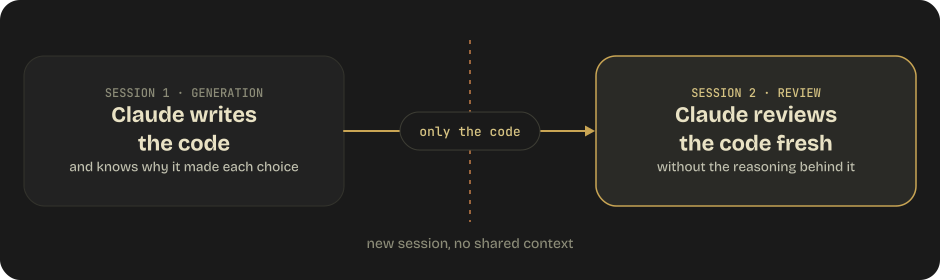
Problem: The same Claude session that wrote code is less effective at reviewing it because it retains the reasoning context (it already "knows" why it made each decision, making it less likely to question them).
Solution: Use independent review instances that don't have the generation context.
Domain 3 Practice Questions
Q1: A team wants testing conventions to apply to all *.test.ts files throughout their codebase, which has tests scattered across many directories. What is the most maintainable approach?
- A) Add a CLAUDE.md in every directory that contains test files
- B) Create a single rule file in
.claude/rules/withpaths: ["**/*.test.ts"]frontmatter - C) Add testing rules to the project-level CLAUDE.md
- D) Create a
tests/directory and put all tests there with a CLAUDE.md
Show answer
Answer: B — Path-specific rules in .claude/rules/ are superior to directory-level CLAUDE.md when conventions span multiple directories. A single rule file with glob patterns covers all matching files without duplication.
Q2: When should Claude Code use plan mode instead of direct execution?
- A) When fixing a single bug with a clear stack trace
- B) When migrating a library that affects 45+ files across the project
- C) When adding a null check to a function
- D) When updating a configuration constant
Show answer
Answer: B — Plan mode is for multi-file changes with architectural implications and multiple valid approaches. A library migration affecting 45+ files clearly fits. The other options are small, obvious-scope changes suited for direct execution.
Q3: A CI pipeline needs to run Claude Code for automated code review. Which flag is essential?
- A)
--verbose - B)
-p/--print - C)
--force - D)
--no-cache
Show answer
Answer: B — The -p/--print flag enables non-interactive mode, which is mandatory in CI. Without it, Claude Code hangs waiting for user input. Pair it with --output-format json (or stream-json), --max-turns / --max-budget-usd for production-grade guardrails, and --permission-prompts none when no host can answer a permission prompt.