Domain 5 · 15% of the exam
Context Management & Reliability
Covers conversation context management, escalation patterns, error propagation, large codebase context strategies, human review workflows, and information provenance.
5.1 Conversation Context Management
The Context Window Is Finite
Claude has a limited context window. Every message, tool result, and system prompt consumes tokens. Long conversations degrade as earlier information gets compressed or lost.
Current sizes, because "1M tokens" changes the shape of the problem without eliminating it:
| Model | Context window | Max output |
|---|---|---|
| Claude Fable 5.1 / Opus 5.5 / Sonnet 5.5 / Haiku 5.5 (current) | 1M tokens | 128k |
| Claude Fable 5 / Opus 5 / Sonnet 5, Opus 4.8 / 4.7 / 4.6, Sonnet 4.6 (legacy) | 1M tokens | 128k |
| Claude Haiku 4.5 (legacy) | 200k tokens | 64k |
Two traps that come with a 1M window:
- A bigger window is not free. Every token in it is billed on every turn, and the "lost in the middle" effect below gets worse with length, not better. Filling a 1M window because you can is a cost and a quality regression. Haiku 5.5 makes the cost side explicit: it is the only model from the 4.6 generation on without flat 1M pricing — a request whose prompt (cache reads and writes included) exceeds 100k tokens pays five times the per-token rate for the whole request. It also keeps the thinking blocks of every earlier turn in context (Haiku 4.5 kept only the latest), and it no longer receives context-awareness tags, so give its agentic loops an explicit task budget (§5.8) instead.
- Token counts changed. Opus 4.7 introduced a new tokenizer, carried by Opus 4.8, Opus 5, Opus 5.5, Sonnet 5 / 5.5, Haiku 5.5, and Fable 5 / 5.1 (Sonnet 5 → 5.5 counts the same; Haiku 4.5 → 5.5 does not): the same text produces roughly 30% more tokens than on pre-4.7 models (1M tokens ≈ 555k words now, versus ≈ 750k before). Any budget, chunk size, or threshold calibrated on an older model needs re-baselining with
messages.count_tokens— never withtiktoken.
Progressive Summarization Risks
When context is compressed (via /compact or automatic compression), the system summarizes earlier conversation. This introduces risks:
What gets lost in summarization:
- Exact numerical values (
$149.99becomes "approximately $150") - Specific dates (
2024-01-15becomes "mid-January") - Precise percentages (
23.7%becomes "about 24%") - Order numbers, customer IDs, reference codes
- Exact error messages and stack traces
Solution: Case Facts Block
Extract critical transactional data into a persistent structured block that survives summarization:
CASE FACTS (do not summarize):
- Customer ID: #12345
- Order: #67890
- Order date: 2024-01-15
- Total: $149.99
- Issue: Damaged product on arrival
- Refund requested: Full refund ($149.99)
The "Lost in the Middle" Effect
Models process the beginning and end of long inputs more reliably than the middle. Information placed in the middle of a large context is more likely to be overlooked.
Mitigation strategies:
- Place key findings summaries at the beginning of aggregated inputs
- Use explicit section headers to create navigation structure
- Keep critical information out of the middle of long documents
- If you must include lots of content, bookend the important parts
Tool Output Trimming
Tool results can be verbose. A customer order lookup might return 40 fields when you only need 5.
Bad: Return all 40 fields, consuming context for nothing.
Good: Trim to relevant fields before returning to Claude:
{
"order_id": "67890",
"status": "delivered",
"delivery_date": "2024-01-20",
"total": 149.99,
"items": ["Widget Pro (x2)"]
}
What Survives /compact
| Survives | May Be Lost |
|---|---|
| Project-root CLAUDE.md and unscoped rules (re-injected from disk) | Earlier conversation details |
| System prompts | Specific tool results |
| Recent messages | Nuanced reasoning from earlier turns |
| Auto-memory (MEMORY.md) | Exact quotes and numbers from early context |
| The plan-mode plan, recently edited files (up to five), invoked skill bodies (capped) | Nested CLAUDE.md files and paths:-scoped rules — summarized away, reloaded only when Claude next touches a matching file |
The nested-file row is the trap: an instruction that lives in src/billing/CLAUDE.md or a path-scoped rule is gone after /compact until Claude reads, writes, or edits a file there again. If a rule must survive compaction, put it in the project-root CLAUDE.md or drop its paths: frontmatter. Claude Code also compacts on its own: automatically near the limit, and — since v2.1.299 — when a 200k+ token conversation sits idle for about 54 minutes, just before its one-hour prompt cache would expire ("idleCompaction": false turns that off).
5.2 Escalation Patterns
When to Escalate Immediately
| Trigger | Why | Action |
|---|---|---|
| Customer explicitly requests a human | Respecting user autonomy | Escalate immediately, no further investigation |
| Policy gap or exception | Agent can't make policy decisions | Escalate with structured context |
| No progress after reasonable attempts | Agent is stuck | Escalate with summary of what was tried |
When NOT to Escalate
| Bad Trigger | Why It's Wrong |
|---|---|
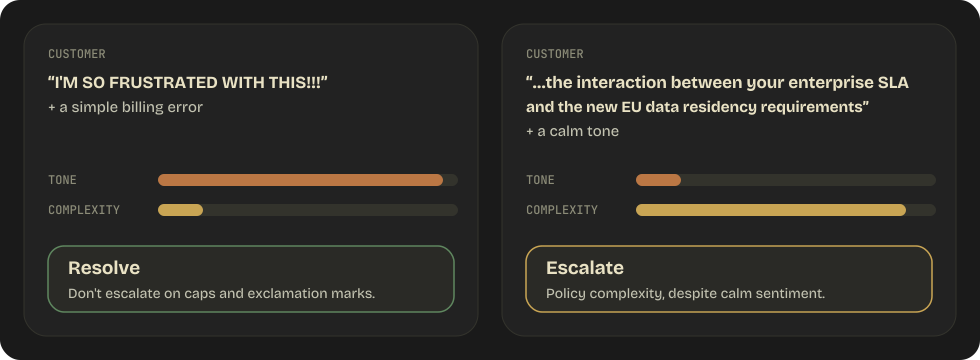
| High sentiment/emotion | Sentiment ≠ complexity. An angry customer may have a simple issue. |
| Self-reported low confidence | Claude's confidence scores are poorly calibrated. A "low confidence" response might be correct, while a "high confidence" response might be wrong. |
| Long conversation | Length doesn't indicate need for escalation. Some issues legitimately take multiple turns. |
The Sentiment ≠ Complexity Distinction
This is a specifically tested concept:
Multiple Customer Matches
When a customer lookup returns multiple matches:
Wrong: Pick the most likely match using heuristics. Right: Ask the customer for additional identifying information to disambiguate.
"I found multiple accounts matching that name. Could you provide
your email address or the last four digits of your phone number
so I can locate the right account?"
Structured Escalation Handoff
When escalating, provide a structured summary because the human agent typically can't see the conversation transcript:
ESCALATION SUMMARY
==================
Customer: Jane Doe (#12345)
Contact: jane@example.com | 555-0123
Issue type: Refund request — damaged product
Order: #67890 ($149.99, delivered 2024-01-20)

Actions taken by agent:
1. Verified customer identity
2. Confirmed order and delivery details
3. Customer provided photos of damage
4. Refund amount ($149.99) exceeds automated approval limit ($100)

Recommended action: Manual approval for full refund + replacement
Urgency: Standard (customer is frustrated but not at risk of churn)
5.3 Error Propagation
Structured Error Context
When errors occur, propagate them with full context:
{
"failure_type": "timeout",
"service": "knowledge_base_search",
"attempted_query": "return policy for electronics over $500",
"timeout_duration_ms": 30000,
"partial_results": null,
"alternative_approaches": [
"Try searching with simpler terms",
"Check the FAQ section directly",
"Ask the customer for the specific product"
],
"is_retryable": true,
"retry_after_ms": 5000
}
This gives Claude enough information to make an intelligent recovery decision.
Anti-Patterns
1. Generic error messages:
{ "error": "Operation failed" }
Claude can't recover intelligently because it doesn't know what failed or why.
2. Silent suppression:
{ "results": [] } // Returned when the search engine was actually down
Claude will confidently tell the user "I couldn't find any information about that" when the truth is "I wasn't able to search." These are fundamentally different situations.
3. Workflow termination:
Step 1: Get customer info → Success
Step 2: Search knowledge base → Timeout
Step 3: ABORT ENTIRE WORKFLOW
Better: Continue with partial results, note the gap, and offer alternatives.
Access Failure vs Empty Result
| Situation | HTTP Status | Meaning | Agent Response |
|---|---|---|---|
| Valid search, no matches | 200 + empty array | No relevant content exists | "I didn't find any matching articles" |
| Search service down | 503 / timeout | Search didn't execute | "I wasn't able to search right now, let me try another approach" |
Subagent Error Recovery
Subagents should implement local recovery for transient failures:
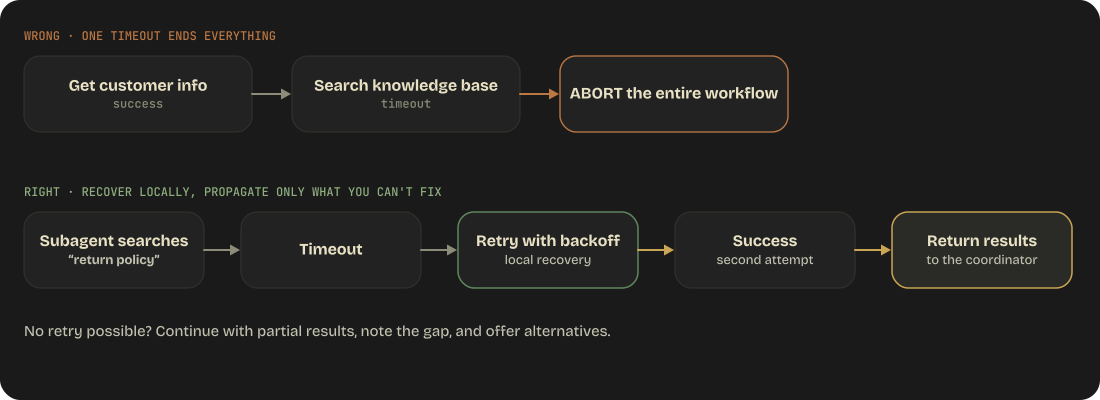
Only propagate errors the subagent cannot resolve. When propagating, include:
- What was attempted
- What partial results were obtained
- What the failure was
- Whether it's retryable
5.4 Large Codebase Context Management
Context Degradation in Extended Sessions
In long sessions, Claude's reliability degrades:
- References "typical patterns" instead of specific code found earlier
- Gives inconsistent answers about the same code
- Forgets earlier discoveries
- Starts making assumptions instead of checking
Mitigation Strategies
1. Scratchpad Files
Persist findings to files that survive context compression:
# scratchpad.md
## Auth System Findings
- Entry point: src/auth/middleware.ts:23
- Uses JWT with RS256
- Token expiry: 1 hour
- Refresh token: 7 days
- Role check: src/auth/roles.ts:45
- Known issue: No token revocation mechanism
When context is compressed, Claude can re-read the scratchpad to recover findings.
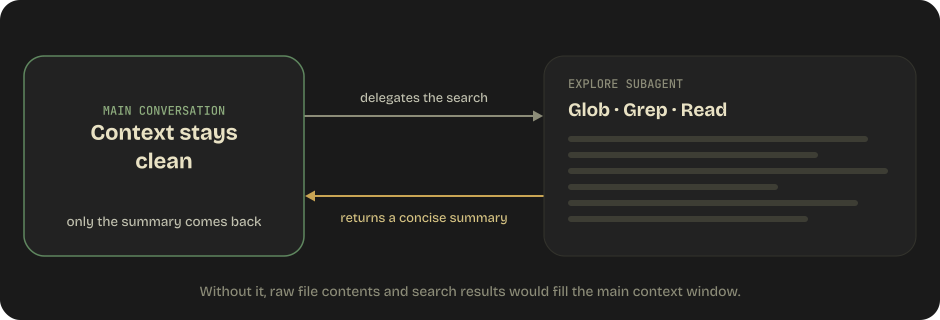
2. Subagent Delegation
Isolate verbose exploration in subagents:
3. /compact Proactive Use
During extended sessions, proactively compact context before it degrades naturally. Better to compact with a structured summary than to let automatic compression lose information unpredictably.
4. Crash Recovery Pattern
For long-running multi-agent workflows:
# Each agent exports state to a known location
agent.save_state("/tmp/workflow/agent-1-state.json")
# Coordinator maintains a manifest
manifest = {
"agent-1": {"status": "complete", "state": "/tmp/workflow/agent-1-state.json"},
"agent-2": {"status": "in_progress", "state": "/tmp/workflow/agent-2-state.json"},
"agent-3": {"status": "pending"}
}
# On resume, coordinator loads manifest and picks up where it left off
5.5 Human Review Workflows
Stratified Random Sampling
Don't just sample randomly from all outputs. Stratify by risk or category:
Category A (high-risk): Sample 20% of outputs
Category B (medium-risk): Sample 10% of outputs
Category C (low-risk): Sample 5% of outputs
This concentrates human review effort on areas most likely to have errors.
Field-Level Confidence Scores
Instead of a single confidence score for the entire extraction, provide per-field confidence:
{
"vendor_name": { "value": "Acme Corp", "confidence": 0.99 },
"total_amount": { "value": 149.99, "confidence": 0.95 },
"purchase_order": { "value": "PO-2024-001", "confidence": 0.72 },
"tax_id": { "value": "12-3456789", "confidence": 0.45 }
}
Calibration: Confidence scores must be calibrated against labeled validation sets. A 0.9 confidence should mean the field is correct ~90% of the time. Without calibration, confidence scores are meaningless.
Accuracy by Document Type
The hidden failure pattern:
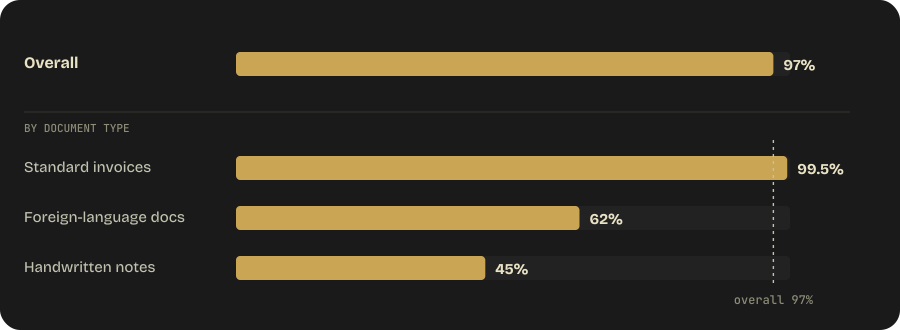
Aggregate metrics mask poor performance on specific document types. Always break down accuracy by type and field.
Per-Document-Type Reporting
Report accuracy metrics for each document type AND each field within that type:
Standard Invoices:
  vendor_name: 99.8%
  total_amount: 99.2%
  line_items: 97.5%
  tax_id: 94.1%

Handwritten Notes:
  vendor_name: 85.0%
  total_amount: 42.0% ← Critical failure
  line_items: 38.0% ← Critical failure
This reveals where the system actually needs improvement rather than hiding behind an aggregate number.
5.6 Information Provenance
Claim-Source Mappings
When subagents produce findings, they should output structured provenance:
{
"claim": "Revenue increased 15% year-over-year in Q4 2024",
"evidence": "Q4 earnings report, page 3, paragraph 2",
"source_url": "https://example.com/earnings/q4-2024",
"document_name": "Q4 2024 Earnings Report",
"publication_date": "2025-01-15",
"source_type": "primary"
}
Handling Conflicting Data
When sources disagree, annotate the conflict rather than silently picking one:
{
"field": "Q4 revenue",
"values": [
{
"value": "$2.3B",
"source": "Company press release (2025-01-15)",
"note": "Preliminary figures"
},
{
"value": "$2.28B",
"source": "SEC filing (2025-02-28)",
"note": "Audited figures"
}
],
"resolution": "SEC filing is the authoritative source (audited)",
"conflict_type": "minor_discrepancy"
}
Anti-pattern: Silently selecting one value without noting the disagreement. This hides potential data quality issues.
Temporal Data
Include publication and collection dates to prevent temporal confusion:
{
"claim": "Unemployment rate is 3.7%",
"data_as_of": "2024-11-01",
"source_published": "2024-12-06",
"retrieved_on": "2025-01-10"
}
Without dates, a reader might think two different unemployment figures from different months represent a contradiction when they're actually both correct for their respective time periods.
Synthesis Output Quality
When producing research synthesis:
-
Distinguish certainty levels:
- "Well-established: Revenue grew 15% (confirmed by SEC filing and two analyst reports)"
- "Contested: Market share estimates range from 12% to 18% depending on methodology"
- "Single-source: Only one report mentions the planned acquisition"
-
Preserve source characterization:
- Don't merge or reinterpret what sources say
- Quote or closely paraphrase the original claim
- Note the source's own caveats and qualifications
-
Render appropriately by content type:
- Financial data → tables with source attribution
- News/events → chronological prose
- Technical specifications → structured lists
- Disputed claims → side-by-side comparison
5.7 Server-Side Context Management
Sections 5.1 and 5.4 cover context management as something you do — case-facts blocks, scratchpads, trimming, delegating to subagents. The API now offers three server-side mechanisms that do part of this work for you. They are complementary, not alternatives, and knowing which one solves which problem is the point.
| Mechanism | What it does | Where state goes |
|---|---|---|
| Context editing | Clears old tool results or thinking blocks before the model sees them | Deleted — gone |
| Compaction | Summarizes earlier context — on demand (you send a compaction request) or when input reaches a token threshold |
Replaced by a signed summary block in the conversation |
| Memory tool | Lets Claude read and write persistent files | Outside the conversation, survives everything |
Context Editing (beta context-management-2025-06-27)
Clears, does not summarize.
client.beta.messages.create(
model="claude-opus-5-5",
betas=["context-management-2025-06-27"],
context_management={"edits": [
{"type": "clear_thinking_20251015",
"keep": {"type": "thinking_turns", "value": 2}},
{"type": "clear_tool_uses_20250919",
"trigger": {"type": "input_tokens", "value": 30000},
"keep": {"type": "tool_uses", "value": 3},
"clear_at_least": {"type": "input_tokens", "value": 5000},
"exclude_tools": ["web_search"]},
]},
tools=[...], messages=[...],
)
clear_tool_uses_20250919— clears old tool results (clear_tool_inputs: truealso clears the parameters). Default trigger: 100,000 input tokens; defaultkeep: 3.clear_thinking_20251015— clears thinking blocks. When combining both,clear_thinkingmust be listed first.clear_at_leastexists to protect the prompt cache: clearing a trivial amount invalidates the cache for no benefit.- The response reports what happened in
context_management.applied_edits. - On Fable 5.1, Opus 5.5, Sonnet 5.5, and Haiku 5.5, server-side context editing never invalidates thinking blocks; deleting the same tool results client-side would (see below).
Compaction: On Demand (beta compact-2026-09-04) vs At a Threshold (beta compact-2026-01-12)
Summarizes rather than clears. Two kinds exist since 2026-09-14, and the docs say to prefer on-demand compaction wherever it is available:
| On demand | At a threshold | |
|---|---|---|
| Who decides when | You, by sending a request | The API, when input tokens reach the trigger (default ~150k) |
| How | Send the conversation as it stands (same system and tools) with top-level compaction: {"type": "summarize"}; the response is a single signed compaction block with stop_reason: "compaction" and no reply |
context_management.edits: [{"type": "compact_20260112"}] on ordinary requests |
| What you send back | The block first in messages, in place of the messages it summarized, on every later request — exactly one block, unmodified, with the beta header |
The whole response.content, appended as usual; the API drops what came before the block |
| Recent turns word for word | Yes — leave them out of the compaction request and send them after the block | Only by pausing after compaction and re-inserting them |
| Runs in the background | Yes — the conversation continues while the summary is written | No, it runs inside the request that hit the threshold |
| Kept turns keep their thinking (Fable 5.1 / Opus 5.5 / Sonnet 5.5 / Haiku 5.5) | Yes, when the API wrote the summary and system / tools didn't change |
No — strip or drop it |
| Availability | Fable 5.x, Mythos 5.x, Opus 5.5 / 5 / 4.8 / 4.7 / 4.6, Sonnet 5.5 / 5 / 4.6, Haiku 5.5; Claude API, Claude Platform on AWS, Google Cloud, Foundry — not Bedrock | Same models |
On-demand details worth carrying: instructions (up to 16,384 characters) replaces the default summarization prompt, so say what to retain and tell the model not to call tools; the summarization call is billed and reported under usage.iterations while the top-level token counts are zero; check stop_reason before looking for the block — max_tokens, tool_use, refusal, or end_turn mean no summary came back, and you simply continue and try again later; a request that ends in an unanswered tool call, or that carries stop_sequences, output_config.format, forced tool_choice, context_management, or a task budget's remaining, is rejected; and images, documents, and fetched URLs inside the summarized range are gone once the block replaces them. role: "system" messages in that range are summarized too — restate an instruction that still matters in a new role: "system" message right after your next user turn. The SDK tool runner does the swap for you via compact_before_next_turn().
The critical integration detail for threshold compaction: append the whole
response.contentback to yourmessageson every turn, not just the extracted text. The compaction blocks in the response are what the API uses to replace compacted history on the next request. Pulling out the text string and appending that silently destroys the compaction state — and it fails quietly, which is the worst failure mode for something you only notice at turn 90.On-demand compaction has two silent mistakes of its own: leaving summarized messages after the block sends them to Claude twice, and leaving the block out of a later request means Claude gets no summary at all. Summarized messages left in front of the block are the one case that errors (
compaction_block_misplaced).
Client-side SDK compaction (compaction_control on the tool runner) is gone from the two main SDKs: Python removed it in v1.0, and TypeScript removed it in 0.129.0 (2026-09-28), so passing compactionControl now throws (the platform docs still call it deprecated in TypeScript and Ruby). Use the server-side mechanisms above — compact_before_next_turn() or a compact_20260112 edit in the runner's request.
Preserved Thinking: Compaction Shapes That Stay Valid
Fable 5.1, Opus 5.5, Sonnet 5.5, and Haiku 5.5 add a constraint the other mechanisms didn't have: their thinking blocks are valid only against the exact history that preceded them, so editing earlier turns invalidates every later block (Domain 4 §4.7). Server-side context editing and compaction don't count as edits — the check compares the conversation as you sent it, and it accepts the swap when the API wrote the summary — which is now the strongest argument for moving trimming to the server. The shapes, and whether the thinking in kept turns survives:
| Shape | Rule |
|---|---|
| Simple compaction | Replace the whole history with one summary (the API's block, or a summary message of your own) plus the new user turn; replay nothing else. No thinking blocks carry over, so nothing fails |
| Keep-tail compaction, API-written (on demand) | Kept turns keep valid thinking while three conditions hold: every compaction since a block was produced ran on a model with preserved thinking; the kept turns directly follow the summarized messages, unchanged, and start with a different role than the last summarized message (compacting exactly the messages of a request you already sent gets this right); and system plus the non-deferred tools are identical on the compaction request and every request after it |
| Keep-tail compaction, client-written | The kept assistant turns still carry thinking produced against the original turns, so those blocks fail. Strip their thinking / redacted_thinking blocks (text and tool calls can stay), or send prefix_mismatch_behavior: "drop_block" |
| Background compaction | With on-demand compaction, turns that arrived while the summary was written are kept turns and keep their thinking under the same conditions. With a client-written summary swapped in later, every block produced in between fails — send "drop_block" on each request that still carries pre-swap thinking, or compact synchronously |
Nothing fails at compaction time; the failure comes on the first later request that replays the kept thinking where the check is enforced — a 400 by default, or dropped blocks under "drop_block", reported in input_transformations. Test it once: compact, keep one turn that holds a thinking block, send the next request with prefix_mismatch_behavior: "error", and expect a 200 with an empty input_transformations. What never works: snipping individual turns out of the middle of the transcript, deleting old tool results by hand, placing a role: "system" message between the block and the kept turns, or rebuilding system / tools between requests. To change system or tools safely, compact the whole conversation first (no kept turns), then change them on the next request; to change instructions or tools without touching either, append a role: "system" message (Domain 2 §2.6, Domain 4 §4.7). Dropping blocks once at a compaction boundary is cheap; invalidating them on every request restarts the prompt cache each time.
Memory Tool (memory_20250818)
A client-side tool — Anthropic defines the interface, you implement the file operations. Declared as {"type": "memory_20250818", "name": "memory"}, no input_schema.
Its role in this domain: it's the persistence layer that makes clearing safe. Combine it with context editing and Claude receives a warning to write anything important to memory before its tool results are cleared. That is the API-level version of the scratchpad pattern in §5.4.
Choosing
| Situation | Mechanism |
|---|---|
| Agentic loop with dozens of verbose tool results | Context editing (clear_tool_uses) |
| Extended thinking plus a need to keep cache hits high | Context editing (clear_thinking) |
| Long research/analysis conversation that must keep its narrative | Compaction — on demand where available, threshold when the API should manage it inside ordinary requests |
| Application must pick the moment, keep the last turns word for word, or keep working while the summary is written | Compaction on demand |
| Findings that must survive across sessions, not just turns | Memory tool |
| Facts that must never be paraphrased | Case-facts block (§5.1) — no mechanism protects exact numbers better than restating them |
5.8 Bounding and Recovering Long Runs
Task Budgets vs max_tokens
max_tokens is a ceiling the model can't see; hitting it truncates output mid-thought. A task budget (output_config.task_budget, beta task-budgets-2026-03-13, minimum 20,000) is a ceiling the model can see, so it paces itself and lands the work. Available on Claude Fable 5.1 / Mythos 5.1, Fable 5 / Mythos 5, Opus 5.5, Opus 5, Sonnet 5.5, Haiku 5.5, and Opus 4.8/4.7 — not on Sonnet 5, Opus 4.6, Sonnet 4.6, or Haiku 4.5. With the 5.5 generation every current model supports it. The budget counts what Claude generates plus the tool results it reads this turn — not the full history you resend. Leave remaining unset in a normal loop; only pass it when you rewrite or compact history yourself and the server can no longer derive prior spend — and never on an on-demand compaction request or a request that carries its block (400). Two reliability footnotes: a budget that is obviously too small for the task makes Claude decline, scope down, or stop early with a partial result (raise the budget before debugging anything else), and the budget value is rendered into the prompt, so changing it mid-task is a cache miss.
Managed Agents session budgets are a different thing: hard, dollar-denominated, platform-enforced caps on one session. A task budget is advisory and token-denominated.
Refusals Are a Reliability Concern, Not Just a Safety One
A refusal arrives as HTTP 200 with stop_reason: "refusal" and a stop_details.category. Code that reads content without checking stop_reason treats a refusal as a successful empty answer — the same class of bug as treating a failed search as zero results (§5.3). For production paths, enable server-side fallback (betas=["server-side-fallback-2026-07-01"], fallbacks="default") so the request is re-routed by category rather than dropped. See Domain 1 §1.1. Opus 5.5 widened the classifier set — a biology classifier joins the cybersecurity one, and prompts that push the model to reproduce its internal reasoning can be declined as reasoning_extraction — so refusals are now a first-class path on the default model, not just the flagship. Sonnet 5.5 and Haiku 5.5 ship classifiers too (Sonnet 5.5 can decline as cyber, bio, frontier_llm, reasoning_extraction, or general_harms), so every current model can refuse. Haiku 5.5 has no server-side fallback and no fallback credit, so route its refusals through the SDK middleware or your own retry, and expect that retry to pay full price to write the fallback model's cache. A Sonnet 5.5 request using between_tools that falls back to Sonnet 5 runs there with thinking disabled. Since 2026-09-24 a refusal before any output is billed when its category is bio, frontier_llm, or reasoning_extraction, and every refusal counts against rate limits, so budget for them. Mythos 5.1's safeguards depend on its Project Glasswing access program, so handle refusal there as well. And a fallback from Fable 5.1, Opus 5.5, or Sonnet 5.5 usually lands on a model that can't read their thinking blocks (only Fable 5.1 / Mythos 5.1 read Opus 5.5's, on the Claude API; only Opus 5.5 reads Sonnet 5.5's), so budget for a re-planning turn.
Domain 5 Practice Questions
Q1: An agent is processing a customer support request. After context compression, the customer's order number ($149.99 order #67890) was summarized as "a recent order." What should have been done to prevent this?
- A) Increase the context window size
- B) Extract critical transactional data into a persistent case facts block
- C) Disable context compression
- D) Repeat the order details in every message
Show answer
Answer: B — Extracting transactional facts (amounts, order numbers, dates) into a structured block that persists through compression prevents loss of critical details.
Q2: A customer says "I AM SO ANGRY RIGHT NOW!!!" about a simple billing charge of $5. Should the agent escalate to a human?
- A) Yes, high sentiment indicates a complex issue
- B) Yes, capital letters indicate urgency
- C) No, sentiment intensity does not indicate issue complexity — the billing issue is simple and resolvable
- D) No, but reduce the agent's confidence score
Show answer
Answer: C — Sentiment ≠ complexity. An angry customer with a simple $5 billing issue doesn't need human escalation. The agent should resolve the simple issue while acknowledging the customer's frustration.
Q3: An extraction system reports 97% overall accuracy. A stakeholder asks if it's ready for production. What additional information is needed?
- A) The system is ready at 97%
- B) Check if accuracy is consistent across all document types and fields
- C) Run more documents through to increase the sample size
- D) Compare against competitor systems
Show answer
Answer: B — Aggregate accuracy can mask poor performance on specific document types. 97% overall might hide 45% accuracy on handwritten documents. Break down by type and field before declaring production readiness.
Q4: Two research subagents return different values for the same metric. What should the coordinator do?
- A) Average the two values
- B) Use the most recent value
- C) Annotate the conflict with source attribution and let the user decide
- D) Discard both and search again
Show answer
Answer: C — Conflicting data should be annotated with source attribution rather than silently resolved. This preserves transparency and lets downstream consumers evaluate the discrepancy.
Q5: A long-running agent enables server-side compaction. The integration appends only response.content[0].text to its message history each turn. What goes wrong?
- A) Nothing — text is all the API needs
- B) Compaction state is lost silently, because the compaction blocks in
response.contentare what the API uses to replace compacted history - C) The request fails with a 400 on the first compaction
- D) Compaction triggers too early
Show answer
Answer: B — Append the whole response.content, not the extracted text. Dropping the non-text blocks destroys the compaction state without raising an error, so the failure only surfaces deep into a long conversation.
Q6: An agentic workflow keeps getting truncated mid-task when it hits max_tokens. Which mechanism lets the model pace itself instead?
- A) Raise
max_tokensand hope for the best - B) A task budget (
output_config.task_budget), which the model can see and plan around - C) A lower
effortsetting - D) An iteration cap in the client loop
Show answer
Answer: B — max_tokens is an enforced ceiling the model is unaware of; a task budget injects a countdown the model sees during generation, so it finishes gracefully. Lower effort reduces spend but does not communicate a ceiling, and a client-side iteration cap is the anti-pattern from Domain 1 §1.1.
Q7: A custom harness keeps context small by deleting old tool results from the middle of the messages array before each request. It worked on Claude Opus 5. After moving to Claude Fable 5.1, requests start failing with a 400 that mentions thinking blocks. What is the correct fix?
- A) Strip all
thinkingblocks from every request - B) Keep the history append-only and move the trimming to server-side context editing (
clear_tool_uses_20250919) or compaction, which don't count as edits - C) Switch
thinkingto{"type": "disabled"} - D) Delete the tool results and the thinking block right after each one
Show answer
Answer: B — Fable 5.1's thinking blocks are valid only against the exact prefix that preceded them, so any client-side edit to earlier turns invalidates every later block. Server-side context editing and compaction are exempt because the check compares the conversation as you sent it. Stripping every thinking block always works but throws away the reasoning and restarts the prompt cache on every request; disabling thinking is a 400 on Fable 5.1 and Opus 5.5 (thinking is always on); deleting the tool results with only the thinking block right after each one still leaves the later thinking blocks behind an edited prefix, so the 400 stays.
Q8: An application uses on-demand compaction. It puts the returned compaction block first in messages, but leaves the messages the block summarized in place after it. Requests keep returning 200. What is happening?
- A) The request should have returned
compaction_block_misplaced; the API is being lenient - B) Nothing was saved — the API sends the summarized messages to Claude again after the summary, and no error is raised
- C) The API deduplicates the summarized messages against the block automatically
- D) The block is dropped because its signature no longer matches the messages
Show answer
Answer: B — After the swap, the block stands in for the messages it summarized, and the API passes every message after it to Claude unchanged, so leaving them in place re-sends them with no error. compaction_block_misplaced fires only when summarized messages remain in front of the block. Leaving the block out of a later request is the other silent mistake: Claude simply gets no summary. Signatures are checked, but only against edits to the block itself.